Streaming Equipment

Elgato Stream Deck Stream Deck for PC

Key features:

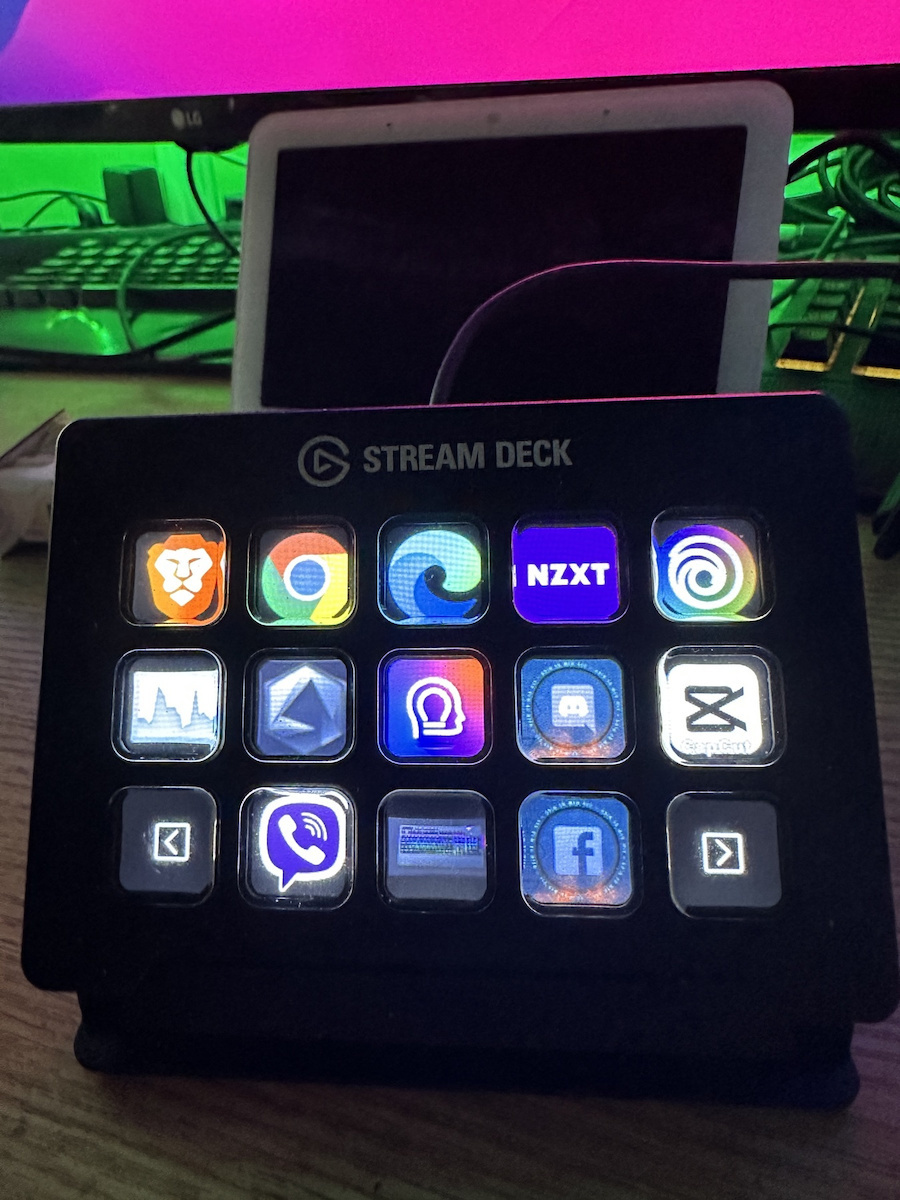
  • 15 LCD Buttons
  • USB 2.0 Connection
  • Cable Length 1
  • 5m

Stream Deck integrates your tools and automatically detects your scenes, media and audio sources, allowing you to control them with a quick press of a button.

See full description
199 90
200 Coins 200 Coins
Delivery Fri, 21 Aug - Thu, 27 Aug
Free   shipping cost
From Starbox 3.3 (7)
Περαία, Θεσσαλονίκης
See Gaming Peripherals on the page of Starbox
What if it breaks?

You're covered by the statutory 2-year warranty. Contact us and we'll handle the entire process with the store, ensuring your issue is resolved with prompt support through a repair, replacement, or refund.

What if I change my mind?

No problem, as long as it's within 14 days. We'll come pick it up or you can choose the Skroutz Point that suits you, completely free for up to 2 times per year, and we'll refund your money. Get Skroutz Plus to enjoy unlimited free returns.

Do you want to gift it?

You select "Gift order" in the cart. We do not include a receipt in the package and provide an electronic exchange card, just in case.

Description

Description

Unleash your creative genius and impress your audience on Twitch and YouTube with the Stream Deck from Elgato. The 15 LCD keys on the Stream Deck are ready to perform unlimited actions, eliminating the need for keyboard mapping and memorizing shortcuts. 

The functional keys allow you to switch scenes, launch media, adjust audio, and more, while the visual feedback confirms each command. 

Traditionally, this level of control was exclusive to mainstream broadcasters, but now it's in your hands!

Works the way you want

Instantly control OBS Studio, XSplit, Streamlabs, Twitch, YouTube, Twitter, Mixer, and more. Stream Deck simply integrates your favorite tools and platforms. From automatic scene and source detection to the ability to control your social media channels, you can do everything with the press of a button.

Become Productive

Automatic notifications make a streamer's life easier. 

Use Deck Stream to upload screen captures as GIFs, images, videos, and clips with the ability to add signature watermarks, intro and outro graphics before presenting them. 

Your options are endless, so explore and experiment. Do whatever it takes to sharpen your creative self and add your personal touch.

Package includes

  • Stream Deck
  • Desktop stand
  • 1.5 meter USB-C to USB-A cable
  • Quick start guide

Manufacturer

See full description

Specifications

Specifications

Console
PC
Type
Stream Deck

Important information

Specifications are collected from official manufacturer websites. Please verify the specifications before proceeding with your final purchase. If you notice any problem you can report it here.

See all specifications

Reviews (15)

Reviews

  1. 11
  2. 2
  3. 1
  4. 1
  5. 1 star
    0
Review this product

Reviews by our members

  • michaelfunk

    Verified purchase

    If you work with OBS, it will be a lifesaver for you. Very easy to use, beautiful as a gadget, and effective. It boosts your productivity by 100%.

    If you want it for everyday use on your computer, only for shortcut buttons, nothing more.

    Translated from Greek ·
    Did you find this review helpful?
  • DJ TELIS

    Verified purchase

    I think it is necessary to facilitate you in many ways to work better

    Translated from Greek ·
    Did you find this review helpful?
  • Giorgos Chatzithanasis
    4
    2 out of 2 members found this review helpful

    Verified purchase

    Very good construction. Somewhat expensive for the money. Nevertheless, it does exactly what it should and has plenty of room for additional functionality through Plugins from the Store.

    Translated from Greek ·
    Did you find this review helpful?
  • Costas Infinity Games
    5
    4 out of 4 members found this review helpful

    I admit that it is a great helping hand in doing many things, it has good construction, it helps me a lot with live streams and the videos I make, the only downside is that you need to explore it well to adjust it, if you manage to do it, then it is perfect!

    Translated from Greek ·
    Did you find this review helpful?
  • socz190
    5
    13 out of 13 members found this review helpful

    Incredibly convenient. Clearly labeled buttons with nice small screens. Does exactly what it says and easy to set up. I use it with Cubase 11 pro.

    Translated from Greek ·
    Did you find this review helpful?
  • Xceptional
    5
    26 out of 26 members found this review helpful

    Verified purchase

    Whatever it promises, a panel with macro buttons.
    Automates your daily actions and there is no need to stream for it to be useful.
    For those who use wifi lighting, it connects perfectly!

    Translated from Greek ·
    Did you find this review helpful?
  • 5
    12 out of 13 members found this review helpful

    Verified purchase

    The best thing there is for multitasking at your office!!!

    Translated from Greek ·
    Did you find this review helpful?
  • 2
    11 out of 51 members found this review helpful

    Quality-price ratio

    Translated from Greek ·
    Did you find this review helpful?
  • Verified purchase

  • Verified purchase

  • Verified purchase

  • Verified purchase

  • If you work with OBS, it will be a lifesaver for you. Very easy to use, beautiful as a gadget, and effective. It boosts your productivity by 100%.

    If you want it for everyday use on your computer, only for shortcut buttons, nothing more.

    Translated from Greek ·
    0
  • I think it is necessary to facilitate you in many ways to work better

    Translated from Greek ·
    0
  • Very good construction. Somewhat expensive for the money. Nevertheless, it does exactly what it should and has plenty of room for additional functionality through Plugins from the Store.

    Translated from Greek ·
    2
  • I admit that it is a great helping hand in doing many things, it has good construction, it helps me a lot with live streams and the videos I make, the only downside is that you need to explore it well to adjust it, if you manage to do it, then it is perfect!

    Translated from Greek ·
    4
  • Incredibly convenient. Clearly labeled buttons with nice small screens. Does exactly what it says and easy to set up. I use it with Cubase 11 pro.

    Translated from Greek ·
    13
  • See all
Questions (7)

Questions

151 users have this product and can help you

Ask for the product
Studio124

Τι μηκος εχει το καλωδιο του ? , διοτι ακουσα οτι δεν μπορεις να το κουμποσεις σε χαμπακι...

roukie

Είναι κοντό. Έχω τον υπολογιστή στο πάτωμα δεξιά και το καλώδιο δεν έφτανε για να το βάλω αριστερά που ήθελα.Κατεληξα να βάλω προέκταση χωρίς hub. Κι εκεί είχα ένα θέμα γιατί δοκίμασα γύρο στις 7 διαφορετικές προεκτάσεις μέχρι να βρω μια που να δουλεύει.

roukie

Έχει βρεί κάποιος usb extender που να δουλεύει με τη συσκευή; Έχω αγοράσει 3 διαφορετικούς μέχρι στιγμής και δεν λειτουργεί με κανέναν.

Reptile1980

Γράφει και στις οδηγίες πως πρέπει να συνδεθεί απευθείας στον υπολογιστή χωρίς να μεσολαβεί τίποτα ενδιάμεσα (hubs, extenders κτλ)

NEW_USER5501

Γεια σας φίλοι μου, αλλά αυτό το μηχάνημα αυτό τι ακριβώς κάνει? Σε τι μπορεί να φανεί χρήσιμο? Ευχαριστώ πολύ

See all questions (7)

Description & Specifications

Unleash your creative genius and impress your audience on Twitch and YouTube with the Stream Deck from Elgato. The 15 LCD keys on the Stream Deck are ready to perform unlimited actions, eliminating the need for keyboard mapping and memorizing shortcuts. 

The functional keys allow you to switch scenes, launch media, adjust audio, and more, while the visual feedback confirms each command. 

Traditionally, this level of control was exclusive to mainstream broadcasters, but now it's in your hands!

Works the way you want

Instantly control OBS Studio, XSplit, Streamlabs, Twitch, YouTube, Twitter, Mixer, and more. Stream Deck simply integrates your favorite tools and platforms. From automatic scene and source detection to the ability to control your social media channels, you can do everything with the press of a button.

Become Productive

Automatic notifications make a streamer's life easier. 

Use Deck Stream to upload screen captures as GIFs, images, videos, and clips with the ability to add signature watermarks, intro and outro graphics before presenting them. 

Your options are endless, so explore and experiment. Do whatever it takes to sharpen your creative self and add your personal touch.

Package includes

  • Stream Deck
  • Desktop stand
  • 1.5 meter USB-C to USB-A cable
  • Quick start guide

Manufacturer

Console
PC
Type
Stream Deck

Important information

Specifications are collected from official manufacturer websites. Please verify the specifications before proceeding with your final purchase. If you notice any problem you can report it here.

Reviews (15)

  1. 11
  2. 2
  3. 1
  4. 1
  5. 1 star
    0
Review this product

Reviews by our members

  • michaelfunk

    Verified purchase

    If you work with OBS, it will be a lifesaver for you. Very easy to use, beautiful as a gadget, and effective. It boosts your productivity by 100%.

    If you want it for everyday use on your computer, only for shortcut buttons, nothing more.

    Translated from Greek ·
    Did you find this review helpful?
  • DJ TELIS

    Verified purchase

    I think it is necessary to facilitate you in many ways to work better

    Translated from Greek ·
    Did you find this review helpful?
  • Giorgos Chatzithanasis
    4
    2 out of 2 members found this review helpful

    Verified purchase

    Very good construction. Somewhat expensive for the money. Nevertheless, it does exactly what it should and has plenty of room for additional functionality through Plugins from the Store.

    Translated from Greek ·
    Did you find this review helpful?
  • Costas Infinity Games
    5
    4 out of 4 members found this review helpful

    I admit that it is a great helping hand in doing many things, it has good construction, it helps me a lot with live streams and the videos I make, the only downside is that you need to explore it well to adjust it, if you manage to do it, then it is perfect!

    Translated from Greek ·
    Did you find this review helpful?
  • socz190
    5
    13 out of 13 members found this review helpful

    Incredibly convenient. Clearly labeled buttons with nice small screens. Does exactly what it says and easy to set up. I use it with Cubase 11 pro.

    Translated from Greek ·
    Did you find this review helpful?
  • Xceptional
    5
    26 out of 26 members found this review helpful

    Verified purchase

    Whatever it promises, a panel with macro buttons.
    Automates your daily actions and there is no need to stream for it to be useful.
    For those who use wifi lighting, it connects perfectly!

    Translated from Greek ·
    Did you find this review helpful?
  • 5
    12 out of 13 members found this review helpful

    Verified purchase

    The best thing there is for multitasking at your office!!!

    Translated from Greek ·
    Did you find this review helpful?
  • 2
    11 out of 51 members found this review helpful

    Quality-price ratio

    Translated from Greek ·
    Did you find this review helpful?
  • Verified purchase

  • Verified purchase

  • Verified purchase

  • Verified purchase

  • If you work with OBS, it will be a lifesaver for you. Very easy to use, beautiful as a gadget, and effective. It boosts your productivity by 100%.

    If you want it for everyday use on your computer, only for shortcut buttons, nothing more.

    Translated from Greek ·
    0
  • I think it is necessary to facilitate you in many ways to work better

    Translated from Greek ·
    0
  • Very good construction. Somewhat expensive for the money. Nevertheless, it does exactly what it should and has plenty of room for additional functionality through Plugins from the Store.

    Translated from Greek ·
    2
  • I admit that it is a great helping hand in doing many things, it has good construction, it helps me a lot with live streams and the videos I make, the only downside is that you need to explore it well to adjust it, if you manage to do it, then it is perfect!

    Translated from Greek ·
    4
  • Incredibly convenient. Clearly labeled buttons with nice small screens. Does exactly what it says and easy to set up. I use it with Cubase 11 pro.

    Translated from Greek ·
    13
  • See all
199,90 €
Free   shipping cost
Bonus 1.000 Coins με μία παραγγελία σε gaming περιφερειακά!
Κέρδισέ τα