
μπορώ να το χρησιμοποιήσω για tablet; (galaxy tab s6 lite)
Разходите за доставка и скоростта на доставка се изчисляват въз основа на местоположението за доставка.


Спецификациите са събрани от официални уебсайтове на производителите. Моля, проверете ги, преди да продължите с окончателната си покупка. Ако забележите някакъв проблем, докладвайте го тук.

Много удобно за Samsung Dex със s24 ultra. Ако не сложите меката пластмаса отдолу, можете да го прикрепите с калъфа на телефона, сядат удобно. Освен това, тъй като зарежда бавно и екранът е затворен, докато е в режим dex, не се загрява, въпреки че е с калъф. Качеството на изработката на стойката е добро, не изглежда много премиум. Изпълнява работата си перфектно и е добре за 30 евро. Взех си и безжичен мишка и клавиатурен комплект само за dex и работи веднага, като включите USB донгъла в стойката. Не е необходимо да имате Bluetooth клавиатура и мишка, класическите безжични работят перфектно и ви спестяват процеса на свързване, когато искате да използвате dex, или да ги държите постоянно включени и да изтощавате батерията на телефона, докато Bluetooth е включен. Просто оставяте донгъла на стойката и те са готови за употреба, веднага след като прикрепите телефона към стойката
Πολύ κομπλέ για Samsung dex με το s24 ultra. Αν δεν του βάλεις το μαλακό πλαστικό στο κάτω μέρος, μπορείς να το κουμπώσεις και με τη θήκη πάνω το κινητό, χωράει άνετα. Επίσης επειδή φορτίζει αργά και είναι κλειστή η οθόνη όσο είναι σε dex, δε ζεσταίνεται παρόλο που είναι με τη θήκη. Η ποιότητα κατασκευής της βάσης είναι μια χαρά δε φαίνεται πολύ της πλάκας, ούτε τίποτα premium. κάνει τη δουλειά της μια χαρά και είναι οκ στα 30 ευρώ. Πήρα και ένα σετ ασύρματο ποντίκι πληκτρολόγιο μόνο για να το έχω για το dex και δουλεύει plug n play, απλά βάζοντας το USB dongle πάνω στη βάση. Δεν είναι απαραίτητο να έχεις Bluetooth keyboard-mouse και τα κλασσικά ασύρματα δουλεύουν τέλεια, και επίσης γλυτώνεις τη διαδικασία του να τα κάνεις pair όταν θέλεις να χρησιμοποιήσεις το dex, ή να τα έχεις ανοιχτά μονίμως και να τρώνε μπαταρία από το κινητό όσο έχεις ανοιχτό Bluetooth. Απλά αφήνεις το dongle στη βάση πάνω και είναι έτοιμα για χρήση με το που κουμπώσεις το κινητό στη βάση
Добре!!
Имам Samsung Galaxy Note10+ и Galaxy S21 FE.
Изпробвал съм други докинг станции и адаптери, но този е доста удобен със разположението на телефона и неговите входове.
Освен това, за да се показва 4K резолюция, устройството трябва да го поддържа в dex, моите телефони достигат само до 1080p, докато S23 Ultra правилно поддържа 4K резолюция.
Относно конструкцията, устройството изглежда пластмасово и евтино.
За тези, които не се интересуват от 4K, то свършва работата си на обикновен екран!
Това е
λοιπόν!!
εχω τα samsung galaxy note10+ και το galaxy s21 fe.
έχω δοκιμάσει κι άλλα dockings όπως και ανταπτορες αλλα αυτό βολεύει αρκετά με την τοποθέτηση του κινητού και με τις εισόδους του.
Επίσης για να προβάλει 4κ ανάλυση θα πρέπει να το υποστηρίζει η συσκευή σε dex, τα κινητά μου φτάνουν έως 1080p, ενώ το s23 ultra υποστηρίζει κανονικά 4Κ ανάλυση.
σαν κατασκευή η συσκευή πλαστικουρα και φτηνιάρικη.
για αυτούς που δεν τους νοιάζει το 4κ, σε μια κανονική οθόνη, την δουλειά του την κάνει!
αυτά
Добра работа с Samsung DeX и има и микро SD карта за допълнително съхранение. Моят проблем е, че с калъфа, телефонът не пасва в USB порта. Затова си купих удължителен кабел, за да го използвам и като TouchPad.
καλό δουλεύει με samsung dex και έχει και micro SD card για έξτρα χορό. το δικό μου θέμα είναι ότι με θήκη το κινητό δε κάθεται στη θύρα usb. και πήρα προέκταση καλωδίου για να το χρησιμοποιήσω και σαν TouchPad.


Под средно ниво строителни материали. USB-C портът не е стабилен и с грешно движение може да го повредите. Въпреки това, свързването със Samsung Dex е перфектно. Зареждането с бързо зарядно устройство от 27W се извършва с 1/3 от нормалната скорост, така че не очаквайте бързо зареждане с това устройство.
Κάτω του μετρίου υλικά κατασκευής. Η θύρα usb-c δεν είναι σταθερή και με μια άστοχη κίνηση μπορείς να την καταστρέψεις. Παρόλα αυτά συνδέεται άψογα με samsung dex. Η φόρτιση με ταχυφορτιστή 27W γίνεται στο 1/3 της ταχύτητας του, οπότε μην περιμένετε ταχεία φόρτιση μ αυτή τη συσκευή.
Ако вашият телефон поддържа Samsung DeX (аз имам S20 FE 2021 4G), го препоръчвам горещо. Свързах клавиатура, мишка, Xbox USB контролер, монитор с резолюция 1080p и се забавлявам много. Усещам се като настолен компютър, но работещ с Android, разбира се. Не изисква външно захранване, всички споменати устройства работят без нужда от адаптер за захранване. Ако искате, можете да използвате един, за да зареждате телефона си едновременно.
Сега, няколко съвета. 1) Не използвайте калъф, докато използвате DeX, тъй като това може да причини прегряване, особено ако го зареждате. Това може да затвори приложенията поради прегряване. (Аз сложих вентилатор отзад вместо да премахвам калъфа постоянно)
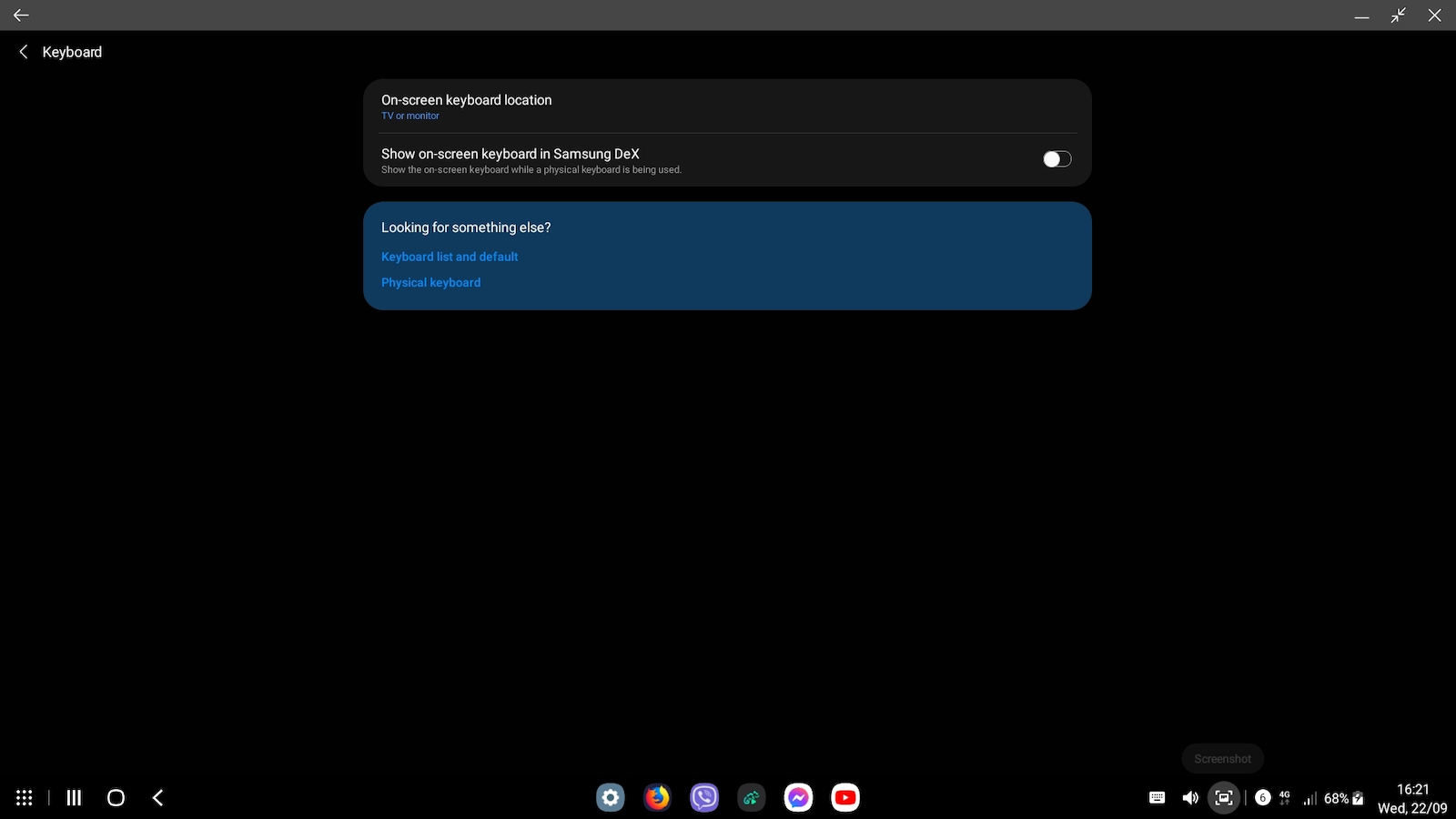
2) В настройките на DeX задайте клавиатурата да се показва само на монитора, иначе екранът на телефона ще се включва ненужно.
И накрая, 3) Firefox не работи перфектно, има някои грешки. Първоначално не се отваря изобщо. Трябва да отидете в настройките на DeX и да въведете "about Samsung DeX", след което да чукнете логото пет пъти, за да влезете в режим на разработчик. След това можете да отворите Firefox (след излизане и повторно влизане в DeX).
10/10 много добро - ign
Εαν το κινητο σας υποστιριζει samsung dex (εχω το s20 fe 2021 4g) σας το προτεινω ανεπιφύλακτα
εχω συνδεσει πανω πληκτρολογιο, ποντικι, xbox usb controller, 1080p monitor και εχω παθει την πλακα μου. νομιζεις οτι εχεις κατσει σε pc. ενα pc που τρεχει android βεβαια. δεν θελει εξωτερικη τροφοδοσια, ολα αυτα που ανεφερα τα σηκωνει χωρις καποιο τροφοδοτικο, εαν θες του βαζεις ενα για να φορτιζει και το κινητο ταυτοχρονα.
καποια tips τωρα. 1) να το βαζετε χωρις θυκη γιατι θα ζωριστει αρκετα ιδικα εαν το φορτιζετε κιολας και θα κλεινει τις εφαρμογες λογο υπερθερμανσης. (Εγω εβαλα απο πισω εναν fan αντι να βγαζω την θήκη ολη την ωρα)
2) Στις ρυθμισεις του dex να βαλετε το πληκτρολογιο να βγαινει μονο στο monitor αλλιώς καθε τρεις και λιγο θα αναβει η οθονη του κινητου χωρις λογο.
και τελος 3) ο firefox δεν λειτουργει στο 100% εχει καποια bugs, αρχικα δεν τον ανοιγει καν, πρεπει να πας στα settings του dex και να μπεις "about samsung dex", μετα πατας πανω στο logo 5 φορες και μπαινει σε developer mode, μετα απο αυτο ανοιγει τον firefox (αφου βγεις απο dex και ξαναμπεις)
10/10 very good - ign
Тази конкретна мобилна докинг станция ви предоставя свободата на връзката чрез своите 7 налични порта! За повече подробности, вижте видеото по-долу!
https://www.youtube.com/watch?v=YMKiUSORSUE&t=73s
Το συγκεκριμένο σταθμός τοποθέτησης κινητού σου δίνει την ελευθέρια σύνδεσης μέσα από 7 θύρες που διαθέτει ! Αναλυτικότερα στο παρακάτω βίντεο !!
https://www.youtube.com/watch?v=YMKiUSORSUE&t=73s
Гаджет. Върши работа. Стойност за парите.
Gadget. Κάνει την δουλειά. Value for money.
Потвърдена покупка
То никак не работи
δεν λειτουργεί καθόλου
Потвърдена покупка
Потвърдена покупка
Много удобно за Samsung Dex със s24 ultra. Ако не сложите меката пластмаса отдолу, можете да го прикрепите с калъфа на телефона, сядат удобно. Освен това, тъй като зарежда бавно и екранът е затворен, докато е в режим dex, не се загрява, въпреки че е с калъф. Качеството на изработката на стойката е добро, не изглежда много премиум. Изпълнява работата си перфектно и е добре за 30 евро. Взех си и безжичен мишка и клавиатурен комплект само за dex и работи веднага, като включите USB донгъла в стойката. Не е необходимо да имате Bluetooth клавиатура и мишка, класическите безжични работят перфектно и ви спестяват процеса на свързване, когато искате да използвате dex, или да ги държите постоянно включени и да изтощавате батерията на телефона, докато Bluetooth е включен. Просто оставяте донгъла на стойката и те са готови за употреба, веднага след като прикрепите телефона към стойката
Πολύ κομπλέ για Samsung dex με το s24 ultra. Αν δεν του βάλεις το μαλακό πλαστικό στο κάτω μέρος, μπορείς να το κουμπώσεις και με τη θήκη πάνω το κινητό, χωράει άνετα. Επίσης επειδή φορτίζει αργά και είναι κλειστή η οθόνη όσο είναι σε dex, δε ζεσταίνεται παρόλο που είναι με τη θήκη. Η ποιότητα κατασκευής της βάσης είναι μια χαρά δε φαίνεται πολύ της πλάκας, ούτε τίποτα premium. κάνει τη δουλειά της μια χαρά και είναι οκ στα 30 ευρώ. Πήρα και ένα σετ ασύρματο ποντίκι πληκτρολόγιο μόνο για να το έχω για το dex και δουλεύει plug n play, απλά βάζοντας το USB dongle πάνω στη βάση. Δεν είναι απαραίτητο να έχεις Bluetooth keyboard-mouse και τα κλασσικά ασύρματα δουλεύουν τέλεια, και επίσης γλυτώνεις τη διαδικασία του να τα κάνεις pair όταν θέλεις να χρησιμοποιήσεις το dex, ή να τα έχεις ανοιχτά μονίμως και να τρώνε μπαταρία από το κινητό όσο έχεις ανοιχτό Bluetooth. Απλά αφήνεις το dongle στη βάση πάνω και είναι έτοιμα για χρήση με το που κουμπώσεις το κινητό στη βάση
Добре!!
Имам Samsung Galaxy Note10+ и Galaxy S21 FE.
Изпробвал съм други докинг станции и адаптери, но този е доста удобен със разположението на телефона и неговите входове.
Освен това, за да се показва 4K резолюция, устройството трябва да го поддържа в dex, моите телефони достигат само до 1080p, докато S23 Ultra правилно поддържа 4K резолюция.
Относно конструкцията, устройството изглежда пластмасово и евтино.
За тези, които не се интересуват от 4K, то свършва работата си на обикновен екран!
Това е
λοιπόν!!
εχω τα samsung galaxy note10+ και το galaxy s21 fe.
έχω δοκιμάσει κι άλλα dockings όπως και ανταπτορες αλλα αυτό βολεύει αρκετά με την τοποθέτηση του κινητού και με τις εισόδους του.
Επίσης για να προβάλει 4κ ανάλυση θα πρέπει να το υποστηρίζει η συσκευή σε dex, τα κινητά μου φτάνουν έως 1080p, ενώ το s23 ultra υποστηρίζει κανονικά 4Κ ανάλυση.
σαν κατασκευή η συσκευή πλαστικουρα και φτηνιάρικη.
για αυτούς που δεν τους νοιάζει το 4κ, σε μια κανονική οθόνη, την δουλειά του την κάνει!
αυτά
Добра работа с Samsung DeX и има и микро SD карта за допълнително съхранение. Моят проблем е, че с калъфа, телефонът не пасва в USB порта. Затова си купих удължителен кабел, за да го използвам и като TouchPad.
καλό δουλεύει με samsung dex και έχει και micro SD card για έξτρα χορό. το δικό μου θέμα είναι ότι με θήκη το κινητό δε κάθεται στη θύρα usb. και πήρα προέκταση καλωδίου για να το χρησιμοποιήσω και σαν TouchPad.
Под средно ниво строителни материали. USB-C портът не е стабилен и с грешно движение може да го повредите. Въпреки това, свързването със Samsung Dex е перфектно. Зареждането с бързо зарядно устройство от 27W се извършва с 1/3 от нормалната скорост, така че не очаквайте бързо зареждане с това устройство.
Κάτω του μετρίου υλικά κατασκευής. Η θύρα usb-c δεν είναι σταθερή και με μια άστοχη κίνηση μπορείς να την καταστρέψεις. Παρόλα αυτά συνδέεται άψογα με samsung dex. Η φόρτιση με ταχυφορτιστή 27W γίνεται στο 1/3 της ταχύτητας του, οπότε μην περιμένετε ταχεία φόρτιση μ αυτή τη συσκευή.
Ако вашият телефон поддържа Samsung DeX (аз имам S20 FE 2021 4G), го препоръчвам горещо. Свързах клавиатура, мишка, Xbox USB контролер, монитор с резолюция 1080p и се забавлявам много. Усещам се като настолен компютър, но работещ с Android, разбира се. Не изисква външно захранване, всички споменати устройства работят без нужда от адаптер за захранване. Ако искате, можете да използвате един, за да зареждате телефона си едновременно.
Сега, няколко съвета. 1) Не използвайте калъф, докато използвате DeX, тъй като това може да причини прегряване, особено ако го зареждате. Това може да затвори приложенията поради прегряване. (Аз сложих вентилатор отзад вместо да премахвам калъфа постоянно)
2) В настройките на DeX задайте клавиатурата да се показва само на монитора, иначе екранът на телефона ще се включва ненужно.
И накрая, 3) Firefox не работи перфектно, има някои грешки. Първоначално не се отваря изобщо. Трябва да отидете в настройките на DeX и да въведете "about Samsung DeX", след което да чукнете логото пет пъти, за да влезете в режим на разработчик. След това можете да отворите Firefox (след излизане и повторно влизане в DeX).
10/10 много добро - ign
Εαν το κινητο σας υποστιριζει samsung dex (εχω το s20 fe 2021 4g) σας το προτεινω ανεπιφύλακτα
εχω συνδεσει πανω πληκτρολογιο, ποντικι, xbox usb controller, 1080p monitor και εχω παθει την πλακα μου. νομιζεις οτι εχεις κατσει σε pc. ενα pc που τρεχει android βεβαια. δεν θελει εξωτερικη τροφοδοσια, ολα αυτα που ανεφερα τα σηκωνει χωρις καποιο τροφοδοτικο, εαν θες του βαζεις ενα για να φορτιζει και το κινητο ταυτοχρονα.
καποια tips τωρα. 1) να το βαζετε χωρις θυκη γιατι θα ζωριστει αρκετα ιδικα εαν το φορτιζετε κιολας και θα κλεινει τις εφαρμογες λογο υπερθερμανσης. (Εγω εβαλα απο πισω εναν fan αντι να βγαζω την θήκη ολη την ωρα)
2) Στις ρυθμισεις του dex να βαλετε το πληκτρολογιο να βγαινει μονο στο monitor αλλιώς καθε τρεις και λιγο θα αναβει η οθονη του κινητου χωρις λογο.
και τελος 3) ο firefox δεν λειτουργει στο 100% εχει καποια bugs, αρχικα δεν τον ανοιγει καν, πρεπει να πας στα settings του dex και να μπεις "about samsung dex", μετα πατας πανω στο logo 5 φορες και μπαινει σε developer mode, μετα απο αυτο ανοιγει τον firefox (αφου βγεις απο dex και ξαναμπεις)
10/10 very good - ign
95 потребителя имат този продукт и могат да Ви помогнат
Попитайте за продукта
μπορώ να το χρησιμοποιήσω για tablet; (galaxy tab s6 lite)

Πιστευω οτι θα χωραει , αρκει να εχει usb-C υποδοχη

ρε παιδιά δεν έχω καταλάβει
αυτό πώς γίνεται να μετατρέπει το κινητό σε pc?
κ όταν λέμε pc τι εννοούμε?
τι λειτουργικό τρέχει δηλαδή?
επίσης όλοι ρωτάτε για Samsung κινητό εάν υποστηρίζεται ενώ το αναφέρει κ στην συσκευασία αλλά δεν λέει για όλα τα κινητά
λέει για κάποια μοντέλα κατοίκων εταιριών
ας πούμε Xiaomi δεν αναφέρει
εγώ που έχω δηλαδή poco f3 δεν θα παίζει?
έχει να κάνει με τον επεξεργαστή του κινητού ή δεν παίζει ρόλο?
ψάχνω στο google κ δεν βρίσκω καμία πληροφορία
όποιος μπορέσει να απαντήσει θα τον ευγνωμονώ!

Πρέπει να διαθέτει usb c 3.2 για να σου παίξει δες προδιαγραφές κινητού

Είναι συμβατό με Samsung A03s ;

στο 03 ίσως δούλεψε μόνο το card reader
Спецификациите са събрани от официални уебсайтове на производителите. Моля, проверете ги, преди да продължите с окончателната си покупка. Ако забележите някакъв проблем, докладвайте го тук.
Много удобно за Samsung Dex със s24 ultra. Ако не сложите меката пластмаса отдолу, можете да го прикрепите с калъфа на телефона, сядат удобно. Освен това, тъй като зарежда бавно и екранът е затворен, докато е в режим dex, не се загрява, въпреки че е с калъф. Качеството на изработката на стойката е добро, не изглежда много премиум. Изпълнява работата си перфектно и е добре за 30 евро. Взех си и безжичен мишка и клавиатурен комплект само за dex и работи веднага, като включите USB донгъла в стойката. Не е необходимо да имате Bluetooth клавиатура и мишка, класическите безжични работят перфектно и ви спестяват процеса на свързване, когато искате да използвате dex, или да ги държите постоянно включени и да изтощавате батерията на телефона, докато Bluetooth е включен. Просто оставяте донгъла на стойката и те са готови за употреба, веднага след като прикрепите телефона към стойката
Πολύ κομπλέ για Samsung dex με το s24 ultra. Αν δεν του βάλεις το μαλακό πλαστικό στο κάτω μέρος, μπορείς να το κουμπώσεις και με τη θήκη πάνω το κινητό, χωράει άνετα. Επίσης επειδή φορτίζει αργά και είναι κλειστή η οθόνη όσο είναι σε dex, δε ζεσταίνεται παρόλο που είναι με τη θήκη. Η ποιότητα κατασκευής της βάσης είναι μια χαρά δε φαίνεται πολύ της πλάκας, ούτε τίποτα premium. κάνει τη δουλειά της μια χαρά και είναι οκ στα 30 ευρώ. Πήρα και ένα σετ ασύρματο ποντίκι πληκτρολόγιο μόνο για να το έχω για το dex και δουλεύει plug n play, απλά βάζοντας το USB dongle πάνω στη βάση. Δεν είναι απαραίτητο να έχεις Bluetooth keyboard-mouse και τα κλασσικά ασύρματα δουλεύουν τέλεια, και επίσης γλυτώνεις τη διαδικασία του να τα κάνεις pair όταν θέλεις να χρησιμοποιήσεις το dex, ή να τα έχεις ανοιχτά μονίμως και να τρώνε μπαταρία από το κινητό όσο έχεις ανοιχτό Bluetooth. Απλά αφήνεις το dongle στη βάση πάνω και είναι έτοιμα για χρήση με το που κουμπώσεις το κινητό στη βάση
Добре!!
Имам Samsung Galaxy Note10+ и Galaxy S21 FE.
Изпробвал съм други докинг станции и адаптери, но този е доста удобен със разположението на телефона и неговите входове.
Освен това, за да се показва 4K резолюция, устройството трябва да го поддържа в dex, моите телефони достигат само до 1080p, докато S23 Ultra правилно поддържа 4K резолюция.
Относно конструкцията, устройството изглежда пластмасово и евтино.
За тези, които не се интересуват от 4K, то свършва работата си на обикновен екран!
Това е
λοιπόν!!
εχω τα samsung galaxy note10+ και το galaxy s21 fe.
έχω δοκιμάσει κι άλλα dockings όπως και ανταπτορες αλλα αυτό βολεύει αρκετά με την τοποθέτηση του κινητού και με τις εισόδους του.
Επίσης για να προβάλει 4κ ανάλυση θα πρέπει να το υποστηρίζει η συσκευή σε dex, τα κινητά μου φτάνουν έως 1080p, ενώ το s23 ultra υποστηρίζει κανονικά 4Κ ανάλυση.
σαν κατασκευή η συσκευή πλαστικουρα και φτηνιάρικη.
για αυτούς που δεν τους νοιάζει το 4κ, σε μια κανονική οθόνη, την δουλειά του την κάνει!
αυτά
Добра работа с Samsung DeX и има и микро SD карта за допълнително съхранение. Моят проблем е, че с калъфа, телефонът не пасва в USB порта. Затова си купих удължителен кабел, за да го използвам и като TouchPad.
καλό δουλεύει με samsung dex και έχει και micro SD card για έξτρα χορό. το δικό μου θέμα είναι ότι με θήκη το κινητό δε κάθεται στη θύρα usb. και πήρα προέκταση καλωδίου για να το χρησιμοποιήσω και σαν TouchPad.
Под средно ниво строителни материали. USB-C портът не е стабилен и с грешно движение може да го повредите. Въпреки това, свързването със Samsung Dex е перфектно. Зареждането с бързо зарядно устройство от 27W се извършва с 1/3 от нормалната скорост, така че не очаквайте бързо зареждане с това устройство.
Κάτω του μετρίου υλικά κατασκευής. Η θύρα usb-c δεν είναι σταθερή και με μια άστοχη κίνηση μπορείς να την καταστρέψεις. Παρόλα αυτά συνδέεται άψογα με samsung dex. Η φόρτιση με ταχυφορτιστή 27W γίνεται στο 1/3 της ταχύτητας του, οπότε μην περιμένετε ταχεία φόρτιση μ αυτή τη συσκευή.
Ако вашият телефон поддържа Samsung DeX (аз имам S20 FE 2021 4G), го препоръчвам горещо. Свързах клавиатура, мишка, Xbox USB контролер, монитор с резолюция 1080p и се забавлявам много. Усещам се като настолен компютър, но работещ с Android, разбира се. Не изисква външно захранване, всички споменати устройства работят без нужда от адаптер за захранване. Ако искате, можете да използвате един, за да зареждате телефона си едновременно.
Сега, няколко съвета. 1) Не използвайте калъф, докато използвате DeX, тъй като това може да причини прегряване, особено ако го зареждате. Това може да затвори приложенията поради прегряване. (Аз сложих вентилатор отзад вместо да премахвам калъфа постоянно)
2) В настройките на DeX задайте клавиатурата да се показва само на монитора, иначе екранът на телефона ще се включва ненужно.
И накрая, 3) Firefox не работи перфектно, има някои грешки. Първоначално не се отваря изобщо. Трябва да отидете в настройките на DeX и да въведете "about Samsung DeX", след което да чукнете логото пет пъти, за да влезете в режим на разработчик. След това можете да отворите Firefox (след излизане и повторно влизане в DeX).
10/10 много добро - ign
Εαν το κινητο σας υποστιριζει samsung dex (εχω το s20 fe 2021 4g) σας το προτεινω ανεπιφύλακτα
εχω συνδεσει πανω πληκτρολογιο, ποντικι, xbox usb controller, 1080p monitor και εχω παθει την πλακα μου. νομιζεις οτι εχεις κατσει σε pc. ενα pc που τρεχει android βεβαια. δεν θελει εξωτερικη τροφοδοσια, ολα αυτα που ανεφερα τα σηκωνει χωρις καποιο τροφοδοτικο, εαν θες του βαζεις ενα για να φορτιζει και το κινητο ταυτοχρονα.
καποια tips τωρα. 1) να το βαζετε χωρις θυκη γιατι θα ζωριστει αρκετα ιδικα εαν το φορτιζετε κιολας και θα κλεινει τις εφαρμογες λογο υπερθερμανσης. (Εγω εβαλα απο πισω εναν fan αντι να βγαζω την θήκη ολη την ωρα)
2) Στις ρυθμισεις του dex να βαλετε το πληκτρολογιο να βγαινει μονο στο monitor αλλιώς καθε τρεις και λιγο θα αναβει η οθονη του κινητου χωρις λογο.
και τελος 3) ο firefox δεν λειτουργει στο 100% εχει καποια bugs, αρχικα δεν τον ανοιγει καν, πρεπει να πας στα settings του dex και να μπεις "about samsung dex", μετα πατας πανω στο logo 5 φορες και μπαινει σε developer mode, μετα απο αυτο ανοιγει τον firefox (αφου βγεις απο dex και ξαναμπεις)
10/10 very good - ign
Тази конкретна мобилна докинг станция ви предоставя свободата на връзката чрез своите 7 налични порта! За повече подробности, вижте видеото по-долу!
https://www.youtube.com/watch?v=YMKiUSORSUE&t=73s
Το συγκεκριμένο σταθμός τοποθέτησης κινητού σου δίνει την ελευθέρια σύνδεσης μέσα από 7 θύρες που διαθέτει ! Αναλυτικότερα στο παρακάτω βίντεο !!
https://www.youtube.com/watch?v=YMKiUSORSUE&t=73s
Гаджет. Върши работа. Стойност за парите.
Gadget. Κάνει την δουλειά. Value for money.
Потвърдена покупка
То никак не работи
δεν λειτουργεί καθόλου
Потвърдена покупка
Потвърдена покупка
Много удобно за Samsung Dex със s24 ultra. Ако не сложите меката пластмаса отдолу, можете да го прикрепите с калъфа на телефона, сядат удобно. Освен това, тъй като зарежда бавно и екранът е затворен, докато е в режим dex, не се загрява, въпреки че е с калъф. Качеството на изработката на стойката е добро, не изглежда много премиум. Изпълнява работата си перфектно и е добре за 30 евро. Взех си и безжичен мишка и клавиатурен комплект само за dex и работи веднага, като включите USB донгъла в стойката. Не е необходимо да имате Bluetooth клавиатура и мишка, класическите безжични работят перфектно и ви спестяват процеса на свързване, когато искате да използвате dex, или да ги държите постоянно включени и да изтощавате батерията на телефона, докато Bluetooth е включен. Просто оставяте донгъла на стойката и те са готови за употреба, веднага след като прикрепите телефона към стойката
Πολύ κομπλέ για Samsung dex με το s24 ultra. Αν δεν του βάλεις το μαλακό πλαστικό στο κάτω μέρος, μπορείς να το κουμπώσεις και με τη θήκη πάνω το κινητό, χωράει άνετα. Επίσης επειδή φορτίζει αργά και είναι κλειστή η οθόνη όσο είναι σε dex, δε ζεσταίνεται παρόλο που είναι με τη θήκη. Η ποιότητα κατασκευής της βάσης είναι μια χαρά δε φαίνεται πολύ της πλάκας, ούτε τίποτα premium. κάνει τη δουλειά της μια χαρά και είναι οκ στα 30 ευρώ. Πήρα και ένα σετ ασύρματο ποντίκι πληκτρολόγιο μόνο για να το έχω για το dex και δουλεύει plug n play, απλά βάζοντας το USB dongle πάνω στη βάση. Δεν είναι απαραίτητο να έχεις Bluetooth keyboard-mouse και τα κλασσικά ασύρματα δουλεύουν τέλεια, και επίσης γλυτώνεις τη διαδικασία του να τα κάνεις pair όταν θέλεις να χρησιμοποιήσεις το dex, ή να τα έχεις ανοιχτά μονίμως και να τρώνε μπαταρία από το κινητό όσο έχεις ανοιχτό Bluetooth. Απλά αφήνεις το dongle στη βάση πάνω και είναι έτοιμα για χρήση με το που κουμπώσεις το κινητό στη βάση
Добре!!
Имам Samsung Galaxy Note10+ и Galaxy S21 FE.
Изпробвал съм други докинг станции и адаптери, но този е доста удобен със разположението на телефона и неговите входове.
Освен това, за да се показва 4K резолюция, устройството трябва да го поддържа в dex, моите телефони достигат само до 1080p, докато S23 Ultra правилно поддържа 4K резолюция.
Относно конструкцията, устройството изглежда пластмасово и евтино.
За тези, които не се интересуват от 4K, то свършва работата си на обикновен екран!
Това е
λοιπόν!!
εχω τα samsung galaxy note10+ και το galaxy s21 fe.
έχω δοκιμάσει κι άλλα dockings όπως και ανταπτορες αλλα αυτό βολεύει αρκετά με την τοποθέτηση του κινητού και με τις εισόδους του.
Επίσης για να προβάλει 4κ ανάλυση θα πρέπει να το υποστηρίζει η συσκευή σε dex, τα κινητά μου φτάνουν έως 1080p, ενώ το s23 ultra υποστηρίζει κανονικά 4Κ ανάλυση.
σαν κατασκευή η συσκευή πλαστικουρα και φτηνιάρικη.
για αυτούς που δεν τους νοιάζει το 4κ, σε μια κανονική οθόνη, την δουλειά του την κάνει!
αυτά
Добра работа с Samsung DeX и има и микро SD карта за допълнително съхранение. Моят проблем е, че с калъфа, телефонът не пасва в USB порта. Затова си купих удължителен кабел, за да го използвам и като TouchPad.
καλό δουλεύει με samsung dex και έχει και micro SD card για έξτρα χορό. το δικό μου θέμα είναι ότι με θήκη το κινητό δε κάθεται στη θύρα usb. και πήρα προέκταση καλωδίου για να το χρησιμοποιήσω και σαν TouchPad.
Под средно ниво строителни материали. USB-C портът не е стабилен и с грешно движение може да го повредите. Въпреки това, свързването със Samsung Dex е перфектно. Зареждането с бързо зарядно устройство от 27W се извършва с 1/3 от нормалната скорост, така че не очаквайте бързо зареждане с това устройство.
Κάτω του μετρίου υλικά κατασκευής. Η θύρα usb-c δεν είναι σταθερή και με μια άστοχη κίνηση μπορείς να την καταστρέψεις. Παρόλα αυτά συνδέεται άψογα με samsung dex. Η φόρτιση με ταχυφορτιστή 27W γίνεται στο 1/3 της ταχύτητας του, οπότε μην περιμένετε ταχεία φόρτιση μ αυτή τη συσκευή.
Ако вашият телефон поддържа Samsung DeX (аз имам S20 FE 2021 4G), го препоръчвам горещо. Свързах клавиатура, мишка, Xbox USB контролер, монитор с резолюция 1080p и се забавлявам много. Усещам се като настолен компютър, но работещ с Android, разбира се. Не изисква външно захранване, всички споменати устройства работят без нужда от адаптер за захранване. Ако искате, можете да използвате един, за да зареждате телефона си едновременно.
Сега, няколко съвета. 1) Не използвайте калъф, докато използвате DeX, тъй като това може да причини прегряване, особено ако го зареждате. Това може да затвори приложенията поради прегряване. (Аз сложих вентилатор отзад вместо да премахвам калъфа постоянно)
2) В настройките на DeX задайте клавиатурата да се показва само на монитора, иначе екранът на телефона ще се включва ненужно.
И накрая, 3) Firefox не работи перфектно, има някои грешки. Първоначално не се отваря изобщо. Трябва да отидете в настройките на DeX и да въведете "about Samsung DeX", след което да чукнете логото пет пъти, за да влезете в режим на разработчик. След това можете да отворите Firefox (след излизане и повторно влизане в DeX).
10/10 много добро - ign
Εαν το κινητο σας υποστιριζει samsung dex (εχω το s20 fe 2021 4g) σας το προτεινω ανεπιφύλακτα
εχω συνδεσει πανω πληκτρολογιο, ποντικι, xbox usb controller, 1080p monitor και εχω παθει την πλακα μου. νομιζεις οτι εχεις κατσει σε pc. ενα pc που τρεχει android βεβαια. δεν θελει εξωτερικη τροφοδοσια, ολα αυτα που ανεφερα τα σηκωνει χωρις καποιο τροφοδοτικο, εαν θες του βαζεις ενα για να φορτιζει και το κινητο ταυτοχρονα.
καποια tips τωρα. 1) να το βαζετε χωρις θυκη γιατι θα ζωριστει αρκετα ιδικα εαν το φορτιζετε κιολας και θα κλεινει τις εφαρμογες λογο υπερθερμανσης. (Εγω εβαλα απο πισω εναν fan αντι να βγαζω την θήκη ολη την ωρα)
2) Στις ρυθμισεις του dex να βαλετε το πληκτρολογιο να βγαινει μονο στο monitor αλλιώς καθε τρεις και λιγο θα αναβει η οθονη του κινητου χωρις λογο.
και τελος 3) ο firefox δεν λειτουργει στο 100% εχει καποια bugs, αρχικα δεν τον ανοιγει καν, πρεπει να πας στα settings του dex και να μπεις "about samsung dex", μετα πατας πανω στο logo 5 φορες και μπαινει σε developer mode, μετα απο αυτο ανοιγει τον firefox (αφου βγεις απο dex και ξαναμπεις)
10/10 very good - ign

Вашият доклад ни помага да предприемем действия, като разберем проблемите, с които нашите потребители се сблъскват с различни видове съдържание
бъдете първият, който остави коментар