The MSI Mag B650 Tomahawk Wi-Fi motherboard is aimed at users who wish to build a powerful desktop system based on AMD Ryzen 7000 Series processors. The motherboard supports the AM5 socket. It has an ATX size, offering more expansion and connectivity options.
The MSI Mag B650 Tomahawk Wi-Fi offers many features that are attractive to gamers and users who require high performance and reliability. It includes support for PCIe 4.0 for fast data transfer speeds, advanced cooling systems for reliable system operation, built-in Wi-Fi 6E for wireless connectivity, as well as numerous USB, SATA, and M.2 ports for flexible storage and connectivity.
Supports AMD Ryzen 7000 Series desktop processors
Supports DDR5 memory, up to 6600+(OC) MHz
High-quality thermal solution: The extended heatsink design and M.2 Shield Frozr are built for high-performance systems and uninterrupted work
2.5G LAN and AMD Wi-Fi 6E solution: Upgraded network solution for professional and multimedia use. Provides secure, stable, and fast network connection
Lightning M.2: Running at PCIe Gen 4 maximizes performance for NVMe-based SSDs
Lightning USB 20G: Built-in USB 3.2 Gen 2x2 port, offers 20Gbps transfer speed, 4 times faster than USB 3.2 Gen 1
AUDIO BOOST 5: Reward your ears with studio-grade sound quality for the most immersive gaming experience
The ultimate processor for gaming
When your computer has the most advanced processor for gamers, you can focus on what really matters: winning on the digital battlefield. Whether you are playing the latest titles or revisiting a classic one, AMD Ryzen 7000 Series processors are a powerhouse for gaming with high-performance "Zen 4" cores. With up to 16 cores, 32 threads, boost clocks of up to 5.7 GHz2, and up to 144 MB of on-chip memory, AMD Ryzen 7000 Series processors deliver game-changing performance.
Fan Control
MSI motherboards allow you to manage the speeds and temperatures of all system and CPU fans. Total Fan Control lets you control your system's main features in a simplified graphical interface. You can also set up to 4 temperature targets for the CPU and motherboard, which will automatically adjust the fan speeds.
The extended heatsink enlarges the heat dissipation surface, ensuring that even high-spec processors will run at full speed.
M.2 Shield Frozr keeps M.2 SSDs safe while preventing throttling, making them run faster.
The VRM heatsink covers the upper MOS and helps in heat dissipation.
7W/mK Thermal Pad & additional Choke Pad, the high-quality 7W/mK MOSFET thermal pads and the additional choke thermal pads ensure that all cores operate with high efficiency.
Ready for water cooling
Designed to support the most popular All-In-One water cooling solutions and custom water cooling solutions on the market. A dedicated water pump PIN header supports up to 3 amps, giving you full control over the pump speed. A "protection zone" allows for easy and safe installation and perfect fitting.
Lightning GEN 4 PCI-E
The MSI Lightning Gen 4 PCI-E represents the bandwidth of an x16 interface at 64GB/s, which has doubled compared to the previous generation.
MSI's PCI Express Steel Armor slots are secured to the motherboard with additional solder points and support the weight of heavy graphics cards. When every advantage in gaming counts, Steel Armor shields the contact point from electromagnetic interference.
The MSI MPG series motherboards support all the latest storage standards, allowing users to connect any ultra-fast storage device. Start games faster, load levels quicker, and gain a real advantage over your enemies.
Lightning USB 3.2 Gen 2x2 20G
DDR5
A huge step in DDR performance improvement with the latest DDR5 memory. Combined with the special SMT soldering process and MSI Memory Boost technology, the MAG B650M MORTAR WIFI is ready to deliver world-class memory performance.
AMD EXPO
The AMD Extended Profiles for Overclocking technology (AMD EXPO Technology) was developed to enable user-friendly memory overclocking support for all types of memory, providing users with an easy path to power acceleration to achieve memory acceleration in their system.
Audio Boost 5
High-performance ALC4080 audio processor
High-quality audio capacitors
High-quality audio ports
Isolated audio signal
DE-POP protection
MSI's top network solution provides incredible data transfer speed for demanding users.
Wi-Fi 6E
Bluetooth 5.2
2.5G LAN
Click Bios 5
Get more from a BIOS designed for ease of use. Configure the motherboard in detail for gaming performance, efficiency, or world record overclocking!
MSI Center
The MSI Center integrates a suite of MSI software utilities into a single central application. Take control of the advanced features of the motherboard and unleash endless possibilities.
True Color
Optimized brightness and color of the screen in various modes for different situations, you can also adjust it yourself.
Mystic Light
Create your own colorful masterpiece with ease. Throw in any color you want with just a few clicks.
Expand the RGB experience with ease
Add more color if you want! The Mystic Light Extension header provides an intuitive way to control additional RGB strips and other RGB peripherals added to a system, without requiring a separate RGB controller.
User Scenario
With one click you can configure your computer, even customize your own profile according to your preferences.
Hardware Monitor
Get instant access to critical information about your computer in real time.
Profile Setting
Adjust selected motherboard settings in the Profile Setting menu, where options for enhancing core performance and optimizing system cooling are presented in an intuitive user interface.
Fan Center
Take full control of your fans with Total Fan Control. Set up to four CPU temperature targets and the motherboard will automatically adjust the fan speeds.
Specifications are collected from official manufacturer websites. Please verify the specifications before proceeding with your final purchase. If you notice any problem you can report it here.
***If you plan to use it with a Ryzen 7 9XXX, it is very likely that you will need to update the BIOS, otherwise it won't boot because it doesn't recognize the processor.***
My personal experience was as follows:
With a 9800x3d processor, it didn't boot at all, not even a signal to the monitor. On the motherboard, the CPU LED was red and the RAM LED was orange.
After some research, I concluded that the motherboard BIOS needs to be updated to support the processor.
Fortunately, the motherboard has a flashback function for the update, which does not require either the CPU or the RAM.
There is information and guides online for the flashback, but generally, the process is as follows:
Download the latest BIOS from the MSI website, extract the correct file, rename it to MSI.ROM, and put it on an empty USB stick formatted in FAT32.
Now, on the motherboard, you don't need to connect anything else except the 24-pin from the power supply and one of the two 8-pins at the top left.
With the power supply switch on but without starting the system, insert the stick into the USB port labeled flashback and press the button above the ports labeled flashback for 3 seconds. A white LED will start blinking, indicating that the update has started and will continue for 5-10 minutes until it is completed. When the update is finished, the PC will turn off by itself.
After that, you can reconnect everything and it will work perfectly.
***Αν σκοπεύετε να την χρησιμοποιήσετε με Ryzen 7 9XXX είναι πολύ πιθανό να χρειαστεί update το bios , διαφορετικά δεν κάνει boot γιατί δεν αναγνωρίζει τον επεξεργαστή.***
Η προσωπική μου εμπειρία ήταν η εξής:
Με επεξεργαστή 9800x3d δεν έκανε καθόλου boot, ούτε σήμα στην οθόνη. Στην μητρική άναβε κόκκινο το led της CPU και πορτοκαλί το led της RAM.
Με λίγο ψάξιμο κατέληξα στο ότι πρέπει να γίνει update το bios της μητρικής για να υποστηρίξει τον επεξεργαστή.
Ευτυχώς η μητρική διαθέτει την λειτουργία flashback για το update , με την οποία δεν χρειάζεται ούτε η cpu ούτε η ram.
Υπάρχουν πληροφορίες και guides online για το flashback αλλά σε γενικές γραμμές η διαδικασία είναι η εξής:
Κατεβάζετε το τελευταίο bios από το site της MSI , εξαγετε το σωστό αρχείο, το κάνετε μετονομασία σε MSI.ROM και το περνάτε σε ένα άδειο usb stick το οποίο είναι διαμορφωμένο σε fat32.
Τώρα στην μητρική δεν χρειάζεται να συνδέσετε τίποτα άλλο παρά μόνο το 24pin από το τροφοδοτικό όπως επίσης και ένα από τα δύο 8pin πάνω αριστερά.
Με τον διακόπτη του τροφοδοτικού στο on αλλά χωρίς να εκκινησετε το σύστημα, βάζετε το stick στην θύρα usb που γράφει flashback και πατάτε για 3 δευτερόλεπτα το κουμπί πάνω από τις θύρες που γράφει flashback. Θα ξεκινήσει να αναβοσβηνει ένα λευκό led που σημαίνει ότι ξεκίνησε το update και θα συνεχίσει για 5-10 λεπτά μέχρι να ολοκληρωθεί. Όταν ολοκληρωθεί το update το PC θα σβήσει μόνο του.
Μετά μπορείτε να τα συνδέσετε ξανά όλα και θα δουλεύουν ρολόι.
Many USB ports, 2 years without shutting down the PC (only a few restarts for Windows updates) and I haven't had the slightest problem. Most importantly, it has BIOS flashback which saved it from a power outage when I was upgrading the BIOS, something that should be standard on all motherboards. And a little information about MSI motherboards: there are 3 quality categories Mag
Πολλές θύρες USB, 2 χρόνια δεν έχω κλείσει το PC (κανά restart για windows update μόνο) και δεν είχα το παραμικρό πρόβλημα. Και το σημαντικότερο, έχει BIOS flashback που την έσωσε απο διακόπη ρεύματος όταν έκανα αναβάθμιση στο BIOS, κάτι που θα έπρεπε να είναι στανταρ σε όλες τις μητρικές. Και μια μικρή πληροφορία για τις μητρικές της MSI: υπάρχουν 3 κατηγορίες ποιότητας Mag
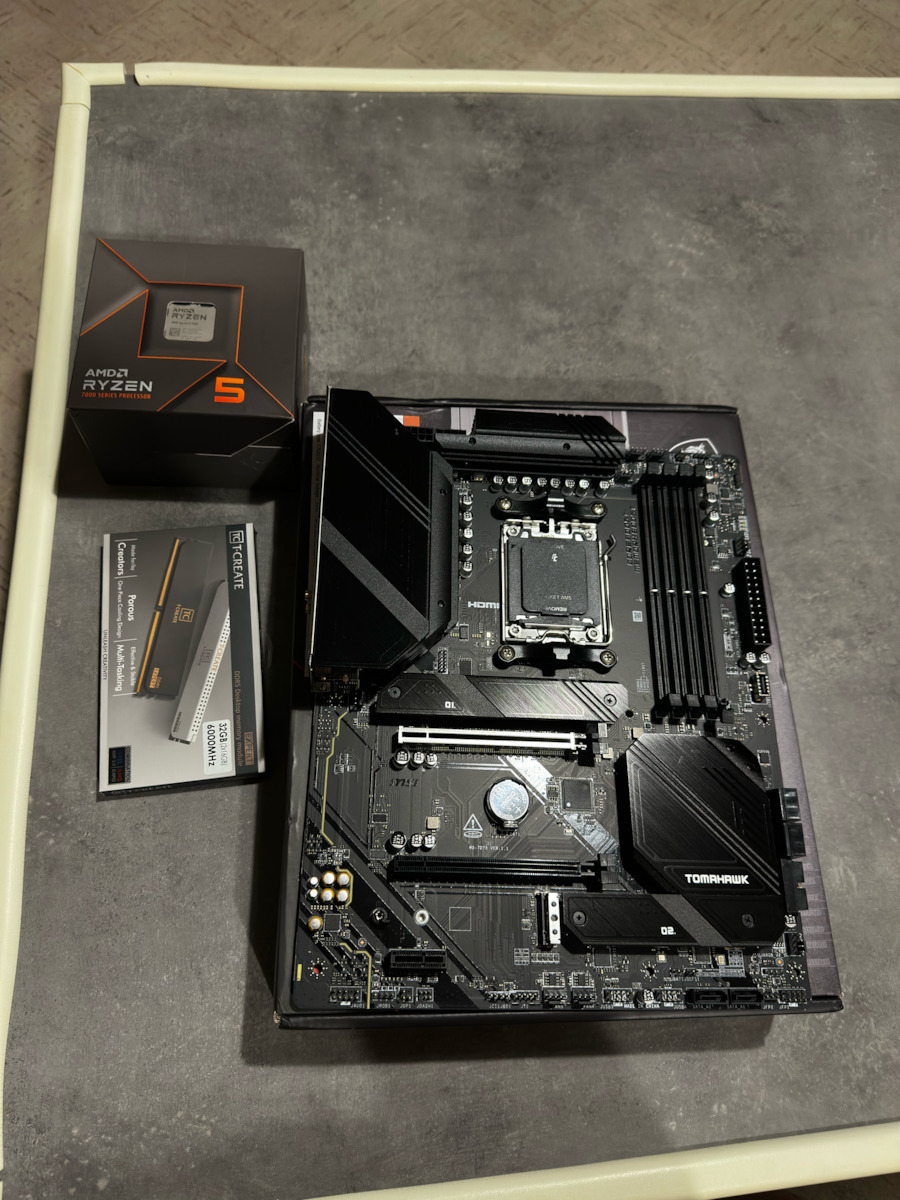
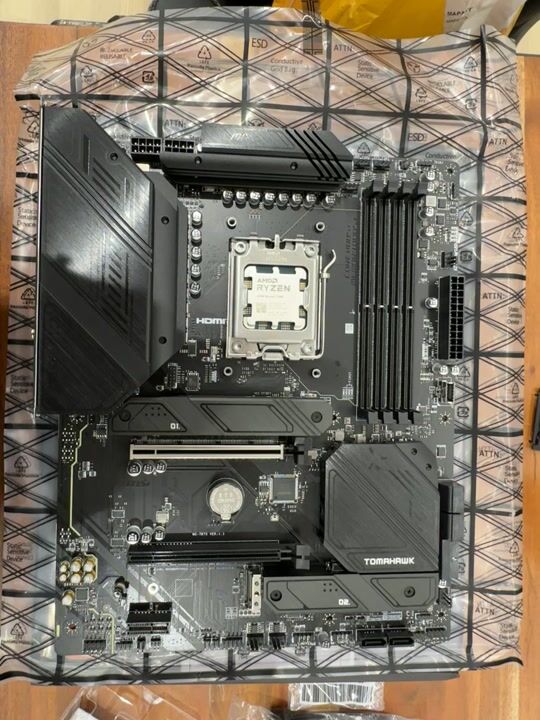
I have heard the best about this one. But unfortunately, as soon as I opened the product, I encountered these specific defects in the area where the processor fits.
I am contacting the store and Skroutz itself and I hope they proceed with a replacement.
1 month until all the components were gathered, the day of the build came and I see this.
Εχω ακουσει τα καλυτερα για την συγκεκριμενη. Αλλα δυστυχως με το που ανοιξα το προιον, αντικρησα τα συγκεκριμένα ελαττωματα στην περιοχή που μπαίνει ο επεξεργαστης.
Επικοινωνω με το κατάστημα και με το ιδιο το skroutz και ευχομαι να προχωρησουν σε αντικατασταση.
1 μηνα μεχρι να μαζευτουν ολα τα εξαρτηματα, ηρθε η μερα του build και βλεπω αυτο.
Another B650 motherboard that I tried. I got it mainly for its sound, which is amazing. I installed a 7700x, 32GB Trident CL 30, started with -30 all cores and what everyone generally does, Geekbench 6 2970-15573, Cinebench R23 20200, same as the others. I reset everything, XMP on, tightest memory, PBO Mode 4, I used the presets that the motherboard had, no timings, no minus here, plus there, 15 seconds with the presets of the motherboard. Cinebench R23 20600, Geekbench 6 3110-16835 and I thought I got the 9700x. Benchmark in games +12% with a prehistoric 6800 at 1080 low, 4-6% in ultra. Just speechless, you put in 7700 and you get 7800x3d! Whatever I say is little! The processor dropped 5 degrees in Cinebench and in 3D MARK it boosts to 5750 with 12 degrees lower! I leave a link https://www.3dmark.com/fs/32439174
P.S.: The memory context restore must be enabled after the settings are applied, otherwise it will keep training the memories. This way it will boot up lightning fast.
Update: If you put in 2 decent speakers or better, forget everything you've heard from integrated sound cards. The difference compared to what I've heard from about 200 motherboards that have passed through my hands is just chaos.
Update 2: I pushed it a bit further due to changing to a 7900xt card. Update BIOS, EXPO: Enable, Fclk 2133, mem 1.40.6400mh (1:1), Vsoc 1.25, Vddq 1.35, Vddio 1.35, PBO mode 4. Memory tighter (not tightest). Geekbench 3112-17320. In gaming, another 3-4%, especially in lows up to 10% additional fps. I leave links
https://www.3dmark.com/fs/32713818
https://www.3dmark.com/spy/52278706
In 2-3 minutes if you are completely inexperienced, you are done. The best motherboard you will find in this AMD generation, both in performance and in sound. With the latest BIOS, the memory context restore does not need to be enabled, it works perfectly on auto
Αλλη μια b650 μητρικη που δοκιμασα.Την πηρα βασικα για τον ηχο της που ειναι καταπληκτικος.Εβαλα εναν 7700x,32gb Trident cl 30,εβαλα για αρχη -30 all cores και οτι κανουν ολοι γενικα,geekbench6 2970-15573,cinebench r23 20200,μια απο τα ιδια με τις αλλες.Τα σβηνω ολα,XMP on,tighest memory,Pbo Mode 4,εβαλα δηλαδη τα ετοιμα που ειχε η μητρικη,ουτε timings,ουτε μειον εδω,συν εκει,15 δευτερα με τα ετοιματζιδικα της μητρικης.Cinebench r23 20600,Gerkbench 6 3110-16835 και νομιζα οτι πηρα τον 9700x.Benchmark σε games +12% με μια 6800 προιστορικη σε 1080 low,4-6% σε ultra.Αφωνος απλα,βαζεις 7700 και σου βγαινει 7800x3d!Οτι και να πω ειναι λιγο!Ο επεξεργαστης επεσε 5 βαθμους στο cinebench και στο 3D MARK μπουσταρει στα 5750 με 12 βαθμους κατω!Αφηνω link https://www.3dmark.com/fs/32439174
ΥΓ:Το memory context restore πρεπει να μπει enable αφου μπουν οι ρυθμισεις,αλλιως θα κανει συνεχως training τις μνημες.Ετσι θα μπουταρει αστραπιαια
Update:Αν βαλετε 2 μετρια και πανω ηχεια,ξεχαστε οτι εχετε ακουσει απο ενσωματωμενες καρτες ηχου.Η διαφορα με οτι εχω ακουσει απο καμμια 200αρια μητρικες που εχουν περασει απο τα χερια μου,απλα χαος
Update 2:Το προχωρησα λιγο παραπανω λογω αλλαγης σε 7900xt καρτας.Update Bios,EXPO: Enable,Fclk 2133,mem 1.40.6400mh(1:1),Vsoc 1.25,Vddq 1.35,Vddio 1.35,Pbo mode 4.Memory tighter(οχι tightest).Geebench 3112-17320.Σε gaming,αλλο ενα 3-4%, ιδιως στα lows εως και 10% επιπλεων fps.Αφηνω links
https://www.3dmark.com/fs/32713818
https://www.3dmark.com/spy/52278706
Σε 2-3 λεπτα αν εισαι τελειως ασχετος,εχεις τελειωσει.Οτι καλυτερο σε μητρικη θα βρειτε σε αυτη την γενια AMD,τοσο σε επιδωσεις οσο και σε ηχο.Με το τελευταιο bios δεν χρειαζεται το memory context restore να γινει enable,δουλευει αψογα στο auto
It is a good motherboard for what it offers. Of course, I can say that the slow boot time is unacceptable for how long they have had the AM5 release. For me personally, it consistently takes 2.5 minutes to get into Windows. Until I found this MEMORY CONTENT RESTORE. And I went down to 20 seconds (with Windows fast boot).
Ειναι καλη μητρικη για αυτα που προσφερει,Βεβαια εγω μπορω να πω οτι το slow boot time ειναι απαραδεκτο για τοσο καιρο που εχουν κανει release η AM5.Εμενα προσωπικα κανει σταθερα 2.5 λεπτα μεχρι να μπει στα windows.Μεχρι που βρηκα αυτο το ΜEMORY CONTENT RESTORE.Και πηγα στα 20 δευτερολεπτα(Με fast boot των WINDOWS).
2 months after the purchase, it doesn't post. The EZ debug LEDs are stuck on red and yellow. I tried to flash the BIOS after removing all the components (VGA, memory kits, CPU, battery for CMOS reset) with the PC off and having inserted the USB stick with the BIOS update .ROM file, pressing the flash key, the PC powers on with the flash BIOS LED blinking infinitely for hours without updating. Be careful because the product has no service in Greece. The store did not perform a fault check on the product but sent it to Germany, and they tell me that the process will take more than a month (working days :( I have been without a PC since the end of July on my old 10-year-old laptop, I have the 7800x3d sitting idle, and something tells me that the process will take at least another 2 months.
2 μήνες μετά την αγορά Δεν κάνει post. EZ debug Leds είναι κολλημένα στο κόκκινο και κίτρινο. Δοκίμασα να κάνω Flash bios έχοντας αφαιρέσει όλα τα components (vga,mem kits,cpu, battery for cmos reset,) με κλειστο το Pc και έχοντας βάλει το usb stick με το bios update .Rom file πατώντας το flash key το pc κάνει power on με το flash bios led να κάνει infinite blinking για ώρες χωρίς να κάνει update.
Προσοχή γιατί το προιόν δεν έχει Σέρβις στην Ελλάδα.
Από το κατάστημα δεν κάναν έλενχο βλάβης στο προιόν αλλά το στέιλανε Γερμανία και η διαδικασία μου λένε ότι θα πάρει πάνω από 1 μήνα (εργάσιμες μέρες :(
Είμαι ίδη από τέλη Ιουλίου χώρίς PC στο πάλιό μου λάπτοπ 10ετίας, έχω τον 7800x3d να κάθεται και κάτι μου λέει ότι η διαδικασία θα τραβήξει τουλαχιστο κάνα 2μηνο.
A great motherboard, guys, with loaded VRMs and coolers that can easily handle the 7590X3D, combined with the 7800X3D and G Skill Tridentz 6000CL30 32GB, and boots up in 20 seconds.
Μια χαρά μητρική είναι παιδιά με φορτωμένα vrm και ψυχτρες που άνετα θα σηκώσουν 7590Χ3D, συνδυάστηκε με 7800Χ3D and G Skill tridentz 6000CL30 32GB και μπουταρει σε 20 δευτερόλεπτα.
Very stable motherboard. MSI has made huge progress with this series. From the beginning, I was looking for the X series chipset, but after researching and reading many forums, it wasn't for me because it involves tweaking the settings and voltage of the processor, something I never want to deal with. So I highly recommend the B chipset and this motherboard. Incredibly easy BIOS, many useful instructional videos from MSI's official website. Stable temperatures and no issues after 2.5 months of use. It has been paired with Radeon 7900xtx and Ryzen 7 7800x3D. Perfect harmony!
Πολύ σταθερή μητρική. Η MSI έκανε τεράστια πρόοδο με αυτή τη σειρά. Εξ αρχής έψαχνα της σειράς chipset X αλλά μετά από ψάξιμο και πολλά Φόρουμ δεν ήταν για μένα γιατί είναι επιπέδου να πειράζεις πολύ τις ρυθμίσεις και την τάση του επεξεργαστή πράγμα που δεν θέλω να ασχοληθώ ποτέ. Οπότε ανεπιφύλακτα προτείνω το chipset B και αυτήν εδώ την μητρική. Απίστευτα εύκολα bios πολλά χρήσιμα βιντεάκια με οδηγίες από το ίδιο επίσημο site της MSI. Σταθερές θερμοκρασίες και κανένα πρόβλημα μετά από 2.5 μήνες χρήσης. Έχει συνδυαστεί με Radeon 7900xtx και Ryzen 7 7800x3D. Πλήρη αρμονία!
Perfect motherboard for the money and it has many USB 3.0 + USB 2.0 ports and it has two antennas for wifi inside the box, very satisfying and quality, it's simply perfect.
Note: I bought it from another account that's why it says I haven't purchased it.
Τέλεια μητρική για τα λεφτά της και έχει πολλές usb 3.0 + usb 2.0 θύρες και έχει δυο κεραίες για wifi μεσα στο κουτι παρά πολύ ικανοποιητική και ποιοτικη είναι απλώς τέλεια.
Σημιωση:Την αγορασα απο αλλον λογαργιασμο γι' αυτο λεει οτι δεν την εχω αγορασει.
One of the best motherboards for the money if not the best, it has everything you need (usb flash back bios, optical). It is perfect for o/c, just be careful with the bios settings.
Μια από τις καλύτερες μητρικές στα λεφτά της αν όχι η καλύτερη , έχει όλα όσα χρειάζεσαι (usb flash back bios, οπτική ). Είναι ότι πρέπει και για o/c , λίγο προσοχή στις ρυθμίσεις του bios θέλει.
I have had this motherboard for about 2-3 months. An excellent motherboard from MSI once again. The truth is that this particular series of motherboards (Tomahawk) has not disappointed over the years and certainly not now! Setting up the computer around the motherboard was very easy, as it had plenty of ports for all needs and I believe all the necessary features one would need. As for connectivity, everything was very simple, from the assembly to the BIOS where I easily found everything I needed for overclocking (XMP, Frequency control, Voltage, etc). It also has very good temperatures on the VRM, Chipset, and MOSFET (about 40 degrees Celsius), which is evident from the cooling it has on top... An excellent, reliable, and cool motherboard, with all the necessary features of today. I also recommend the software that accompanies it, as it helps with troubleshooting and monitoring in general. I believe it has a good price for the B650 in general and it is worth getting for everything it offers. This is my evaluation so far. If anything changes, I will update.
Την μητρική την έχω περίπου 2-3 μήνες. Μια εξαιρετική μητρική από την MSI για άλλη μια φορά. Η αλήθεια είναι ότι η συγκεκριμένη σειρά μητρικών (Tomahawk) δεν έχει απογοητεύσει ανα τα χρόνια και ούτε και τώρα βέβαια! Το στήσιμο του υπολογιστή γύρω από την μητρική ήταν πανεύκολο, διότι είχε πληθώρα θύρων για όλες τις ανάγκες και πιστεύω όλα τα απαραίτητα χαρακτηριστικά που θα χρειαστεί κανείς. Όσον αφορά την συνδεσιμότητα, όλα ήταν πολύ απλά, από την σύνθεση, μέχρι και το bios όπου βρήκα πανεύκολα ότι χρειάστηκα για Overclock (XMP, Frequency control, Voltage κλπ). Επίσης, έχει πολύ καλές θερμοκρασίες στα VRM, Chipset και MOSFET (περίπου 40 βαθμούς Κελσίου), κάτι το οποίο φαίνεται και από την ψύξη που έχει πάνω... Εξαιρετική μητρική, αξιόπιστη και κρύα, με όλα τα απαραίτητα χαρακτηριστικά του σήμερα. Επίσης, προτείνω τα λογισμικά που την συνοδεύουν, καθώς βοηθάνε με το troubleshooting και monitoring γενικά. Πιστεύω έχει καλή τιμή για το B650 γενικά και αξίζει να την πάρετε για όλα όσα προσφέρει. Αύτη είναι η αξιολόγηση μου μέχρι στιγμής. Αν αλλάξει κάτι θα ενημερώσω.
It is a very good motherboard for its price (at the standard prices of AM5 motherboards) and I have not encountered any issues anywhere. The MSI Click BIOS is very good, you just need to get used to the slightly different UI from ASUS BIOS and generally that style. I have paired it with a Ryzen 7 7800X3D and a CL30 32GB RAM kit from G.Skill Trident Z5 Neo without any issues. It also has 10 USB ports, so you can connect as many peripherals as you want.
The only thing I couldn't stand is the MSI Center (MSI's Armory Crate). It is slow, very basic, poorly organized without reason, and only has 3 tabs for management, offering minimal customization options. There is no way to sync RGB from fans with a Corsair HUB, nor other devices like Razer mouse, HyperX keyboard, etc. And of course, there is no program to create Custom Layouts for RGB like Asus' Aura Creator.
For those who get this motherboard, I recommend downloading SignalRGB and Fan Control instead of the MSI Center. These are two applications, one for RGB management and the other for managing all fans, and they work perfectly with this motherboard. SignalRGB recognizes everything, from RAM, Corsair HUB, to Razer mouse and HyperX keyboard. While SignalRGB is running, Corsair processes and the MSI Center won't work properly, so for fan management, I will refer you to Fan Control.
Fan Control is a reliable application where you can create your own curves for case fans and CPU fans or set a constant speed.
**Update after a few days. It has some minor issues which I won't call deal-breakers, but I will inform you to keep them in mind. I happened to change the cooler, so I removed the CPU to clean it from the paste better. Then I repositioned it, but the PC wouldn't post at all (it wouldn't boot to BIOS). Fortunately, removing and repositioning the CMOS battery fixed it, but the first 2 boots worried me again, as it got stuck once in memory training (orange light on the motherboard) and once in the combination of red with orange light. We're talking about times over 10 minutes. The simple memory training with memory context restore closed or on auto usually lasts 30 to 60 seconds with the 32GB RAM I have (the first memory training takes longer but what matters is how long it will last from there on).
I don't want to blame this particular motherboard, it may be something more common that other motherboards experience with all that's going on with the AM5 platform, but I wanted to share it.
Ειναι μια παρα πολυ καλη μητρικη για τα χρηματα της (στο στανταρ τιμων των AM5 motherboard) και δεν εχω αντιμετωπισει πουθενα προβλημα. Το Click BIOS της MSI ειναι πολυ καλο, αρκει να συνηθησεις λιγο το διαφορετικο UI απο το BIOS της ASUS και γενικα εκεινου του στυλ. Την εχω συνδιασει με εναν Ryzen 7 7800X3D και με CL30 32GB RAM kit της G.Skill Trident Z5 Neo χωρις κανενα θεμα.
Επισης, εχει 10 θυρες USB, οποτε συνδεεις οσα peripherals θελεις.
Το μονο πραγμα που δεν μπορουσα να αντεξω ειναι το MSI Center (Το Armory Crate της MSI). Ειναι αργο, πολυ basic, χωρις λογο κακως οργανομενο ενω εχει μονο 3 σελιδες (tabs) για διαχειρηση, και σου προσφερει ελαχιστες επιλογες για customization. Δεν υπαρχει τροπος να κανεις sync τα RGB απο ανεμιστηρακια με HUB της Corsair, ουτε και αλλες συσκευες οπως Razer ποντικι, HyperX πληκτρολογιο κτλ. Και φυσικα και δεν υπαρχει προγραμμα για να φτιαξεις Custom Layouts για RGB οπως εχει η Asus το Aura Creator.
Οσοι παρετε αυτο το motherboard, σας συνιστω να κατεβασετε το SignalRGB και το Fan Control αντι για το MSI Center. Ειναι δυο εφαρμογες, η μια για διαχειρηση των RGB και η αλλη για διαχειριση απο ΟΛΑ τα ανεμιστηρακια, και με τη motherboard αυτη λειτουργουν ολα ΤΕΛΕΙΑ. Τα αναγνωριζει ολα το SignalRGB, απο RAM, Corsair HUB, μεχρι και το Razer ποντικι και το πληκτρολογιο HyperX.
Οσο τρεχει το SignalRGB, τα processes της Corsair, το MSI Center δε θα λειτουργουν καλα, οποτε για διαχειριση απο τα ανεμιστηρακια θα σας παραπέμψω στο Fan Control.
Το Fan Control ειναι μια αξιοπιστη εφαρμογη στην οποια μπορεις να φτιαξεις δικα σου curves για τα φανακια της θηκης και της CPU ή να ορισεις μια σταθερη ταχυτητα.
**Update μετά απο λίγες μέρες. Έχει καποια μικρο-θεματάκια τα οποία ΔΕ θα τα πω deal-breakers, αλλά θα ενημερώσω για να τα έχετε στον νου σας.
Ετυχε να αλλαξω ψυκτρα, οποτε εβγαλα και τη CPU για να τη καθαρισω απο τη παστα καλυτερα. Υστερα την ξανατοποθετησα πισω, αλλα το PC δε εκανε με τιποτα post (δεν bootαρε ουτε στη BIOS). Με την αφαιρεση και ξανατοποθετηση της CMOS μπαταριας εστρωσε ευτυχως, αλλα τα πρωτα 2 boot με προβληματισαν και παλι, καθως ειχε κολλησει μια φορα στο memory training (πορτοκαλι φωτακι στο motherboard) και μια φορα στο συνδιασμο κοκκινο με πορτοκαλι φωτακι. Μιλαμε για χρονους ανω των 10 λεπτων. Το απλο memory training με το memory context restore κλειστο ή στο auto, συνηθως διαρκει στα 30 με 60 δευτερολεπτα με τη 32GB RAM που εχω (το πρωτο memory training αργει παραπανω αλλα μας νοιαζει απο κει και περα ποσο θα διαρκει).
Δε θελω να κατηγωρισω τη συγκεκριμενη Motherboard, μπορει να ειναι κατι πιο συχνο που να παθαινουν κι αλλες μητρικες με ολα αυτα που γινονται με την ΑΜ5 πλατφορμα, αλλα ηθελα να το μοιραστω.
Strong motherboard but MSI's software for controlling fans, temperatures, etc. is inadequate, so you will need to look for another program (e.g. Fan Control)
Δυνατη μητρικη αλλα το software της MSI για έλεγχο fans, θερμοκρασιων, κτλπ, είναι ελλιπες οποτε θα πρεπει να δειτε καποιο αλλο προγραμμα (πχ. Fan Control)
Very high-quality moba with many ports as you can see in the video, easy bios with a wide variety of settings and very good WiFi connection... I highly recommend it
Πολύ ποιοτική moba με πολλές θύρες θύρες οπως θα δείτε και στο βίντεο, εύκολο bios με μεγάλη ποικιλία σε ρυθμίσεις και πολύ καλή σύνδεση με το WiFi… την συνιστώ ανεπιφύλακτα
It has been installed in a Deepcool ck560 case with an Amd Ryzen 7 7700X and Kingston Fury Beast 32gb memory at 5600ghz without any issues with the initial bios.
Έχει μπει σε κουτί Deepcool ck560 με ένα Amd Ryzen 7 7700X και μνήμες Kingston Fury Beast 32gb στα 5600ghz χωρίς κανένα πρόβλημα με το αρχικό bios .
Expensive motherboard for its category but no complaints other than that. Did not need any BIOS updates, read Western Digital SN850 M.2 for a new Windows 11 installation and Corsair Vengeance 5600 C36 XMP, and posted on the first try. Running a 7700X in eco mode and gaming, so the temperatures are very low to judge the VRM heatsink.
Ακριβή μητρική για την κατηγορία της αλλά κανένα παράπονο πέρα απ'αυτό. Bios δεν χρειάστηκε κανένα update, διάβασε western digital sn850 m2 για νέα εγκατάσταση windows 11 κ Corsair vengeance 5600 c36 xmp κ έκανε post με την πρώτη προσπάθεια. Τρέχω 7700x σε eco mode κ gaming έτσι οι θερμοκρασίες είναι πολύ χαμηλές για να κρίνω VRM heatsink.
***If you plan to use it with a Ryzen 7 9XXX, it is very likely that you will need to update the BIOS, otherwise it won't boot because it doesn't recognize the processor.***
My personal experience was as follows:
With a 9800x3d processor, it didn't boot at all, not even a signal to the monitor. On the motherboard, the CPU LED was red and the RAM LED was orange.
After some research, I concluded that the motherboard BIOS needs to be updated to support the processor.
Fortunately, the motherboard has a flashback function for the update, which does not require either the CPU or the RAM.
There is information and guides online for the flashback, but generally, the process is as follows:
Download the latest BIOS from the MSI website, extract the correct file, rename it to MSI.ROM, and put it on an empty USB stick formatted in FAT32.
Now, on the motherboard, you don't need to connect anything else except the 24-pin from the power supply and one of the two 8-pins at the top left.
With the power supply switch on but without starting the system, insert the stick into the USB port labeled flashback and press the button above the ports labeled flashback for 3 seconds. A white LED will start blinking, indicating that the update has started and will continue for 5-10 minutes until it is completed. When the update is finished, the PC will turn off by itself.
After that, you can reconnect everything and it will work perfectly.
***Αν σκοπεύετε να την χρησιμοποιήσετε με Ryzen 7 9XXX είναι πολύ πιθανό να χρειαστεί update το bios , διαφορετικά δεν κάνει boot γιατί δεν αναγνωρίζει τον επεξεργαστή.***
Η προσωπική μου εμπειρία ήταν η εξής:
Με επεξεργαστή 9800x3d δεν έκανε καθόλου boot, ούτε σήμα στην οθόνη. Στην μητρική άναβε κόκκινο το led της CPU και πορτοκαλί το led της RAM.
Με λίγο ψάξιμο κατέληξα στο ότι πρέπει να γίνει update το bios της μητρικής για να υποστηρίξει τον επεξεργαστή.
Ευτυχώς η μητρική διαθέτει την λειτουργία flashback για το update , με την οποία δεν χρειάζεται ούτε η cpu ούτε η ram.
Υπάρχουν πληροφορίες και guides online για το flashback αλλά σε γενικές γραμμές η διαδικασία είναι η εξής:
Κατεβάζετε το τελευταίο bios από το site της MSI , εξαγετε το σωστό αρχείο, το κάνετε μετονομασία σε MSI.ROM και το περνάτε σε ένα άδειο usb stick το οποίο είναι διαμορφωμένο σε fat32.
Τώρα στην μητρική δεν χρειάζεται να συνδέσετε τίποτα άλλο παρά μόνο το 24pin από το τροφοδοτικό όπως επίσης και ένα από τα δύο 8pin πάνω αριστερά.
Με τον διακόπτη του τροφοδοτικού στο on αλλά χωρίς να εκκινησετε το σύστημα, βάζετε το stick στην θύρα usb που γράφει flashback και πατάτε για 3 δευτερόλεπτα το κουμπί πάνω από τις θύρες που γράφει flashback. Θα ξεκινήσει να αναβοσβηνει ένα λευκό led που σημαίνει ότι ξεκίνησε το update και θα συνεχίσει για 5-10 λεπτά μέχρι να ολοκληρωθεί. Όταν ολοκληρωθεί το update το PC θα σβήσει μόνο του.
Μετά μπορείτε να τα συνδέσετε ξανά όλα και θα δουλεύουν ρολόι.
Many USB ports, 2 years without shutting down the PC (only a few restarts for Windows updates) and I haven't had the slightest problem. Most importantly, it has BIOS flashback which saved it from a power outage when I was upgrading the BIOS, something that should be standard on all motherboards. And a little information about MSI motherboards: there are 3 quality categories Mag
Πολλές θύρες USB, 2 χρόνια δεν έχω κλείσει το PC (κανά restart για windows update μόνο) και δεν είχα το παραμικρό πρόβλημα. Και το σημαντικότερο, έχει BIOS flashback που την έσωσε απο διακόπη ρεύματος όταν έκανα αναβάθμιση στο BIOS, κάτι που θα έπρεπε να είναι στανταρ σε όλες τις μητρικές. Και μια μικρή πληροφορία για τις μητρικές της MSI: υπάρχουν 3 κατηγορίες ποιότητας Mag
I have heard the best about this one. But unfortunately, as soon as I opened the product, I encountered these specific defects in the area where the processor fits.
I am contacting the store and Skroutz itself and I hope they proceed with a replacement.
1 month until all the components were gathered, the day of the build came and I see this.
Εχω ακουσει τα καλυτερα για την συγκεκριμενη. Αλλα δυστυχως με το που ανοιξα το προιον, αντικρησα τα συγκεκριμένα ελαττωματα στην περιοχή που μπαίνει ο επεξεργαστης.
Επικοινωνω με το κατάστημα και με το ιδιο το skroutz και ευχομαι να προχωρησουν σε αντικατασταση.
1 μηνα μεχρι να μαζευτουν ολα τα εξαρτηματα, ηρθε η μερα του build και βλεπω αυτο.
Another B650 motherboard that I tried. I got it mainly for its sound, which is amazing. I installed a 7700x, 32GB Trident CL 30, started with -30 all cores and what everyone generally does, Geekbench 6 2970-15573, Cinebench R23 20200, same as the others. I reset everything, XMP on, tightest memory, PBO Mode 4, I used the presets that the motherboard had, no timings, no minus here, plus there, 15 seconds with the presets of the motherboard. Cinebench R23 20600, Geekbench 6 3110-16835 and I thought I got the 9700x. Benchmark in games +12% with a prehistoric 6800 at 1080 low, 4-6% in ultra. Just speechless, you put in 7700 and you get 7800x3d! Whatever I say is little! The processor dropped 5 degrees in Cinebench and in 3D MARK it boosts to 5750 with 12 degrees lower! I leave a link https://www.3dmark.com/fs/32439174
P.S.: The memory context restore must be enabled after the settings are applied, otherwise it will keep training the memories. This way it will boot up lightning fast.
Update: If you put in 2 decent speakers or better, forget everything you've heard from integrated sound cards. The difference compared to what I've heard from about 200 motherboards that have passed through my hands is just chaos.
Update 2: I pushed it a bit further due to changing to a 7900xt card. Update BIOS, EXPO: Enable, Fclk 2133, mem 1.40.6400mh (1:1), Vsoc 1.25, Vddq 1.35, Vddio 1.35, PBO mode 4. Memory tighter (not tightest). Geekbench 3112-17320. In gaming, another 3-4%, especially in lows up to 10% additional fps. I leave links
https://www.3dmark.com/fs/32713818
https://www.3dmark.com/spy/52278706
In 2-3 minutes if you are completely inexperienced, you are done. The best motherboard you will find in this AMD generation, both in performance and in sound. With the latest BIOS, the memory context restore does not need to be enabled, it works perfectly on auto
Αλλη μια b650 μητρικη που δοκιμασα.Την πηρα βασικα για τον ηχο της που ειναι καταπληκτικος.Εβαλα εναν 7700x,32gb Trident cl 30,εβαλα για αρχη -30 all cores και οτι κανουν ολοι γενικα,geekbench6 2970-15573,cinebench r23 20200,μια απο τα ιδια με τις αλλες.Τα σβηνω ολα,XMP on,tighest memory,Pbo Mode 4,εβαλα δηλαδη τα ετοιμα που ειχε η μητρικη,ουτε timings,ουτε μειον εδω,συν εκει,15 δευτερα με τα ετοιματζιδικα της μητρικης.Cinebench r23 20600,Gerkbench 6 3110-16835 και νομιζα οτι πηρα τον 9700x.Benchmark σε games +12% με μια 6800 προιστορικη σε 1080 low,4-6% σε ultra.Αφωνος απλα,βαζεις 7700 και σου βγαινει 7800x3d!Οτι και να πω ειναι λιγο!Ο επεξεργαστης επεσε 5 βαθμους στο cinebench και στο 3D MARK μπουσταρει στα 5750 με 12 βαθμους κατω!Αφηνω link https://www.3dmark.com/fs/32439174
ΥΓ:Το memory context restore πρεπει να μπει enable αφου μπουν οι ρυθμισεις,αλλιως θα κανει συνεχως training τις μνημες.Ετσι θα μπουταρει αστραπιαια
Update:Αν βαλετε 2 μετρια και πανω ηχεια,ξεχαστε οτι εχετε ακουσει απο ενσωματωμενες καρτες ηχου.Η διαφορα με οτι εχω ακουσει απο καμμια 200αρια μητρικες που εχουν περασει απο τα χερια μου,απλα χαος
Update 2:Το προχωρησα λιγο παραπανω λογω αλλαγης σε 7900xt καρτας.Update Bios,EXPO: Enable,Fclk 2133,mem 1.40.6400mh(1:1),Vsoc 1.25,Vddq 1.35,Vddio 1.35,Pbo mode 4.Memory tighter(οχι tightest).Geebench 3112-17320.Σε gaming,αλλο ενα 3-4%, ιδιως στα lows εως και 10% επιπλεων fps.Αφηνω links
https://www.3dmark.com/fs/32713818
https://www.3dmark.com/spy/52278706
Σε 2-3 λεπτα αν εισαι τελειως ασχετος,εχεις τελειωσει.Οτι καλυτερο σε μητρικη θα βρειτε σε αυτη την γενια AMD,τοσο σε επιδωσεις οσο και σε ηχο.Με το τελευταιο bios δεν χρειαζεται το memory context restore να γινει enable,δουλευει αψογα στο auto
It is a good motherboard for what it offers. Of course, I can say that the slow boot time is unacceptable for how long they have had the AM5 release. For me personally, it consistently takes 2.5 minutes to get into Windows. Until I found this MEMORY CONTENT RESTORE. And I went down to 20 seconds (with Windows fast boot).
Ειναι καλη μητρικη για αυτα που προσφερει,Βεβαια εγω μπορω να πω οτι το slow boot time ειναι απαραδεκτο για τοσο καιρο που εχουν κανει release η AM5.Εμενα προσωπικα κανει σταθερα 2.5 λεπτα μεχρι να μπει στα windows.Μεχρι που βρηκα αυτο το ΜEMORY CONTENT RESTORE.Και πηγα στα 20 δευτερολεπτα(Με fast boot των WINDOWS).
Καλημέρα με ενδιαφέρει αυτή η μητρική όμως βλέπω και εδώ και στο YouTube πως υπάρχουν θέματα με το bios και τις ram.το ίδιο συμβαίνει και σε άλλα μοντέλα της msi. Όποιος την έχει και γνωρίζει κάτι σχετικά με τα παραπάνω ας με διαφωτίσει. Ευχαριστώ
Εχω τη συγκεκριμένη Μητρική εδώ και 8 μήνες το μόνο αρνητικό. Είναι το γεγονός ότι αργεί να bootarei.Του παίρνει 2 και κάτι λεπτά να μου μπει στα windows.Αυτο λογικά οφείλεται στο memory training και το overclocking της ram(xmp profile).Γενικά όμως μετά το boot τρέχει ομαλά σε όλα.Για άλλες mobo της msi δε γνωρίζω,γιατί αυτή είναι η πρώτη που αγόρασα από μητρικές.
Specifications are collected from official manufacturer websites. Please verify the specifications before proceeding with your final purchase. If you notice any problem you can report it here.
Description
The MSI Mag B650 Tomahawk Wi-Fi motherboard is aimed at users who wish to build a powerful desktop system based on AMD Ryzen 7000 Series processors. The motherboard supports the AM5 socket. It has an ATX size, offering more expansion and connectivity options.
The MSI Mag B650 Tomahawk Wi-Fi offers many features that are attractive to gamers and users who require high performance and reliability. It includes support for PCIe 4.0 for fast data transfer speeds, advanced cooling systems for reliable system operation, built-in Wi-Fi 6E for wireless connectivity, as well as numerous USB, SATA, and M.2 ports for flexible storage and connectivity.
Supports AMD Ryzen 7000 Series desktop processors
Supports DDR5 memory, up to 6600+(OC) MHz
High-quality thermal solution: The extended heatsink design and M.2 Shield Frozr are built for high-performance systems and uninterrupted work
2.5G LAN and AMD Wi-Fi 6E solution: Upgraded network solution for professional and multimedia use. Provides secure, stable, and fast network connection
Lightning M.2: Running at PCIe Gen 4 maximizes performance for NVMe-based SSDs
Lightning USB 20G: Built-in USB 3.2 Gen 2x2 port, offers 20Gbps transfer speed, 4 times faster than USB 3.2 Gen 1
AUDIO BOOST 5: Reward your ears with studio-grade sound quality for the most immersive gaming experience
The ultimate processor for gaming
When your computer has the most advanced processor for gamers, you can focus on what really matters: winning on the digital battlefield. Whether you are playing the latest titles or revisiting a classic one, AMD Ryzen 7000 Series processors are a powerhouse for gaming with high-performance "Zen 4" cores. With up to 16 cores, 32 threads, boost clocks of up to 5.7 GHz2, and up to 144 MB of on-chip memory, AMD Ryzen 7000 Series processors deliver game-changing performance.
Fan Control
MSI motherboards allow you to manage the speeds and temperatures of all system and CPU fans. Total Fan Control lets you control your system's main features in a simplified graphical interface. You can also set up to 4 temperature targets for the CPU and motherboard, which will automatically adjust the fan speeds.
The extended heatsink enlarges the heat dissipation surface, ensuring that even high-spec processors will run at full speed.
M.2 Shield Frozr keeps M.2 SSDs safe while preventing throttling, making them run faster.
The VRM heatsink covers the upper MOS and helps in heat dissipation.
7W/mK Thermal Pad & additional Choke Pad, the high-quality 7W/mK MOSFET thermal pads and the additional choke thermal pads ensure that all cores operate with high efficiency.
Ready for water cooling
Designed to support the most popular All-In-One water cooling solutions and custom water cooling solutions on the market. A dedicated water pump PIN header supports up to 3 amps, giving you full control over the pump speed. A "protection zone" allows for easy and safe installation and perfect fitting.
Lightning GEN 4 PCI-E
The MSI Lightning Gen 4 PCI-E represents the bandwidth of an x16 interface at 64GB/s, which has doubled compared to the previous generation.
MSI's PCI Express Steel Armor slots are secured to the motherboard with additional solder points and support the weight of heavy graphics cards. When every advantage in gaming counts, Steel Armor shields the contact point from electromagnetic interference.
The MSI MPG series motherboards support all the latest storage standards, allowing users to connect any ultra-fast storage device. Start games faster, load levels quicker, and gain a real advantage over your enemies.
Lightning USB 3.2 Gen 2x2 20G
DDR5
A huge step in DDR performance improvement with the latest DDR5 memory. Combined with the special SMT soldering process and MSI Memory Boost technology, the MAG B650M MORTAR WIFI is ready to deliver world-class memory performance.
AMD EXPO
The AMD Extended Profiles for Overclocking technology (AMD EXPO Technology) was developed to enable user-friendly memory overclocking support for all types of memory, providing users with an easy path to power acceleration to achieve memory acceleration in their system.
Audio Boost 5
High-performance ALC4080 audio processor
High-quality audio capacitors
High-quality audio ports
Isolated audio signal
DE-POP protection
MSI's top network solution provides incredible data transfer speed for demanding users.
Wi-Fi 6E
Bluetooth 5.2
2.5G LAN
Click Bios 5
Get more from a BIOS designed for ease of use. Configure the motherboard in detail for gaming performance, efficiency, or world record overclocking!
MSI Center
The MSI Center integrates a suite of MSI software utilities into a single central application. Take control of the advanced features of the motherboard and unleash endless possibilities.
True Color
Optimized brightness and color of the screen in various modes for different situations, you can also adjust it yourself.
Mystic Light
Create your own colorful masterpiece with ease. Throw in any color you want with just a few clicks.
Expand the RGB experience with ease
Add more color if you want! The Mystic Light Extension header provides an intuitive way to control additional RGB strips and other RGB peripherals added to a system, without requiring a separate RGB controller.
User Scenario
With one click you can configure your computer, even customize your own profile according to your preferences.
Hardware Monitor
Get instant access to critical information about your computer in real time.
Profile Setting
Adjust selected motherboard settings in the Profile Setting menu, where options for enhancing core performance and optimizing system cooling are presented in an intuitive user interface.
Fan Center
Take full control of your fans with Total Fan Control. Set up to four CPU temperature targets and the motherboard will automatically adjust the fan speeds.
***If you plan to use it with a Ryzen 7 9XXX, it is very likely that you will need to update the BIOS, otherwise it won't boot because it doesn't recognize the processor.***
My personal experience was as follows:
With a 9800x3d processor, it didn't boot at all, not even a signal to the monitor. On the motherboard, the CPU LED was red and the RAM LED was orange.
After some research, I concluded that the motherboard BIOS needs to be updated to support the processor.
Fortunately, the motherboard has a flashback function for the update, which does not require either the CPU or the RAM.
There is information and guides online for the flashback, but generally, the process is as follows:
Download the latest BIOS from the MSI website, extract the correct file, rename it to MSI.ROM, and put it on an empty USB stick formatted in FAT32.
Now, on the motherboard, you don't need to connect anything else except the 24-pin from the power supply and one of the two 8-pins at the top left.
With the power supply switch on but without starting the system, insert the stick into the USB port labeled flashback and press the button above the ports labeled flashback for 3 seconds. A white LED will start blinking, indicating that the update has started and will continue for 5-10 minutes until it is completed. When the update is finished, the PC will turn off by itself.
After that, you can reconnect everything and it will work perfectly.
***Αν σκοπεύετε να την χρησιμοποιήσετε με Ryzen 7 9XXX είναι πολύ πιθανό να χρειαστεί update το bios , διαφορετικά δεν κάνει boot γιατί δεν αναγνωρίζει τον επεξεργαστή.***
Η προσωπική μου εμπειρία ήταν η εξής:
Με επεξεργαστή 9800x3d δεν έκανε καθόλου boot, ούτε σήμα στην οθόνη. Στην μητρική άναβε κόκκινο το led της CPU και πορτοκαλί το led της RAM.
Με λίγο ψάξιμο κατέληξα στο ότι πρέπει να γίνει update το bios της μητρικής για να υποστηρίξει τον επεξεργαστή.
Ευτυχώς η μητρική διαθέτει την λειτουργία flashback για το update , με την οποία δεν χρειάζεται ούτε η cpu ούτε η ram.
Υπάρχουν πληροφορίες και guides online για το flashback αλλά σε γενικές γραμμές η διαδικασία είναι η εξής:
Κατεβάζετε το τελευταίο bios από το site της MSI , εξαγετε το σωστό αρχείο, το κάνετε μετονομασία σε MSI.ROM και το περνάτε σε ένα άδειο usb stick το οποίο είναι διαμορφωμένο σε fat32.
Τώρα στην μητρική δεν χρειάζεται να συνδέσετε τίποτα άλλο παρά μόνο το 24pin από το τροφοδοτικό όπως επίσης και ένα από τα δύο 8pin πάνω αριστερά.
Με τον διακόπτη του τροφοδοτικού στο on αλλά χωρίς να εκκινησετε το σύστημα, βάζετε το stick στην θύρα usb που γράφει flashback και πατάτε για 3 δευτερόλεπτα το κουμπί πάνω από τις θύρες που γράφει flashback. Θα ξεκινήσει να αναβοσβηνει ένα λευκό led που σημαίνει ότι ξεκίνησε το update και θα συνεχίσει για 5-10 λεπτά μέχρι να ολοκληρωθεί. Όταν ολοκληρωθεί το update το PC θα σβήσει μόνο του.
Μετά μπορείτε να τα συνδέσετε ξανά όλα και θα δουλεύουν ρολόι.
Many USB ports, 2 years without shutting down the PC (only a few restarts for Windows updates) and I haven't had the slightest problem. Most importantly, it has BIOS flashback which saved it from a power outage when I was upgrading the BIOS, something that should be standard on all motherboards. And a little information about MSI motherboards: there are 3 quality categories Mag
Πολλές θύρες USB, 2 χρόνια δεν έχω κλείσει το PC (κανά restart για windows update μόνο) και δεν είχα το παραμικρό πρόβλημα. Και το σημαντικότερο, έχει BIOS flashback που την έσωσε απο διακόπη ρεύματος όταν έκανα αναβάθμιση στο BIOS, κάτι που θα έπρεπε να είναι στανταρ σε όλες τις μητρικές. Και μια μικρή πληροφορία για τις μητρικές της MSI: υπάρχουν 3 κατηγορίες ποιότητας Mag
I have heard the best about this one. But unfortunately, as soon as I opened the product, I encountered these specific defects in the area where the processor fits.
I am contacting the store and Skroutz itself and I hope they proceed with a replacement.
1 month until all the components were gathered, the day of the build came and I see this.
Εχω ακουσει τα καλυτερα για την συγκεκριμενη. Αλλα δυστυχως με το που ανοιξα το προιον, αντικρησα τα συγκεκριμένα ελαττωματα στην περιοχή που μπαίνει ο επεξεργαστης.
Επικοινωνω με το κατάστημα και με το ιδιο το skroutz και ευχομαι να προχωρησουν σε αντικατασταση.
1 μηνα μεχρι να μαζευτουν ολα τα εξαρτηματα, ηρθε η μερα του build και βλεπω αυτο.
Another B650 motherboard that I tried. I got it mainly for its sound, which is amazing. I installed a 7700x, 32GB Trident CL 30, started with -30 all cores and what everyone generally does, Geekbench 6 2970-15573, Cinebench R23 20200, same as the others. I reset everything, XMP on, tightest memory, PBO Mode 4, I used the presets that the motherboard had, no timings, no minus here, plus there, 15 seconds with the presets of the motherboard. Cinebench R23 20600, Geekbench 6 3110-16835 and I thought I got the 9700x. Benchmark in games +12% with a prehistoric 6800 at 1080 low, 4-6% in ultra. Just speechless, you put in 7700 and you get 7800x3d! Whatever I say is little! The processor dropped 5 degrees in Cinebench and in 3D MARK it boosts to 5750 with 12 degrees lower! I leave a link https://www.3dmark.com/fs/32439174
P.S.: The memory context restore must be enabled after the settings are applied, otherwise it will keep training the memories. This way it will boot up lightning fast.
Update: If you put in 2 decent speakers or better, forget everything you've heard from integrated sound cards. The difference compared to what I've heard from about 200 motherboards that have passed through my hands is just chaos.
Update 2: I pushed it a bit further due to changing to a 7900xt card. Update BIOS, EXPO: Enable, Fclk 2133, mem 1.40.6400mh (1:1), Vsoc 1.25, Vddq 1.35, Vddio 1.35, PBO mode 4. Memory tighter (not tightest). Geekbench 3112-17320. In gaming, another 3-4%, especially in lows up to 10% additional fps. I leave links
https://www.3dmark.com/fs/32713818
https://www.3dmark.com/spy/52278706
In 2-3 minutes if you are completely inexperienced, you are done. The best motherboard you will find in this AMD generation, both in performance and in sound. With the latest BIOS, the memory context restore does not need to be enabled, it works perfectly on auto
Αλλη μια b650 μητρικη που δοκιμασα.Την πηρα βασικα για τον ηχο της που ειναι καταπληκτικος.Εβαλα εναν 7700x,32gb Trident cl 30,εβαλα για αρχη -30 all cores και οτι κανουν ολοι γενικα,geekbench6 2970-15573,cinebench r23 20200,μια απο τα ιδια με τις αλλες.Τα σβηνω ολα,XMP on,tighest memory,Pbo Mode 4,εβαλα δηλαδη τα ετοιμα που ειχε η μητρικη,ουτε timings,ουτε μειον εδω,συν εκει,15 δευτερα με τα ετοιματζιδικα της μητρικης.Cinebench r23 20600,Gerkbench 6 3110-16835 και νομιζα οτι πηρα τον 9700x.Benchmark σε games +12% με μια 6800 προιστορικη σε 1080 low,4-6% σε ultra.Αφωνος απλα,βαζεις 7700 και σου βγαινει 7800x3d!Οτι και να πω ειναι λιγο!Ο επεξεργαστης επεσε 5 βαθμους στο cinebench και στο 3D MARK μπουσταρει στα 5750 με 12 βαθμους κατω!Αφηνω link https://www.3dmark.com/fs/32439174
ΥΓ:Το memory context restore πρεπει να μπει enable αφου μπουν οι ρυθμισεις,αλλιως θα κανει συνεχως training τις μνημες.Ετσι θα μπουταρει αστραπιαια
Update:Αν βαλετε 2 μετρια και πανω ηχεια,ξεχαστε οτι εχετε ακουσει απο ενσωματωμενες καρτες ηχου.Η διαφορα με οτι εχω ακουσει απο καμμια 200αρια μητρικες που εχουν περασει απο τα χερια μου,απλα χαος
Update 2:Το προχωρησα λιγο παραπανω λογω αλλαγης σε 7900xt καρτας.Update Bios,EXPO: Enable,Fclk 2133,mem 1.40.6400mh(1:1),Vsoc 1.25,Vddq 1.35,Vddio 1.35,Pbo mode 4.Memory tighter(οχι tightest).Geebench 3112-17320.Σε gaming,αλλο ενα 3-4%, ιδιως στα lows εως και 10% επιπλεων fps.Αφηνω links
https://www.3dmark.com/fs/32713818
https://www.3dmark.com/spy/52278706
Σε 2-3 λεπτα αν εισαι τελειως ασχετος,εχεις τελειωσει.Οτι καλυτερο σε μητρικη θα βρειτε σε αυτη την γενια AMD,τοσο σε επιδωσεις οσο και σε ηχο.Με το τελευταιο bios δεν χρειαζεται το memory context restore να γινει enable,δουλευει αψογα στο auto
It is a good motherboard for what it offers. Of course, I can say that the slow boot time is unacceptable for how long they have had the AM5 release. For me personally, it consistently takes 2.5 minutes to get into Windows. Until I found this MEMORY CONTENT RESTORE. And I went down to 20 seconds (with Windows fast boot).
Ειναι καλη μητρικη για αυτα που προσφερει,Βεβαια εγω μπορω να πω οτι το slow boot time ειναι απαραδεκτο για τοσο καιρο που εχουν κανει release η AM5.Εμενα προσωπικα κανει σταθερα 2.5 λεπτα μεχρι να μπει στα windows.Μεχρι που βρηκα αυτο το ΜEMORY CONTENT RESTORE.Και πηγα στα 20 δευτερολεπτα(Με fast boot των WINDOWS).
2 months after the purchase, it doesn't post. The EZ debug LEDs are stuck on red and yellow. I tried to flash the BIOS after removing all the components (VGA, memory kits, CPU, battery for CMOS reset) with the PC off and having inserted the USB stick with the BIOS update .ROM file, pressing the flash key, the PC powers on with the flash BIOS LED blinking infinitely for hours without updating. Be careful because the product has no service in Greece. The store did not perform a fault check on the product but sent it to Germany, and they tell me that the process will take more than a month (working days :( I have been without a PC since the end of July on my old 10-year-old laptop, I have the 7800x3d sitting idle, and something tells me that the process will take at least another 2 months.
2 μήνες μετά την αγορά Δεν κάνει post. EZ debug Leds είναι κολλημένα στο κόκκινο και κίτρινο. Δοκίμασα να κάνω Flash bios έχοντας αφαιρέσει όλα τα components (vga,mem kits,cpu, battery for cmos reset,) με κλειστο το Pc και έχοντας βάλει το usb stick με το bios update .Rom file πατώντας το flash key το pc κάνει power on με το flash bios led να κάνει infinite blinking για ώρες χωρίς να κάνει update.
Προσοχή γιατί το προιόν δεν έχει Σέρβις στην Ελλάδα.
Από το κατάστημα δεν κάναν έλενχο βλάβης στο προιόν αλλά το στέιλανε Γερμανία και η διαδικασία μου λένε ότι θα πάρει πάνω από 1 μήνα (εργάσιμες μέρες :(
Είμαι ίδη από τέλη Ιουλίου χώρίς PC στο πάλιό μου λάπτοπ 10ετίας, έχω τον 7800x3d να κάθεται και κάτι μου λέει ότι η διαδικασία θα τραβήξει τουλαχιστο κάνα 2μηνο.
A great motherboard, guys, with loaded VRMs and coolers that can easily handle the 7590X3D, combined with the 7800X3D and G Skill Tridentz 6000CL30 32GB, and boots up in 20 seconds.
Μια χαρά μητρική είναι παιδιά με φορτωμένα vrm και ψυχτρες που άνετα θα σηκώσουν 7590Χ3D, συνδυάστηκε με 7800Χ3D and G Skill tridentz 6000CL30 32GB και μπουταρει σε 20 δευτερόλεπτα.
Very stable motherboard. MSI has made huge progress with this series. From the beginning, I was looking for the X series chipset, but after researching and reading many forums, it wasn't for me because it involves tweaking the settings and voltage of the processor, something I never want to deal with. So I highly recommend the B chipset and this motherboard. Incredibly easy BIOS, many useful instructional videos from MSI's official website. Stable temperatures and no issues after 2.5 months of use. It has been paired with Radeon 7900xtx and Ryzen 7 7800x3D. Perfect harmony!
Πολύ σταθερή μητρική. Η MSI έκανε τεράστια πρόοδο με αυτή τη σειρά. Εξ αρχής έψαχνα της σειράς chipset X αλλά μετά από ψάξιμο και πολλά Φόρουμ δεν ήταν για μένα γιατί είναι επιπέδου να πειράζεις πολύ τις ρυθμίσεις και την τάση του επεξεργαστή πράγμα που δεν θέλω να ασχοληθώ ποτέ. Οπότε ανεπιφύλακτα προτείνω το chipset B και αυτήν εδώ την μητρική. Απίστευτα εύκολα bios πολλά χρήσιμα βιντεάκια με οδηγίες από το ίδιο επίσημο site της MSI. Σταθερές θερμοκρασίες και κανένα πρόβλημα μετά από 2.5 μήνες χρήσης. Έχει συνδυαστεί με Radeon 7900xtx και Ryzen 7 7800x3D. Πλήρη αρμονία!
Perfect motherboard for the money and it has many USB 3.0 + USB 2.0 ports and it has two antennas for wifi inside the box, very satisfying and quality, it's simply perfect.
Note: I bought it from another account that's why it says I haven't purchased it.
Τέλεια μητρική για τα λεφτά της και έχει πολλές usb 3.0 + usb 2.0 θύρες και έχει δυο κεραίες για wifi μεσα στο κουτι παρά πολύ ικανοποιητική και ποιοτικη είναι απλώς τέλεια.
Σημιωση:Την αγορασα απο αλλον λογαργιασμο γι' αυτο λεει οτι δεν την εχω αγορασει.
One of the best motherboards for the money if not the best, it has everything you need (usb flash back bios, optical). It is perfect for o/c, just be careful with the bios settings.
Μια από τις καλύτερες μητρικές στα λεφτά της αν όχι η καλύτερη , έχει όλα όσα χρειάζεσαι (usb flash back bios, οπτική ). Είναι ότι πρέπει και για o/c , λίγο προσοχή στις ρυθμίσεις του bios θέλει.
I have had this motherboard for about 2-3 months. An excellent motherboard from MSI once again. The truth is that this particular series of motherboards (Tomahawk) has not disappointed over the years and certainly not now! Setting up the computer around the motherboard was very easy, as it had plenty of ports for all needs and I believe all the necessary features one would need. As for connectivity, everything was very simple, from the assembly to the BIOS where I easily found everything I needed for overclocking (XMP, Frequency control, Voltage, etc). It also has very good temperatures on the VRM, Chipset, and MOSFET (about 40 degrees Celsius), which is evident from the cooling it has on top... An excellent, reliable, and cool motherboard, with all the necessary features of today. I also recommend the software that accompanies it, as it helps with troubleshooting and monitoring in general. I believe it has a good price for the B650 in general and it is worth getting for everything it offers. This is my evaluation so far. If anything changes, I will update.
Την μητρική την έχω περίπου 2-3 μήνες. Μια εξαιρετική μητρική από την MSI για άλλη μια φορά. Η αλήθεια είναι ότι η συγκεκριμένη σειρά μητρικών (Tomahawk) δεν έχει απογοητεύσει ανα τα χρόνια και ούτε και τώρα βέβαια! Το στήσιμο του υπολογιστή γύρω από την μητρική ήταν πανεύκολο, διότι είχε πληθώρα θύρων για όλες τις ανάγκες και πιστεύω όλα τα απαραίτητα χαρακτηριστικά που θα χρειαστεί κανείς. Όσον αφορά την συνδεσιμότητα, όλα ήταν πολύ απλά, από την σύνθεση, μέχρι και το bios όπου βρήκα πανεύκολα ότι χρειάστηκα για Overclock (XMP, Frequency control, Voltage κλπ). Επίσης, έχει πολύ καλές θερμοκρασίες στα VRM, Chipset και MOSFET (περίπου 40 βαθμούς Κελσίου), κάτι το οποίο φαίνεται και από την ψύξη που έχει πάνω... Εξαιρετική μητρική, αξιόπιστη και κρύα, με όλα τα απαραίτητα χαρακτηριστικά του σήμερα. Επίσης, προτείνω τα λογισμικά που την συνοδεύουν, καθώς βοηθάνε με το troubleshooting και monitoring γενικά. Πιστεύω έχει καλή τιμή για το B650 γενικά και αξίζει να την πάρετε για όλα όσα προσφέρει. Αύτη είναι η αξιολόγηση μου μέχρι στιγμής. Αν αλλάξει κάτι θα ενημερώσω.
It is a very good motherboard for its price (at the standard prices of AM5 motherboards) and I have not encountered any issues anywhere. The MSI Click BIOS is very good, you just need to get used to the slightly different UI from ASUS BIOS and generally that style. I have paired it with a Ryzen 7 7800X3D and a CL30 32GB RAM kit from G.Skill Trident Z5 Neo without any issues. It also has 10 USB ports, so you can connect as many peripherals as you want.
The only thing I couldn't stand is the MSI Center (MSI's Armory Crate). It is slow, very basic, poorly organized without reason, and only has 3 tabs for management, offering minimal customization options. There is no way to sync RGB from fans with a Corsair HUB, nor other devices like Razer mouse, HyperX keyboard, etc. And of course, there is no program to create Custom Layouts for RGB like Asus' Aura Creator.
For those who get this motherboard, I recommend downloading SignalRGB and Fan Control instead of the MSI Center. These are two applications, one for RGB management and the other for managing all fans, and they work perfectly with this motherboard. SignalRGB recognizes everything, from RAM, Corsair HUB, to Razer mouse and HyperX keyboard. While SignalRGB is running, Corsair processes and the MSI Center won't work properly, so for fan management, I will refer you to Fan Control.
Fan Control is a reliable application where you can create your own curves for case fans and CPU fans or set a constant speed.
**Update after a few days. It has some minor issues which I won't call deal-breakers, but I will inform you to keep them in mind. I happened to change the cooler, so I removed the CPU to clean it from the paste better. Then I repositioned it, but the PC wouldn't post at all (it wouldn't boot to BIOS). Fortunately, removing and repositioning the CMOS battery fixed it, but the first 2 boots worried me again, as it got stuck once in memory training (orange light on the motherboard) and once in the combination of red with orange light. We're talking about times over 10 minutes. The simple memory training with memory context restore closed or on auto usually lasts 30 to 60 seconds with the 32GB RAM I have (the first memory training takes longer but what matters is how long it will last from there on).
I don't want to blame this particular motherboard, it may be something more common that other motherboards experience with all that's going on with the AM5 platform, but I wanted to share it.
Ειναι μια παρα πολυ καλη μητρικη για τα χρηματα της (στο στανταρ τιμων των AM5 motherboard) και δεν εχω αντιμετωπισει πουθενα προβλημα. Το Click BIOS της MSI ειναι πολυ καλο, αρκει να συνηθησεις λιγο το διαφορετικο UI απο το BIOS της ASUS και γενικα εκεινου του στυλ. Την εχω συνδιασει με εναν Ryzen 7 7800X3D και με CL30 32GB RAM kit της G.Skill Trident Z5 Neo χωρις κανενα θεμα.
Επισης, εχει 10 θυρες USB, οποτε συνδεεις οσα peripherals θελεις.
Το μονο πραγμα που δεν μπορουσα να αντεξω ειναι το MSI Center (Το Armory Crate της MSI). Ειναι αργο, πολυ basic, χωρις λογο κακως οργανομενο ενω εχει μονο 3 σελιδες (tabs) για διαχειρηση, και σου προσφερει ελαχιστες επιλογες για customization. Δεν υπαρχει τροπος να κανεις sync τα RGB απο ανεμιστηρακια με HUB της Corsair, ουτε και αλλες συσκευες οπως Razer ποντικι, HyperX πληκτρολογιο κτλ. Και φυσικα και δεν υπαρχει προγραμμα για να φτιαξεις Custom Layouts για RGB οπως εχει η Asus το Aura Creator.
Οσοι παρετε αυτο το motherboard, σας συνιστω να κατεβασετε το SignalRGB και το Fan Control αντι για το MSI Center. Ειναι δυο εφαρμογες, η μια για διαχειρηση των RGB και η αλλη για διαχειριση απο ΟΛΑ τα ανεμιστηρακια, και με τη motherboard αυτη λειτουργουν ολα ΤΕΛΕΙΑ. Τα αναγνωριζει ολα το SignalRGB, απο RAM, Corsair HUB, μεχρι και το Razer ποντικι και το πληκτρολογιο HyperX.
Οσο τρεχει το SignalRGB, τα processes της Corsair, το MSI Center δε θα λειτουργουν καλα, οποτε για διαχειριση απο τα ανεμιστηρακια θα σας παραπέμψω στο Fan Control.
Το Fan Control ειναι μια αξιοπιστη εφαρμογη στην οποια μπορεις να φτιαξεις δικα σου curves για τα φανακια της θηκης και της CPU ή να ορισεις μια σταθερη ταχυτητα.
**Update μετά απο λίγες μέρες. Έχει καποια μικρο-θεματάκια τα οποία ΔΕ θα τα πω deal-breakers, αλλά θα ενημερώσω για να τα έχετε στον νου σας.
Ετυχε να αλλαξω ψυκτρα, οποτε εβγαλα και τη CPU για να τη καθαρισω απο τη παστα καλυτερα. Υστερα την ξανατοποθετησα πισω, αλλα το PC δε εκανε με τιποτα post (δεν bootαρε ουτε στη BIOS). Με την αφαιρεση και ξανατοποθετηση της CMOS μπαταριας εστρωσε ευτυχως, αλλα τα πρωτα 2 boot με προβληματισαν και παλι, καθως ειχε κολλησει μια φορα στο memory training (πορτοκαλι φωτακι στο motherboard) και μια φορα στο συνδιασμο κοκκινο με πορτοκαλι φωτακι. Μιλαμε για χρονους ανω των 10 λεπτων. Το απλο memory training με το memory context restore κλειστο ή στο auto, συνηθως διαρκει στα 30 με 60 δευτερολεπτα με τη 32GB RAM που εχω (το πρωτο memory training αργει παραπανω αλλα μας νοιαζει απο κει και περα ποσο θα διαρκει).
Δε θελω να κατηγωρισω τη συγκεκριμενη Motherboard, μπορει να ειναι κατι πιο συχνο που να παθαινουν κι αλλες μητρικες με ολα αυτα που γινονται με την ΑΜ5 πλατφορμα, αλλα ηθελα να το μοιραστω.
Strong motherboard but MSI's software for controlling fans, temperatures, etc. is inadequate, so you will need to look for another program (e.g. Fan Control)
Δυνατη μητρικη αλλα το software της MSI για έλεγχο fans, θερμοκρασιων, κτλπ, είναι ελλιπες οποτε θα πρεπει να δειτε καποιο αλλο προγραμμα (πχ. Fan Control)
Very high-quality moba with many ports as you can see in the video, easy bios with a wide variety of settings and very good WiFi connection... I highly recommend it
Πολύ ποιοτική moba με πολλές θύρες θύρες οπως θα δείτε και στο βίντεο, εύκολο bios με μεγάλη ποικιλία σε ρυθμίσεις και πολύ καλή σύνδεση με το WiFi… την συνιστώ ανεπιφύλακτα
It has been installed in a Deepcool ck560 case with an Amd Ryzen 7 7700X and Kingston Fury Beast 32gb memory at 5600ghz without any issues with the initial bios.
Έχει μπει σε κουτί Deepcool ck560 με ένα Amd Ryzen 7 7700X και μνήμες Kingston Fury Beast 32gb στα 5600ghz χωρίς κανένα πρόβλημα με το αρχικό bios .
Expensive motherboard for its category but no complaints other than that. Did not need any BIOS updates, read Western Digital SN850 M.2 for a new Windows 11 installation and Corsair Vengeance 5600 C36 XMP, and posted on the first try. Running a 7700X in eco mode and gaming, so the temperatures are very low to judge the VRM heatsink.
Ακριβή μητρική για την κατηγορία της αλλά κανένα παράπονο πέρα απ'αυτό. Bios δεν χρειάστηκε κανένα update, διάβασε western digital sn850 m2 για νέα εγκατάσταση windows 11 κ Corsair vengeance 5600 c36 xmp κ έκανε post με την πρώτη προσπάθεια. Τρέχω 7700x σε eco mode κ gaming έτσι οι θερμοκρασίες είναι πολύ χαμηλές για να κρίνω VRM heatsink.
***If you plan to use it with a Ryzen 7 9XXX, it is very likely that you will need to update the BIOS, otherwise it won't boot because it doesn't recognize the processor.***
My personal experience was as follows:
With a 9800x3d processor, it didn't boot at all, not even a signal to the monitor. On the motherboard, the CPU LED was red and the RAM LED was orange.
After some research, I concluded that the motherboard BIOS needs to be updated to support the processor.
Fortunately, the motherboard has a flashback function for the update, which does not require either the CPU or the RAM.
There is information and guides online for the flashback, but generally, the process is as follows:
Download the latest BIOS from the MSI website, extract the correct file, rename it to MSI.ROM, and put it on an empty USB stick formatted in FAT32.
Now, on the motherboard, you don't need to connect anything else except the 24-pin from the power supply and one of the two 8-pins at the top left.
With the power supply switch on but without starting the system, insert the stick into the USB port labeled flashback and press the button above the ports labeled flashback for 3 seconds. A white LED will start blinking, indicating that the update has started and will continue for 5-10 minutes until it is completed. When the update is finished, the PC will turn off by itself.
After that, you can reconnect everything and it will work perfectly.
***Αν σκοπεύετε να την χρησιμοποιήσετε με Ryzen 7 9XXX είναι πολύ πιθανό να χρειαστεί update το bios , διαφορετικά δεν κάνει boot γιατί δεν αναγνωρίζει τον επεξεργαστή.***
Η προσωπική μου εμπειρία ήταν η εξής:
Με επεξεργαστή 9800x3d δεν έκανε καθόλου boot, ούτε σήμα στην οθόνη. Στην μητρική άναβε κόκκινο το led της CPU και πορτοκαλί το led της RAM.
Με λίγο ψάξιμο κατέληξα στο ότι πρέπει να γίνει update το bios της μητρικής για να υποστηρίξει τον επεξεργαστή.
Ευτυχώς η μητρική διαθέτει την λειτουργία flashback για το update , με την οποία δεν χρειάζεται ούτε η cpu ούτε η ram.
Υπάρχουν πληροφορίες και guides online για το flashback αλλά σε γενικές γραμμές η διαδικασία είναι η εξής:
Κατεβάζετε το τελευταίο bios από το site της MSI , εξαγετε το σωστό αρχείο, το κάνετε μετονομασία σε MSI.ROM και το περνάτε σε ένα άδειο usb stick το οποίο είναι διαμορφωμένο σε fat32.
Τώρα στην μητρική δεν χρειάζεται να συνδέσετε τίποτα άλλο παρά μόνο το 24pin από το τροφοδοτικό όπως επίσης και ένα από τα δύο 8pin πάνω αριστερά.
Με τον διακόπτη του τροφοδοτικού στο on αλλά χωρίς να εκκινησετε το σύστημα, βάζετε το stick στην θύρα usb που γράφει flashback και πατάτε για 3 δευτερόλεπτα το κουμπί πάνω από τις θύρες που γράφει flashback. Θα ξεκινήσει να αναβοσβηνει ένα λευκό led που σημαίνει ότι ξεκίνησε το update και θα συνεχίσει για 5-10 λεπτά μέχρι να ολοκληρωθεί. Όταν ολοκληρωθεί το update το PC θα σβήσει μόνο του.
Μετά μπορείτε να τα συνδέσετε ξανά όλα και θα δουλεύουν ρολόι.
Many USB ports, 2 years without shutting down the PC (only a few restarts for Windows updates) and I haven't had the slightest problem. Most importantly, it has BIOS flashback which saved it from a power outage when I was upgrading the BIOS, something that should be standard on all motherboards. And a little information about MSI motherboards: there are 3 quality categories Mag
Πολλές θύρες USB, 2 χρόνια δεν έχω κλείσει το PC (κανά restart για windows update μόνο) και δεν είχα το παραμικρό πρόβλημα. Και το σημαντικότερο, έχει BIOS flashback που την έσωσε απο διακόπη ρεύματος όταν έκανα αναβάθμιση στο BIOS, κάτι που θα έπρεπε να είναι στανταρ σε όλες τις μητρικές. Και μια μικρή πληροφορία για τις μητρικές της MSI: υπάρχουν 3 κατηγορίες ποιότητας Mag
I have heard the best about this one. But unfortunately, as soon as I opened the product, I encountered these specific defects in the area where the processor fits.
I am contacting the store and Skroutz itself and I hope they proceed with a replacement.
1 month until all the components were gathered, the day of the build came and I see this.
Εχω ακουσει τα καλυτερα για την συγκεκριμενη. Αλλα δυστυχως με το που ανοιξα το προιον, αντικρησα τα συγκεκριμένα ελαττωματα στην περιοχή που μπαίνει ο επεξεργαστης.
Επικοινωνω με το κατάστημα και με το ιδιο το skroutz και ευχομαι να προχωρησουν σε αντικατασταση.
1 μηνα μεχρι να μαζευτουν ολα τα εξαρτηματα, ηρθε η μερα του build και βλεπω αυτο.
Another B650 motherboard that I tried. I got it mainly for its sound, which is amazing. I installed a 7700x, 32GB Trident CL 30, started with -30 all cores and what everyone generally does, Geekbench 6 2970-15573, Cinebench R23 20200, same as the others. I reset everything, XMP on, tightest memory, PBO Mode 4, I used the presets that the motherboard had, no timings, no minus here, plus there, 15 seconds with the presets of the motherboard. Cinebench R23 20600, Geekbench 6 3110-16835 and I thought I got the 9700x. Benchmark in games +12% with a prehistoric 6800 at 1080 low, 4-6% in ultra. Just speechless, you put in 7700 and you get 7800x3d! Whatever I say is little! The processor dropped 5 degrees in Cinebench and in 3D MARK it boosts to 5750 with 12 degrees lower! I leave a link https://www.3dmark.com/fs/32439174
P.S.: The memory context restore must be enabled after the settings are applied, otherwise it will keep training the memories. This way it will boot up lightning fast.
Update: If you put in 2 decent speakers or better, forget everything you've heard from integrated sound cards. The difference compared to what I've heard from about 200 motherboards that have passed through my hands is just chaos.
Update 2: I pushed it a bit further due to changing to a 7900xt card. Update BIOS, EXPO: Enable, Fclk 2133, mem 1.40.6400mh (1:1), Vsoc 1.25, Vddq 1.35, Vddio 1.35, PBO mode 4. Memory tighter (not tightest). Geekbench 3112-17320. In gaming, another 3-4%, especially in lows up to 10% additional fps. I leave links
https://www.3dmark.com/fs/32713818
https://www.3dmark.com/spy/52278706
In 2-3 minutes if you are completely inexperienced, you are done. The best motherboard you will find in this AMD generation, both in performance and in sound. With the latest BIOS, the memory context restore does not need to be enabled, it works perfectly on auto
Αλλη μια b650 μητρικη που δοκιμασα.Την πηρα βασικα για τον ηχο της που ειναι καταπληκτικος.Εβαλα εναν 7700x,32gb Trident cl 30,εβαλα για αρχη -30 all cores και οτι κανουν ολοι γενικα,geekbench6 2970-15573,cinebench r23 20200,μια απο τα ιδια με τις αλλες.Τα σβηνω ολα,XMP on,tighest memory,Pbo Mode 4,εβαλα δηλαδη τα ετοιμα που ειχε η μητρικη,ουτε timings,ουτε μειον εδω,συν εκει,15 δευτερα με τα ετοιματζιδικα της μητρικης.Cinebench r23 20600,Gerkbench 6 3110-16835 και νομιζα οτι πηρα τον 9700x.Benchmark σε games +12% με μια 6800 προιστορικη σε 1080 low,4-6% σε ultra.Αφωνος απλα,βαζεις 7700 και σου βγαινει 7800x3d!Οτι και να πω ειναι λιγο!Ο επεξεργαστης επεσε 5 βαθμους στο cinebench και στο 3D MARK μπουσταρει στα 5750 με 12 βαθμους κατω!Αφηνω link https://www.3dmark.com/fs/32439174
ΥΓ:Το memory context restore πρεπει να μπει enable αφου μπουν οι ρυθμισεις,αλλιως θα κανει συνεχως training τις μνημες.Ετσι θα μπουταρει αστραπιαια
Update:Αν βαλετε 2 μετρια και πανω ηχεια,ξεχαστε οτι εχετε ακουσει απο ενσωματωμενες καρτες ηχου.Η διαφορα με οτι εχω ακουσει απο καμμια 200αρια μητρικες που εχουν περασει απο τα χερια μου,απλα χαος
Update 2:Το προχωρησα λιγο παραπανω λογω αλλαγης σε 7900xt καρτας.Update Bios,EXPO: Enable,Fclk 2133,mem 1.40.6400mh(1:1),Vsoc 1.25,Vddq 1.35,Vddio 1.35,Pbo mode 4.Memory tighter(οχι tightest).Geebench 3112-17320.Σε gaming,αλλο ενα 3-4%, ιδιως στα lows εως και 10% επιπλεων fps.Αφηνω links
https://www.3dmark.com/fs/32713818
https://www.3dmark.com/spy/52278706
Σε 2-3 λεπτα αν εισαι τελειως ασχετος,εχεις τελειωσει.Οτι καλυτερο σε μητρικη θα βρειτε σε αυτη την γενια AMD,τοσο σε επιδωσεις οσο και σε ηχο.Με το τελευταιο bios δεν χρειαζεται το memory context restore να γινει enable,δουλευει αψογα στο auto
It is a good motherboard for what it offers. Of course, I can say that the slow boot time is unacceptable for how long they have had the AM5 release. For me personally, it consistently takes 2.5 minutes to get into Windows. Until I found this MEMORY CONTENT RESTORE. And I went down to 20 seconds (with Windows fast boot).
Ειναι καλη μητρικη για αυτα που προσφερει,Βεβαια εγω μπορω να πω οτι το slow boot time ειναι απαραδεκτο για τοσο καιρο που εχουν κανει release η AM5.Εμενα προσωπικα κανει σταθερα 2.5 λεπτα μεχρι να μπει στα windows.Μεχρι που βρηκα αυτο το ΜEMORY CONTENT RESTORE.Και πηγα στα 20 δευτερολεπτα(Με fast boot των WINDOWS).






Be the first to leave a comment!