Όταν μιλάς για εκτυπωτές σίγουρα πρώτα στο μυαλό σου έρχονται οι εκτυπωτές της HP. (Όχι ότι σε δεύτερη σκέψη δεν σου έρχονται και οι Epson, Canon, Brother κτλ) αλλά πως να το κάνουμε τώρα να ‘ουμε, όλοι είχαμε στο σπίτι μας κάποτε έναν HP Deskjet (και ίσως ακόμα έχουμε) που έχουμε συνδυάσει τα παιδικά μας χρονιά. Να τώρα άνοιξα ένα word για να γράψω αυτό το μικρό κειμενάκι και να σου ξύπνησε και ο εκτυπωτής νομίζοντας ότι θα εκτυπώσει αλλά που να ξέρει ότι εγώ άνοιξα το word για τα ορθογραφικά! :P (περισσότερο για αυτό σε λίγο – όχι δεν εννοώ τα ορθογραφικά)
Είναι λίγο χαοτικό εκεί έξω η επιλογή εκτυπωτή μιας και υπάρχουν πάρα πολλές επιλογές πλέον τα features αμέτρητα και reviews άλλα τόσα. Αλλά τι να κάνεις που at the end of the day θα πρέπει να διαλέξεις έναν και να τον φας στην μούρη για όσο αντέξει. Τα 2 κύρια χαρακτηριστικά που ψάχνεις όταν αγοράζεις εκτυπωτή είναι το connectivity και το κόστος του μελανιού. Κάτι που ο συγκεκριμένος εκτυπωτής της HP τικάρει όλα τα boxes.
Design and build quality;
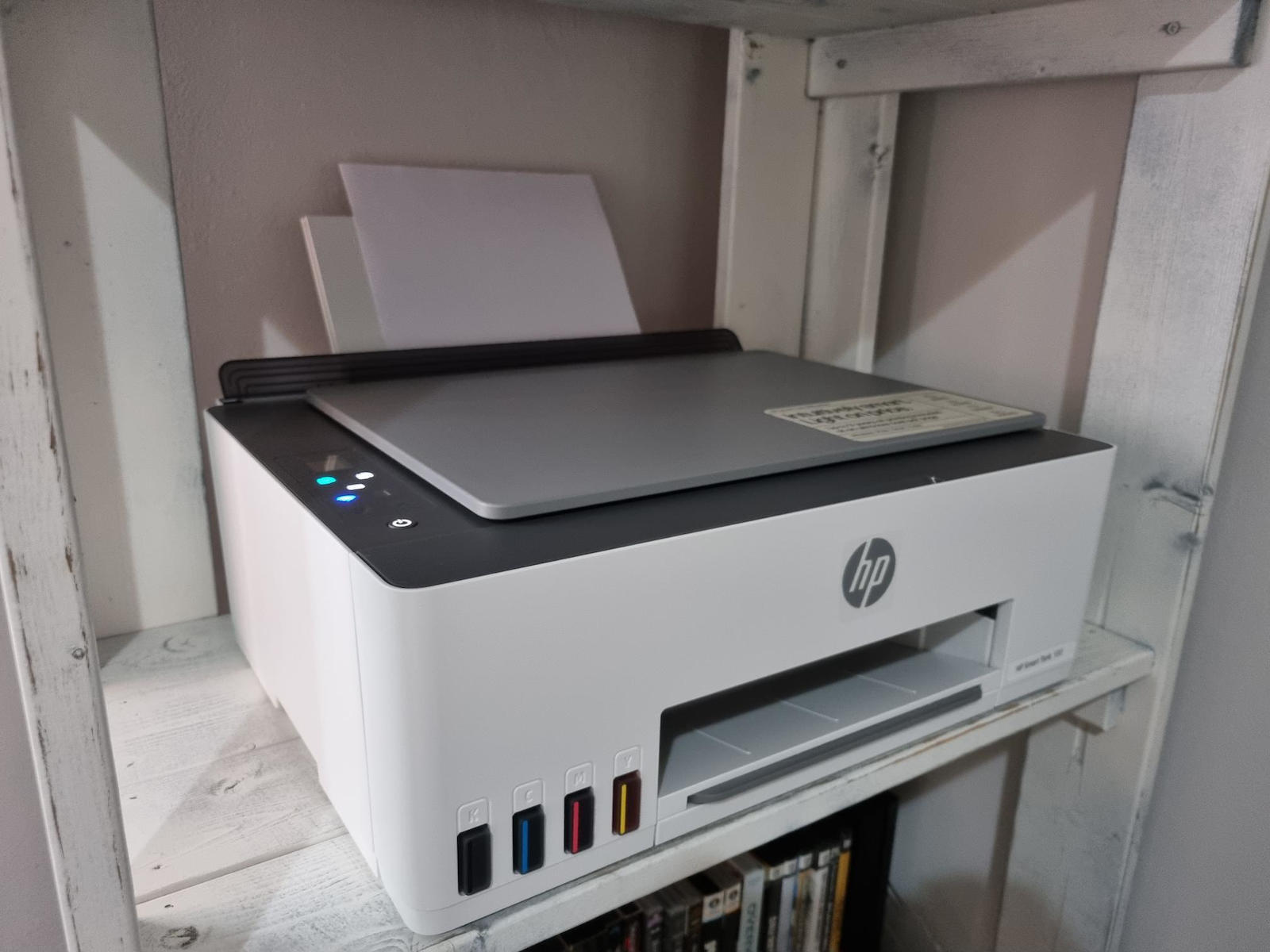
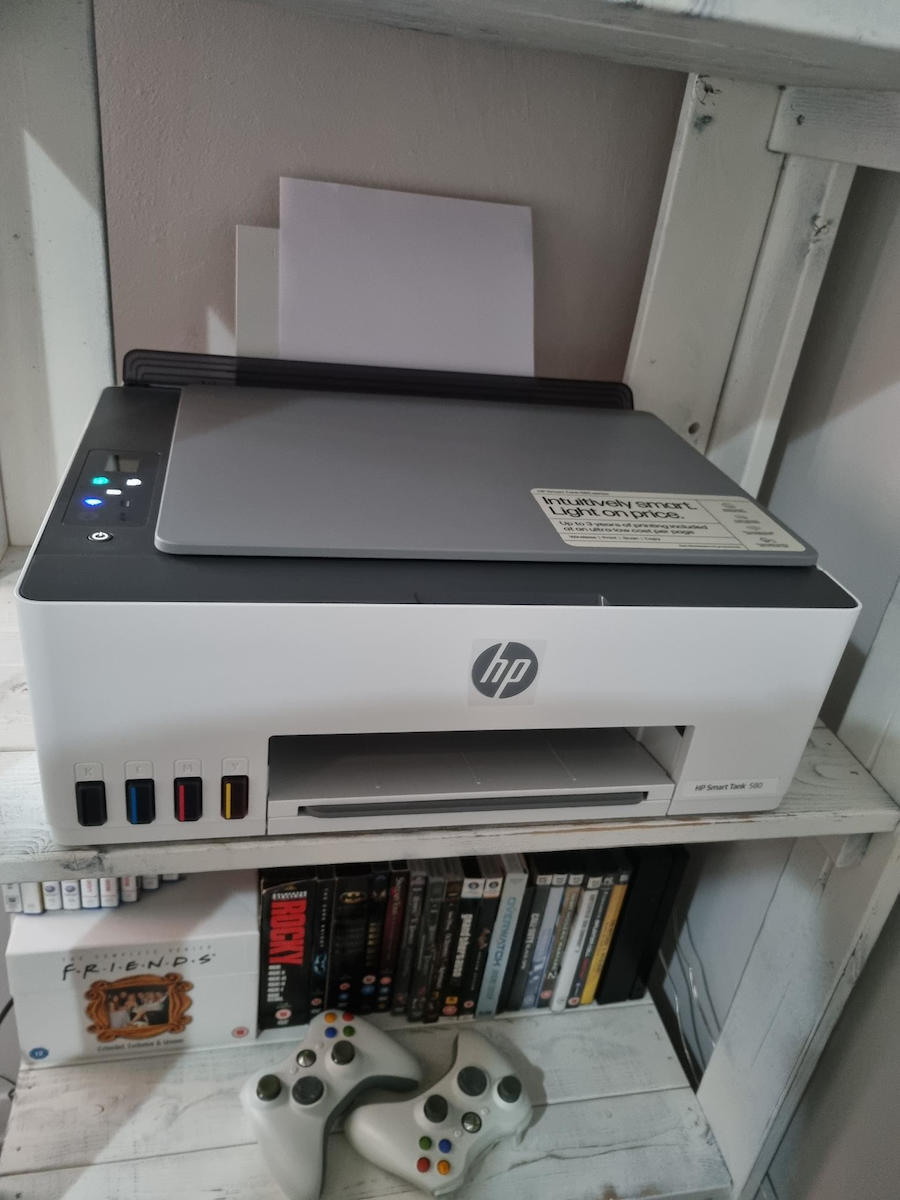
Όπως και να το κάνεις είναι designια και ίσως από τους πιο ωραίους εκτυπωτές που κυκλοφορούν εκεί έξω. Είναι compact με απλό άλλα πολύ όμορφο design. Δεν είναι τυχαίο άλλωστε που κέρδισε και το iF DESIGN AWARD 2023. Επίσης τα πλαστικά είναι πολύ ποιότητα και στιβαρά και δεν σου φέρνει σε καμία περίπτωση την εντύπωση ότι αν το σηκώσεις θα σου μείνει στα χέρια. (BONUS: Θα έλεγα ότι μπορεί να αντέξει και καμία φάπα μικρά παιδιά.)
Στο πάνω μέρος στα αριστερά είναι μια μικρή οθόνη με κουμπιά για όλες τις λειτουργίες που μπορείς να κάνεις. Στο πίσω μέρος αφού σηκώσεις το συρόμενο δίσκο εισόδου (όπως το αναφέρει και η HP) τοποθετείς το χαρτί ενώ μπροστά είναι το lid για την σάρωση.
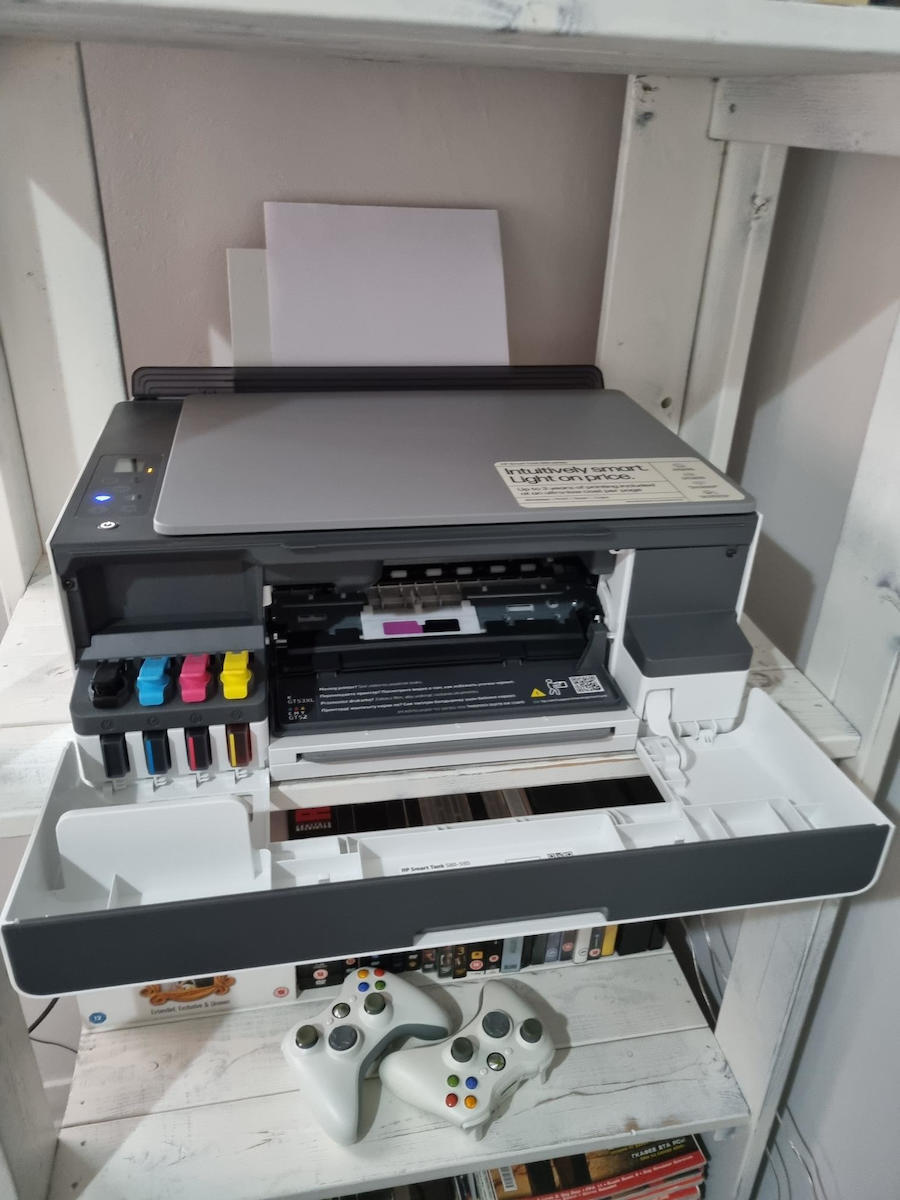
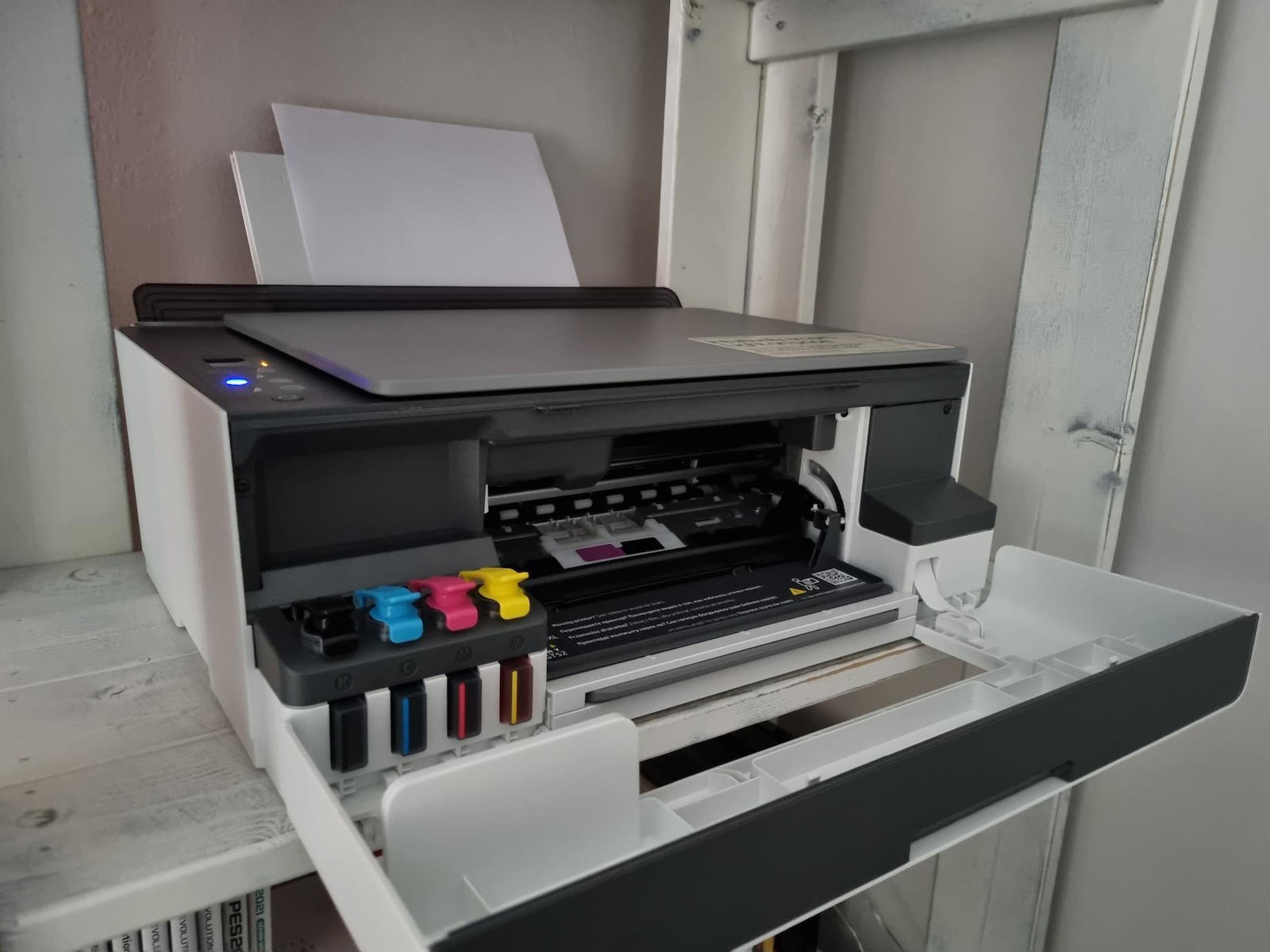
Στο μπροστινό μέρος είναι από εκεί που βγαίνει το χαρτί όπως και αφού ανοίξεις το πορτάκι τα δοχεία για τα μελάνια και οι κεφάλες λίγο πιο μέσα.
Installation;
Και λοιπόν έρχεται η στιγμή που τον έχεις αγοράσει σου έρχεται στο σπίτι και τον ανοίγεις και λες ωπα τώρα τι κάνω. Όσο και high end user να είσαι μια σταγόνα ίδρωτα κατεβαίνει στην σκέψη ότι ακόμα και εσύ ο τρανός και τρομερός builder μπορεί να κάνεις κάποιο λάθος.
Αφού τον βγάλεις από το κουτί που η HP στο έχει κάνει πανεύκολο γιατί το έχει βάλει σε σακούλα με χεράκι και απλά τον τράβας (ένα μεγάλο μπράβο στην HP που δεν θα πρέπει να μαλώσεις με τα φενιζολ και το κουτί μέχρι να καταφέρεις να τον βγάλεις) έρχεται η στιγμή της σύνδεσης.
Εδώ μπορείς (και πρέπει) να κατεβάσεις το app της HP η να ανοίξεις το manual που έρχεται μαζί με το κουτί για να σε καθοδηγήσουν για τα επόμενα βήματα (αλλά εγώ θα τα πω έτσι κι αλλιώς) και μάλιστα το κάνουν πάρα πολύ καλά step by step. Θα πρότεινα να κατεβάσεις το app γιατί θα τον συνδέσεις στο WIFI που είναι πάρα πολύ εύκολο και θα χρησιμεύσει να μην το κάνεις μετά.
Ξεκινάς με το να αφαιρέσεις τα χαρτόνια και τις ταινίες (TIP: αφαίρεσε πρώτα το χαρτόνι από το μπροστινό μέρος και μετα άνοιξε το καπάκι) και αφού τελειώσεις τον βάζεις σε λειτουργία. Σου δείχνει ότι δεν έχει μελανί κάτι που δεν θα έπρεπε να σας φοβίζει γιατί η HP και γενικά το smart tank το έχουν κάνει πάρα πολύ εύκολο. Ανοίγεις τα lid από κάθε ένα μελανί και τοποθετείς το μπουκαλάκι του αφού γεμίσει μέχρι πάνω μπορείς να το αφαιρέσεις χωρίς να ανησυχείς αν θα χυθεί έστω και μια σταγόνα έξω (καλά μην το κάνεις σαν αουγκανος γιατί τότε ίσως έχεις προβληματάκι) απαλά και με αγάπη. Μετα έχουμε τις κεφάλες που είναι σαν όλες τις κεφάλες που υπάρχουν εκεί έξω απλά θα πρέπει να υπάρξει προσοχή στο να μην ακουμπήσεις την ταινία και να κουμπώσει. Μετα τοποθετείς το χαρτί κάνεις ευθυγράμμιση, σαρώνεις αυτό που εκτύπωσες και είσαι έτοιμος.
Printing Speed and Quality;
Πέραν από αυτά που λέει ότι κάνει όπως οι γρήγορες εκτυπώσεις και τα λοιπά (για να λέμε την αλήθεια ποιον νοιάζει αν εκτυπώνει σε 12 η σε 20 δευτερόλεπτα όταν πρόκειται για οικιακή χρήση). Θα σταθώ στην ποιότητα της εκτύπωσης μιας και δεν απογοητεύει όσον αφορά την ακρίβεια των χρωμάτων. Οι έγχρωμες εκτυπώσεις είναι ζωντανές και ακριβείς, χωρίς σημαντικές διαφοροποιήσεις στη σκίαση ή την απόχρωση, ακόμη και σε πολλές εκτυπώσεις. Οι ασπρόμαυρες θα έλεγα ότι αγγίζουν την τελειότητα με καθαρή και ευκρινή εικόνα, χωρίς μουτζούρες, καθιστώντας την κατάλληλη τόσο για κείμενο όσο και για εικόνες. Όσον αφορά την αντοχή, οι εκτυπώσεις παραμένουν ανέπαφες ακόμα και μετά από παρατεταμένη χρήση. Ειδικότερα σε φωτογραφία θα έλεγα ότι είναι αρκετά καλή αν αναλογιστείς ότι για να έχεις ένα πάρα πολύ καλό αποτέλεσμα πρέπει να πας σε εκτυπωτή που κάνει 600-700 ευρώ.
Verdict;
Το installation ήταν πάρα πολύ εύκολο και κατατοπιστικό από την HP αρκεί μην πετάξεις το μάνουαλ και κάνεις του κεφαλιού σου. Το app καλοφτιαγμένο και κατατοπιστικό. Συνδέθηκε με ότι συσκευή υπάρχει στο σπίτι από Desktop, Laptop, Android και Apple χωρίς το παραμικρό πρόβλημα όμως και ότι δεν έχω παρατηρήσει ούτε ένα πρόβλημα σχετικά με το connectivity. Επίσης τον διάλεξα γιατί δίνει 3 χρόνια εγγύηση και μέχρι τέλος Ιουλίου σου δίνει 30 ευρώ cashback. Τον συνιστώ ανεπιφύλακτα αν θες να επενδύσεις σε έναν πολύ καλό εκτυπωτή για το επόμενα χρόνια με χαμηλό κόστος per page.
Pros;
+Print quality
+ Οικονομικός (έλα τώρα HP κάτσε καλά τι 12.000 ασπρόμαυρες η 6.000 έγχρωμες)
+ Ready when you are (μόλις ανιχνεύσει ότι ίσως κάτι θες να εκτυπώσεις -βλέπε word στην αρχή είναι έτοιμος να το κάνει χωρίς να πρέπει να κάνεις κάτι εσύ η να τον ανοίξεις)
+ Build quality
+ Connectivity
+App
+Auto On/Off (Κλείνει αυτόματα όταν δεν χρησιμοποιείται)
Cons;
-Δυσκολάκι να βρω
Update 03/08/2023:
All lights blinking fix;
Αντιμετώπιζα ένα πρόβλημα που σε random στιγμές αναβόσβηναν όλα τα φωτάκια και η μόνη λύση ήταν να τον κλείσω και να τον ξανά ανοίξω για να φτιάξει. Ανακάλυψα ότι έχει βγει ένα firmware update από την HP που το διορθώνει. Οπότε συνιστώ μετα την αγορά να κάνετε και το firmware update.
https://support.hp.com/us-en/drivers/selfservice/swdetails/hp-smart-tank-580-all-in-one-printer/2100992726/swItemId/bi-303970-4



 139 Coins
Για να κερδίσεις τα Skroutz Coins, γίνε μέλος του Skroutz Plus και αποδέξου τους όρους του προγράμματος επιβράβευσης.
139 Coins
Για να κερδίσεις τα Skroutz Coins, γίνε μέλος του Skroutz Plus και αποδέξου τους όρους του προγράμματος επιβράβευσης.


Άφησε πρώτος το σχόλιό σου!