3D Printers

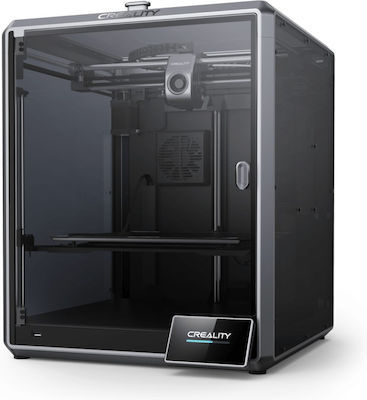
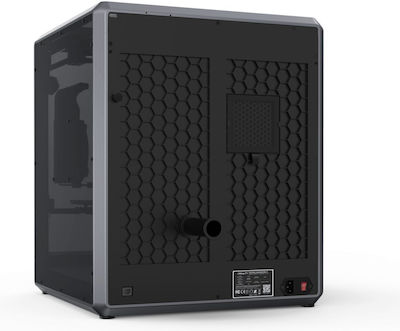
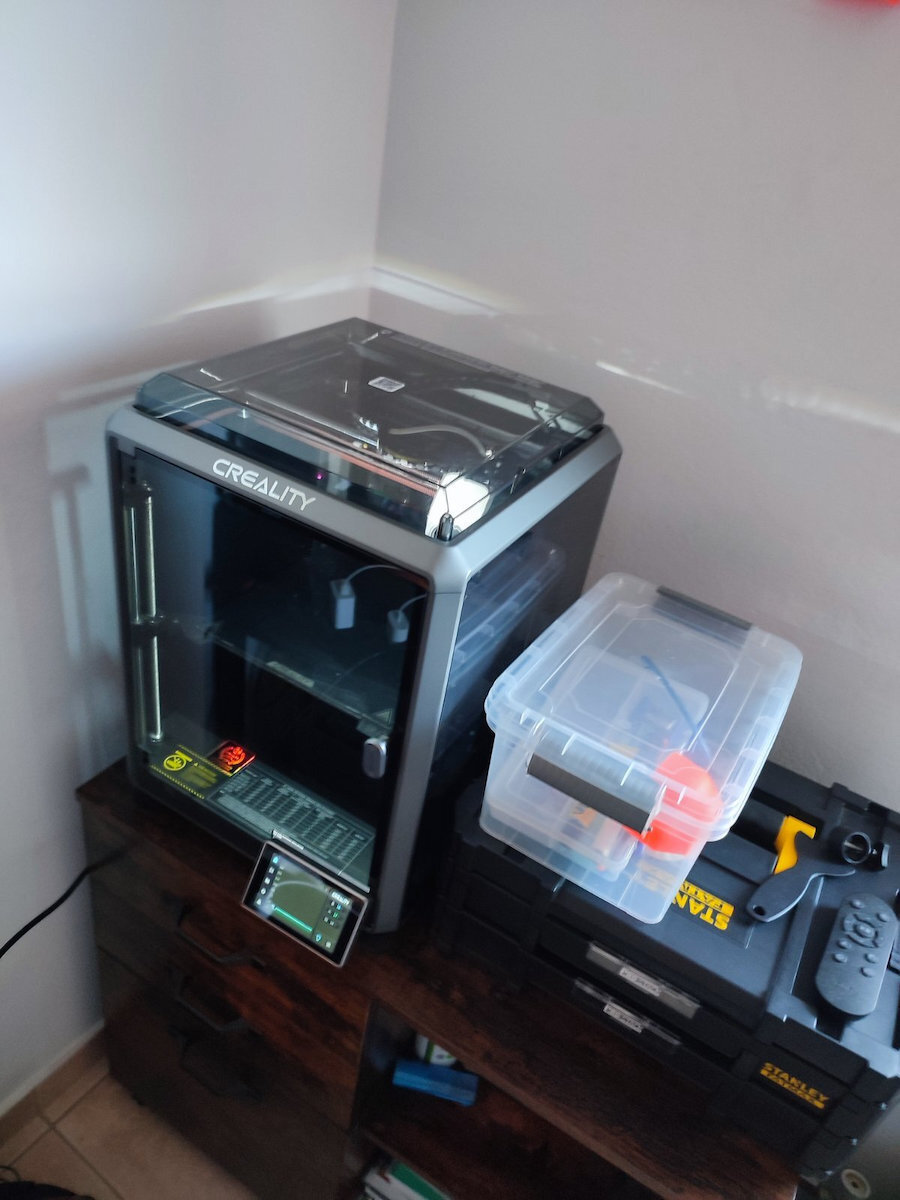
Creality3D K1 Max Standalone 3D Printer with USB / Wi-Fi Connection

The K1 Max reaches 600mm/s in just 0.03s based on an acceleration of 20000mm/s². It can be as productive as many 3D printers combined.

The K1 Max reaches 600mm/s in just 0.03s based on an acceleration of 20000mm/s². It can be as productive as many 3D printers combined.

See full description See full description

Top specs

  • Connectivity USB, Wi-Fi
  • See all
591 08
592 Coins 592 Coins
Delivery up to 15 days
7,00 €  
Delivery to your floor available
Do you want it with Free shipping?
From Techstores 4.7 (100)
Καλλιθέα, Αττικής
2 pieces
See 3D Printers & Accessories on the page of Techstores
What if it breaks?

You're covered by the statutory 2-year warranty. Contact us and we'll handle the entire process with the store, ensuring your issue is resolved with prompt support through a repair, replacement, or refund.

What if I change my mind?

No problem, as long as it's within 14 days. We'll come and pick it up (completely free of charge if you have Skroutz Plus) and refund your money.

Description

Description

The K1 Max reaches 600mm/s in just 0.03s based on an acceleration of 20000mm/s². It can be as productive as many 3D printers combined.

Easy settings for speed

The K1 Max combines the agile Core XY with a lightweight 190 g print head for less motion inertia.

Maximum Flow 32 mm³/s

New ceramic heater, surrounding the entire hotend. Heats up to 200℃ in 40 seconds and melts the filament immediately.

Dual-speed extruder, providing strong extrusion force.


Model Cooling by Dual Fans

A large fan on the print head with air ducts directly cools the model. An auxiliary 18W fan in the build chamber also enhances the cooling effect. The model hardens before any deformation occurs. 

The latest slicer Creality Print 4.3 includes rich presets and simplifies the cutting process into 3 simple steps.

Maximum capacity, efficient use of space

The K1 Max features a large build volume of 300x300x300mm, ideal for rapid prototyping or design verification.
It also offers a high build volume to printer size ratio of 25.5%.
The K1 Max is the most efficient FDM 3D printer in its class.

AI LiDAR takes care of the first layer

Still worried about the first layer? Just leave it all to the AI LiDAR of the K1 Max.
The 1 μm resolution LiDAR will scan the first layer on its own. It will stop the print and notify you immediately if something goes wrong.

The AI camera tracks

The K1 Max uses an AI camera to monitor spaghetti-type failures, foreign objects, etc. It will notify you when an error occurs. It also supports real-time monitoring and creates snapshots for sharing.

Smart System

Unbridled Performance

The K1 Max adopts the smart Creality OS. It features a simple user interface and synchronizes data and commands with computers, phones, Cloud, and additional modules. The user-friendly dual-core 1.2 GHz processor powers high-speed printing with ease. The 8G ROM stores up to 400 model files and allows for quick writing and reading.

Once the K1 Max is connected via WiFi or RJ45 Ethernet port to the LAN or the Internet, you can monitor and control the printing from a computer or phone with the Creality Print software or the Creality Cloud.
Even better, when multiple K1 Max printers are online, they can easily be gathered or grouped for volume production.

Rigid frame, consistent quality

The frame of the K1 Max is made with rigid components from cast aluminum alloy. It allows stable printing at high speed. And the print quality is excellent all the time.

The upgraded Z-axis with more precise positioning effectively reduces the Z banding. The texture has never been so fine.

Smooth surface with input configuration

A G-sensor on the print head measures the resonance frequencies of high-speed printing and adjusts the input to mitigate them. No more print failures.

Better Feeding with Motion Advance

The motion promotion function provides optimal feed flow. It reduces drops and flows efficiently.

Automatic dual hands-free alignment

The strain sensors on the bed create an accurate mesh.

Print right after unboxing

The K1 Max is assembled and calibrated before shipping and comes with a quick start guide.
You can start printing as soon as your K1 Max arrives.

Effective Air Cleaner

The built-in air filters will clean the unhealthy compounds generated during printing, making the printing process much more pleasant.

Manufacturer

See full description

Specifications

Specifications

Technical Specifications

Type
Standalone
Extruder
Single
Consumable
Filament
Compatibility
Mac, PC (Windows)
Printing Technology
FDM
Auto-Leveling
No
Camera
Yes
Connectivity
USB, Wi-Fi
Nozzle Temperature
300 °C
Fully Enclosed
Yes
Card Reader
No
Weight
18 kg

Print Dimensions (Build Volume)

Width
300 mm
Length
300 mm
Height
300 mm

Printing

Maximum Print Speed
600 mm/s
Maximum Resolution
-

Dimensions

Height
435 mm
Width
462 mm
Length
526 mm

Important information

Specifications are collected from official manufacturer websites. Please verify the specifications before proceeding with your final purchase. If you notice any problem you can report it here.

See all specifications

Reviews (7)

Reviews

  1. 3
  2. 1
  3. 2
  4. 1
  5. 1 star
    0
Review this product
  • Construction quality
  • Precision in operation
  • Value for money
  • Noise

Reviews by our members

  • John Spark
    5
    8 out of 9 members found this review helpful

    I have had the Creality K1 for about a year and a half, and I see that many say not to buy this machine, so I decided to write my own experience. Initially, especially as my first machine, I can tell you that with a little searching on YouTube and the internet, I quickly found what was necessary for me to start learning and making my first models. As for the machine, personally, it hasn't given me any issues so far. A friend of mine has the same machine, but he didn't clean it, and when he loaded his filament, he would hit it with his fists, saying that it wouldn't break, and yes... he broke several components. In summary, I will tell you not to be afraid to get this machine, just like any other machine of this type, such as the Bambu Lab or Flashforge. After almost 2 years of using the K1 and having used several models in the school's labs, including those from Creality, Flashforge, and Bambu Lab, I can tell you to get whatever machine fits your budget and to really consider what your needs are. Beyond that, how long a machine lasts is purely dependent on how well you take care of it, and of course, no machine, not just 3D printers but machines in general, is completely indestructible; at some point, they will require service, just like your cars do. The more you take care of it, the longer you will have it.

    Translated from Greek ·
    Did you find this review helpful?
  • geogatas
    3
    7 out of 12 members found this review helpful

    Don't buy Creality k1. I am a user of 2 machines since their release date. Many problems that you won't find in a printer from Bambu Lab (P1s). I have changed the extruder twice, had issues with the thermistor, and in general, the company lacks reliability, which is evident in the new models they release every 2 months with updates because the previous ones have issues. You spend 200 euros more and get a Bambu, either P1s or P1p, and you have no problems. I have done over 50 prints on the Bambu I have with the entire bed filled, and everything has come out as it should.

    Translated from Greek ·
    Did you find this review helpful?
  • Paris_Paraskevas
    4
    9 out of 9 members found this review helpful

    I got the 2023 model before the many corrections they made to the 2024 model so I have a few vfa parasites and sometimes issues with filament jams, but because a friend has the 2024 they have put smaller pulleys on the belts so it no longer has vfa parasites and they have changed the extruder with a model that has internal tension springs that mine doesn't have and they have put a unicorn hot end which is seamless from top to bottom so the thread doesn't stick, and it heats up better. Its speed is incredible, it prints everything in half the time than we are used to and the noise from the fans can be mitigated if you open the windows and lower the fans to 50-55%, also now with the Slicer Creality Print 5 it has better quality in everything... very good machine especially if you get the 2024 model with the blue details on the box...

    Translated from Greek ·
    • Construction quality
    • Value for money
    • Precision in operation
    • Noise
    Did you find this review helpful?
  • bb10903a
    3
    7 out of 33 members found this review helpful

    I have had it for about a month and the only thing that concerns me is that its operation is quite noisy to the point of being tiring, especially if it is in the same space where you work. Also, due to its high printing speed, it should be placed in a stable position because otherwise it transfers its vibrations to the table it may be placed on. Other than that, it is quite fast with very good print quality on PLA, ABS, PETG, etc

    Translated from Greek ·
    • Construction quality
    • Precision in operation
    • Value for money
    • Noise
    Did you find this review helpful?
  • Verified purchase

  • I have had the Creality K1 for about a year and a half, and I see that many say not to buy this machine, so I decided to write my own experience. Initially, especially as my first machine, I can tell you that with a little searching on YouTube and the internet, I quickly found what was necessary for me to start learning and making my first models. As for the machine, personally, it hasn't given me any issues so far. A friend of mine has the same machine, but he didn't clean it, and when he loaded his filament, he would hit it with his fists, saying that it wouldn't break, and yes... he broke several components. In summary, I will tell you not to be afraid to get this machine, just like any other machine of this type, such as the Bambu Lab or Flashforge. After almost 2 years of using the K1 and having used several models in the school's labs, including those from Creality, Flashforge, and Bambu Lab, I can tell you to get whatever machine fits your budget and to really consider what your needs are. Beyond that, how long a machine lasts is purely dependent on how well you take care of it, and of course, no machine, not just 3D printers but machines in general, is completely indestructible; at some point, they will require service, just like your cars do. The more you take care of it, the longer you will have it.

    Translated from Greek ·
    8
  • Don't buy Creality k1. I am a user of 2 machines since their release date. Many problems that you won't find in a printer from Bambu Lab (P1s). I have changed the extruder twice, had issues with the thermistor, and in general, the company lacks reliability, which is evident in the new models they release every 2 months with updates because the previous ones have issues. You spend 200 euros more and get a Bambu, either P1s or P1p, and you have no problems. I have done over 50 prints on the Bambu I have with the entire bed filled, and everything has come out as it should.

    Translated from Greek ·
    7
  • I got the 2023 model before the many corrections they made to the 2024 model so I have a few vfa parasites and sometimes issues with filament jams, but because a friend has the 2024 they have put smaller pulleys on the belts so it no longer has vfa parasites and they have changed the extruder with a model that has internal tension springs that mine doesn't have and they have put a unicorn hot end which is seamless from top to bottom so the thread doesn't stick, and it heats up better. Its speed is incredible, it prints everything in half the time than we are used to and the noise from the fans can be mitigated if you open the windows and lower the fans to 50-55%, also now with the Slicer Creality Print 5 it has better quality in everything... very good machine especially if you get the 2024 model with the blue details on the box...

    Translated from Greek ·
    9
  • I have had it for about a month and the only thing that concerns me is that its operation is quite noisy to the point of being tiring, especially if it is in the same space where you work. Also, due to its high printing speed, it should be placed in a stable position because otherwise it transfers its vibrations to the table it may be placed on. Other than that, it is quite fast with very good print quality on PLA, ABS, PETG, etc

    Translated from Greek ·
    7
  • 0
  • See all
Questions (1)

Questions

32 users have this product and can help you

Ask for the product
aristidis_agathagelidis
See all questions (1)

Description & Specifications

The K1 Max reaches 600mm/s in just 0.03s based on an acceleration of 20000mm/s². It can be as productive as many 3D printers combined.

Easy settings for speed

The K1 Max combines the agile Core XY with a lightweight 190 g print head for less motion inertia.

Maximum Flow 32 mm³/s

New ceramic heater, surrounding the entire hotend. Heats up to 200℃ in 40 seconds and melts the filament immediately.

Dual-speed extruder, providing strong extrusion force.


Model Cooling by Dual Fans

A large fan on the print head with air ducts directly cools the model. An auxiliary 18W fan in the build chamber also enhances the cooling effect. The model hardens before any deformation occurs. 

The latest slicer Creality Print 4.3 includes rich presets and simplifies the cutting process into 3 simple steps.

Maximum capacity, efficient use of space

The K1 Max features a large build volume of 300x300x300mm, ideal for rapid prototyping or design verification.
It also offers a high build volume to printer size ratio of 25.5%.
The K1 Max is the most efficient FDM 3D printer in its class.

AI LiDAR takes care of the first layer

Still worried about the first layer? Just leave it all to the AI LiDAR of the K1 Max.
The 1 μm resolution LiDAR will scan the first layer on its own. It will stop the print and notify you immediately if something goes wrong.

The AI camera tracks

The K1 Max uses an AI camera to monitor spaghetti-type failures, foreign objects, etc. It will notify you when an error occurs. It also supports real-time monitoring and creates snapshots for sharing.

Smart System

Unbridled Performance

The K1 Max adopts the smart Creality OS. It features a simple user interface and synchronizes data and commands with computers, phones, Cloud, and additional modules. The user-friendly dual-core 1.2 GHz processor powers high-speed printing with ease. The 8G ROM stores up to 400 model files and allows for quick writing and reading.

Once the K1 Max is connected via WiFi or RJ45 Ethernet port to the LAN or the Internet, you can monitor and control the printing from a computer or phone with the Creality Print software or the Creality Cloud.
Even better, when multiple K1 Max printers are online, they can easily be gathered or grouped for volume production.

Rigid frame, consistent quality

The frame of the K1 Max is made with rigid components from cast aluminum alloy. It allows stable printing at high speed. And the print quality is excellent all the time.

The upgraded Z-axis with more precise positioning effectively reduces the Z banding. The texture has never been so fine.

Smooth surface with input configuration

A G-sensor on the print head measures the resonance frequencies of high-speed printing and adjusts the input to mitigate them. No more print failures.

Better Feeding with Motion Advance

The motion promotion function provides optimal feed flow. It reduces drops and flows efficiently.

Automatic dual hands-free alignment

The strain sensors on the bed create an accurate mesh.

Print right after unboxing

The K1 Max is assembled and calibrated before shipping and comes with a quick start guide.
You can start printing as soon as your K1 Max arrives.

Effective Air Cleaner

The built-in air filters will clean the unhealthy compounds generated during printing, making the printing process much more pleasant.

Manufacturer

Technical Specifications

Type
Standalone
Extruder
Single
Consumable
Filament
Compatibility
Mac, PC (Windows)
Printing Technology
FDM
Auto-Leveling
No
Camera
Yes
Connectivity
USB, Wi-Fi
Nozzle Temperature
300 °C
Fully Enclosed
Yes
Card Reader
No
Weight
18 kg

Print Dimensions (Build Volume)

Width
300 mm
Length
300 mm
Height
300 mm

Printing

Maximum Print Speed
600 mm/s
Maximum Resolution
-

Dimensions

Height
435 mm
Width
462 mm
Length
526 mm

Important information

Specifications are collected from official manufacturer websites. Please verify the specifications before proceeding with your final purchase. If you notice any problem you can report it here.

Reviews (7)

  1. 3
  2. 1
  3. 2
  4. 1
  5. 1 star
    0
Review this product
  • Construction quality
  • Precision in operation
  • Value for money
  • Noise

Reviews by our members

  • John Spark
    5
    8 out of 9 members found this review helpful

    I have had the Creality K1 for about a year and a half, and I see that many say not to buy this machine, so I decided to write my own experience. Initially, especially as my first machine, I can tell you that with a little searching on YouTube and the internet, I quickly found what was necessary for me to start learning and making my first models. As for the machine, personally, it hasn't given me any issues so far. A friend of mine has the same machine, but he didn't clean it, and when he loaded his filament, he would hit it with his fists, saying that it wouldn't break, and yes... he broke several components. In summary, I will tell you not to be afraid to get this machine, just like any other machine of this type, such as the Bambu Lab or Flashforge. After almost 2 years of using the K1 and having used several models in the school's labs, including those from Creality, Flashforge, and Bambu Lab, I can tell you to get whatever machine fits your budget and to really consider what your needs are. Beyond that, how long a machine lasts is purely dependent on how well you take care of it, and of course, no machine, not just 3D printers but machines in general, is completely indestructible; at some point, they will require service, just like your cars do. The more you take care of it, the longer you will have it.

    Translated from Greek ·
    Did you find this review helpful?
  • geogatas
    3
    7 out of 12 members found this review helpful

    Don't buy Creality k1. I am a user of 2 machines since their release date. Many problems that you won't find in a printer from Bambu Lab (P1s). I have changed the extruder twice, had issues with the thermistor, and in general, the company lacks reliability, which is evident in the new models they release every 2 months with updates because the previous ones have issues. You spend 200 euros more and get a Bambu, either P1s or P1p, and you have no problems. I have done over 50 prints on the Bambu I have with the entire bed filled, and everything has come out as it should.

    Translated from Greek ·
    Did you find this review helpful?
  • Paris_Paraskevas
    4
    9 out of 9 members found this review helpful

    I got the 2023 model before the many corrections they made to the 2024 model so I have a few vfa parasites and sometimes issues with filament jams, but because a friend has the 2024 they have put smaller pulleys on the belts so it no longer has vfa parasites and they have changed the extruder with a model that has internal tension springs that mine doesn't have and they have put a unicorn hot end which is seamless from top to bottom so the thread doesn't stick, and it heats up better. Its speed is incredible, it prints everything in half the time than we are used to and the noise from the fans can be mitigated if you open the windows and lower the fans to 50-55%, also now with the Slicer Creality Print 5 it has better quality in everything... very good machine especially if you get the 2024 model with the blue details on the box...

    Translated from Greek ·
    • Construction quality
    • Value for money
    • Precision in operation
    • Noise
    Did you find this review helpful?
  • bb10903a
    3
    7 out of 33 members found this review helpful

    I have had it for about a month and the only thing that concerns me is that its operation is quite noisy to the point of being tiring, especially if it is in the same space where you work. Also, due to its high printing speed, it should be placed in a stable position because otherwise it transfers its vibrations to the table it may be placed on. Other than that, it is quite fast with very good print quality on PLA, ABS, PETG, etc

    Translated from Greek ·
    • Construction quality
    • Precision in operation
    • Value for money
    • Noise
    Did you find this review helpful?
  • Verified purchase

  • I have had the Creality K1 for about a year and a half, and I see that many say not to buy this machine, so I decided to write my own experience. Initially, especially as my first machine, I can tell you that with a little searching on YouTube and the internet, I quickly found what was necessary for me to start learning and making my first models. As for the machine, personally, it hasn't given me any issues so far. A friend of mine has the same machine, but he didn't clean it, and when he loaded his filament, he would hit it with his fists, saying that it wouldn't break, and yes... he broke several components. In summary, I will tell you not to be afraid to get this machine, just like any other machine of this type, such as the Bambu Lab or Flashforge. After almost 2 years of using the K1 and having used several models in the school's labs, including those from Creality, Flashforge, and Bambu Lab, I can tell you to get whatever machine fits your budget and to really consider what your needs are. Beyond that, how long a machine lasts is purely dependent on how well you take care of it, and of course, no machine, not just 3D printers but machines in general, is completely indestructible; at some point, they will require service, just like your cars do. The more you take care of it, the longer you will have it.

    Translated from Greek ·
    8
  • Don't buy Creality k1. I am a user of 2 machines since their release date. Many problems that you won't find in a printer from Bambu Lab (P1s). I have changed the extruder twice, had issues with the thermistor, and in general, the company lacks reliability, which is evident in the new models they release every 2 months with updates because the previous ones have issues. You spend 200 euros more and get a Bambu, either P1s or P1p, and you have no problems. I have done over 50 prints on the Bambu I have with the entire bed filled, and everything has come out as it should.

    Translated from Greek ·
    7
  • I got the 2023 model before the many corrections they made to the 2024 model so I have a few vfa parasites and sometimes issues with filament jams, but because a friend has the 2024 they have put smaller pulleys on the belts so it no longer has vfa parasites and they have changed the extruder with a model that has internal tension springs that mine doesn't have and they have put a unicorn hot end which is seamless from top to bottom so the thread doesn't stick, and it heats up better. Its speed is incredible, it prints everything in half the time than we are used to and the noise from the fans can be mitigated if you open the windows and lower the fans to 50-55%, also now with the Slicer Creality Print 5 it has better quality in everything... very good machine especially if you get the 2024 model with the blue details on the box...

    Translated from Greek ·
    9
  • I have had it for about a month and the only thing that concerns me is that its operation is quite noisy to the point of being tiring, especially if it is in the same space where you work. Also, due to its high printing speed, it should be placed in a stable position because otherwise it transfers its vibrations to the table it may be placed on. Other than that, it is quite fast with very good print quality on PLA, ABS, PETG, etc

    Translated from Greek ·
    7
  • 0
  • See all
591,08 €
7,00 €  
Delivery to your floor available