Είναι κανείς εδώ? Αν ναί τότε είστε αναγκασμένοι να διαβάσετε το review. ΝΟ BLINKING
Κάποια σημαντικά πράγματα:
Το μόνιτορ με την βάση του, απο το την αρχή της ΟΘΟΝΗΣ(όχι το stand) μέχρι το τέλος του stand είναι περίπου 18 εκ.
Αλλο σημαντικό είναι οτι η SAMSUNG δεν σας καλύπτει αν έχετε απο 1 εώς κάποια Pixel καμένα στην εγγύηση (δλδ δεν είναι 0 Pixel warranty) που σημαίνει με λίγα λόγια ότι .... το be continued....
Εργονομία - εξωτερικά οθόνης.
Απο θέμα εργονομίας δεν θα έχετε κανένα πρόβλημα γιατί είναι ολα smooth. Raise it, tilt it, turn it κτλ. με άνεση. Έρχεται με display port 1.2, hdmi 2.0 και φυσικά το καλώδιο τροφοδοσίας. όπου χρειάζεται πρώτα να το βάλετε στο power supply που είναι εξωτερικό και μετά στην πρίζα, θα πιάνει λίγο παραπάνω χώρο αλλά all good. Τα Bezels είναι σχεδόν μηδαμινά που χαρίζει μια εξαιτερική αισθητική. Για το OSD έχει ενα μικρό joystick στο κάτω μέρος της οθόνης που έχει όλες τις ρυθμίσεις που χρειάζεσαι όπως black equalizer, LOCAL DIMMING ( βασικό που αρκετά Monitors δεν έχουν για καλύτερη αντίθεση αλλά αυξάνει to blooming) καθώς και όλα τα γνωστά για να το φερεις super-duper. Στην αρχή είναι λίγο μη βολικό αλλά συνηθίζεται.
ΧΡΩΜΑΤΑ-ΑΝΤΙΘΕΣΗ-ΓΩΝΙΕΣ ΘΕΑΣΗΣ-1440p
Το μόνιτορ έρχεται semi-calibrated, saturated χρώματα (θα χρειαστεί οπωσδήποτε να ρίξετε το "color" χαμηλότερα διότι το saturation είναι υπερβολικό) με ανίκητο brightness 430cd/m2 (αν είσαι δλδ vampire μην την αγοράσεις). Το sdr του είναι περίπου 99% που αποδίδει ωραία ζωντανά χρώματα με την αντίθεση του να είναι πολύ καλή για Ips δεδομένα με τουλάχιστον 1:1200 contrast που ακόμα και το βράδυ τα μαύρα είναι αρκετά καλά. Επιπρόσθετα η οθόνη έχει 178/178 γωνίες θέασης που σημαίνει ΌΤΙ ΤΟ ΧΡΩΜΑ ΔΕΝ ΑΛΛΆΖΕΙ ΕΥΚΟΛΑ ΟΧΙ ΟΜΩΣ Η ΦΩΤΕΙΝΟΤΗΤΑ. Δηλαδή αμα κοιτάξεις 45 μοίρες η φωτεινότητα θα αλλάξει ως το πιο σκούρο που είναι παραπάνω απ'ότι θα ήθελα αλλά τα χρώματα θα είναι πολύ ικανοποιητικά. Τώρα θα αναρωτηθεί κάποιος άμα αλλάζει η φωτεινότητα δεν αλλάζει και κάπως το χρώμα? SPOILER ALERT: ναι. Εναλλαγή σέ 1440p απο 1080 είναι μεγάλη και είναι το καλύτερο δώρο σε αυτές τις οθόνες που δίνει τεράστιο δέος και free real estate. Προσπαθήστε μέσω windows απο display setting να βάλετε τα γράμματα στο 110% χωρίς να αλλάξετε resolution ή κλίμακα για να τα βλέπετε όπως πρέπει + να μεγεθύνετε μερικές ιστοσελίδες από 100% σε 110% και αντίστοιχα.
RESPONSE TIME - REFRESH RATE!
Tο response time είναι αρκετά καλό Και θα ικανοποιήσει σχεδόν κάθε gamer εκεί έξω. Έχει 3 modes, standard, FASTER, EXTREME, το faster είναι ότι πρέπει δίνει πολύ καλά timings όσο σε input lag και response. Αφήστε το ΕΧΤΡΕΜΕ ήσυχο γιατί θα βλέπετε σκιέs ειδικά στο scrolling. Γενικότερα έχει λίγο blur με τα adaptive sync modes αλλά είναι σταθερό σε όλες τις συχνότητες. Τέλος ένα άλλο TUMBOO! που μερικοί σχολιάζουν είναι, ότι 144hz με 180hz δεν έχει διαφορά, είναι σχεδόν απειροελάχιστη. SPOILER: Λάθος. Η διαφορά είναι αρκετή γιατί φαίνεται αρκετά στο Input lag αλλά και στο smoothness όταν γυριζεις γρήγορα ή 360. ( Σε εμένα τουλάχιστον + αμα παίρνεις 160-180 consistent frames).
ΓΕΝΙΚΑ ΠΡΑΓΜΑΤΑ
Ηχεία δεν έχει, είναι FLICKER free ( δεν τρεμοπαίζει) και δεν κουράζει τόσο, freesync + gsync compatible, Vesa mount 100x100, to HDR 400 είναι στα κατώτερα επίπεδα, μπορεί να αρέσει σε κάποιους αλλά θέλει Hdmi 2.0 που πάει στα 144hz.
WHAT I NOT LIKED
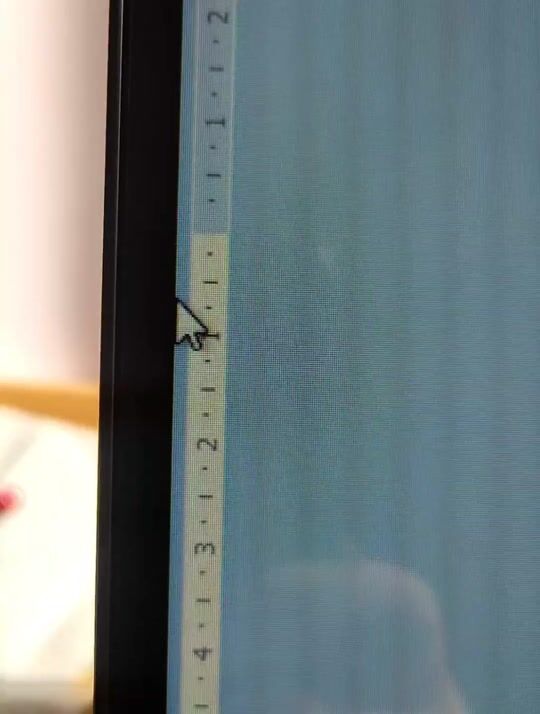
Λοιπόν, η εξωτερική περιφέρια της οθόνης είναι πιο σκοτεινή σε σχέση με το εσωτερικό ειδικότερα στα δεξιά που πέφτει η φωτεινότητα, πχ. απο 100% brightness σε 80%. Παράλληλα, άμα κοιτάξεις απο κάτω γίνεται λίγο φωτεινή ενώ απο πάνω το αντίθετο δλδ. πιο σκούρα, όσον αναφορά τις vertical γωνίες θέαση. Όσο σε horizontal, προς την αριστερή κατεύθυνση, σκουραίνει περισσότερο από τις υπόλοιπες γωνίες με την μεγαλύτερη κλήση γωνίας. Συγκεκριμένα το δικό μου unit, έχει λίγο backlight bleed αριστερά πάνω και ips glow σε νορμάλ επίπεδα που μπορεί να ενοχλήσει κάποιον αλλά συνηθίζεται.
+ Απενεργοποιήστε το ECO mode που είναι ρυθμισμένο by default.