

149
00
€
Delivery
Tomorrow
Free
shipping cost
From
Stechi
(39)
Shipping costs and delivery speed are calculated based on the delivery location.


Insta360 Flow 2
Everyday AI Cinematography Assistant
Insta360 Flow 2
Everyday AI Cinematography Assistant
Already in cart from another shop
You're covered by the statutory 2-year warranty. Contact us and we'll handle the entire process with the store, ensuring your issue is resolved with prompt support through a repair, replacement, or refund.
No problem, as long as it's within 14 days. We'll come pick it up or you can choose the Skroutz Point that suits you, completely free for up to 2 times per year, and we'll refund your money. Get Skroutz Plus to enjoy unlimited free returns.
You select "Gift order" in the cart. We do not include a receipt in the package and provide an electronic exchange card, just in case.
Insta360 Flow 2
Everyday AI Cinematography Assistant
Included in the package:
Manufacturer: Insta360
Weight: 0.7kg
Specifications are collected from official manufacturer websites. Please verify the specifications before proceeding with your final purchase. If you notice any problem you can report it here.

In the reviews, users do not specify whether they use the gimbal with an Android phone or an iPhone. I’m sharing my own review based on my experience with the device.
I bought the Insta360 Flow 2 AI Tracker Bundle gimbal for my Honor Magic8 Lite phone. I just managed to get it on the last day of the sale. I installed the Insta360 app on my phone according to the instructions. I should point out that I’m a complete beginner and this is my first time using a gimbal. At first, I was impressed by the features it offers. Through the app and without the AI Tracker, it can recognize one or more faces very easily, start recording using the gimbal button, zoom using the wheel, provide excellent stabilization, and offer many other conveniences.
However, after watching the first video, as well as the subsequent ones I recorded, I was disappointed. The video was unacceptable, with distorted colors and dense vertical red or blue lines in various parts of the image. No matter how hard I tried, the result was the same.
In the end, the Insta360 app recommended by the manufacturer is designed to work exclusively on iPhones, not on Android, which is what I have. Besides, in the instructional video for using the Insta360 Flow 2, the presenter uses an iPhone.
After that, I uninstalled the Insta360 app and used the gimbal without it. The video was crystal clear, but the gimbal’s functions using its buttons were limited. Recording video this way cannot be started using the button, but must be started from the phone screen. Zooming cannot be done with the wheel, and there is no recognition of one or multiple faces on the phone screen.
Then I connected the gimbal to my phone via Bluetooth. Most of the functions were enabled, such as the shutter button, which could start and stop video recording or take a photo, as well as zooming by turning the gimbal’s wheel. When used together with the AI Tracker accessory, the gimbal’s functionality was restored. However, face recognition and tracking are handled by the accessory itself, not by the phone’s software. That’s why it enables Auto-Tracking in any camera app you use on your Android phone.
However, make sure the AI Tracker accessory is inserted and firmly locked into the Type-C port. Press the two ends, which open like a clothespin and lock onto the sides of the port. Press the button on the back, directly opposite the gimbal’s front buttons, once; the AI Tracker’s red light turns green, and only then does it lock onto a face. If you press it a second time, it turns off and the light turns red. If the AI Tracker is not inserted correctly, the red light will not turn green. That’s what happened to me at first, and I couldn’t figure out what was wrong.
When there are many people in a room, such as around a large table, enabling the AI Tracker is not convenient, so it’s best to leave it disabled. This is because it may lock onto the nearest face, and the phone will automatically turn toward that person as you try to record the others.
Στις αξιολογήσεις οι χρήστες δεν διευκρινίζουν αν χρησιμοποιούν το gimbal σε κινητό με android ή σε κινητό iFhone. Σας παραθέτω τη δική μου κριτική με βάση τη χρήση της συσκευής.
Αγόρασα το Gimbal Insta360 Flow 2 AI Tracker Bundle για το κινητό μου μάρκας Honor Magic8 Lite. Το πρόλαβα την τελευταία ημέρα της προσφοράς. Εγκατέστησα στο κινητό την εφαρμογή Insta360 σύμφωνα με τις οδηγίες. Να επισημάνω ότι είμαι τελείως αρχάριος και χρησιμοποιώ gimbal για πρώτη φορά. Εντυπωσιάστηκα στην αρχή με τις δυνατότητες που προσφέρει. Μέσω της εφαρμογής και χωρίς το AI Tracker, πανεύκολη αναγνώριση ενός ή περισσότερων προσώπων, δυνατότητα εγγραφής από το κουμπί του gimbal, zoom από τη ροδέλα, σταθεροποίηση πάρα πολύ καλή και πολλές άλλες ευκολίες.
Βλέποντας όμως το πρώτο βίντεο, αλλά και τα επόμενα που τράβηξα, απογοητεύτηκα. Απαράδεκτο βίντεο με αλλοιωμένα χρώματα και με πυκνές κάθετες κόκκινες ή μπλε γραμμές σε διάφορα σημεία της εικόνας. Όσο κι αν προσπάθησα, το αποτέλεσμα ήταν το ίδιο.
Τελικά η εφαρμογή Insta360 που προτείνει ο κατασκευαστής είναι φτιαγμένη για να δουλεύει αποκλειστικά σε iPhone και όχι σε Android που έχω εγώ. Εξάλλου στο εκπαιδευτικό βίντεο για τη χρήση του Insta360 Flow 2, η παρουσιάστρια χρησιμοποιεί κινητό iPhone.
Μετά από αυτό, απεγκατέστησα την εφαρμογή Insta360 και χρησιμοποίησα το gimbal χωρίς αυτήν. Το βίντεο ήταν πεντακάθαρο, αλλά οι λειτουργία του gimbal μέσω των πλήκτρων περιορισμένη. Η έναρξη της εγγραφής του βίντεο με αυτόν τον τρόπο δε γίνεται από το πλήκτρο, αλλά από την οθόνη του κινητού. Το zoom δε γίνεται με τη ροδέλα και δεν υπάρχει η αναγνώριση ενός ή πολλαπλών προσώπων στην οθόνη του κινητού.
Στη συνέχεια σύνδεσα το gimbal με το κινητό μέσω bluetooth. Οι περισσότερες λειτουργίες ενεργοποιήθηκαν, όπως το κουμπί λήψης (Shutter) το οποίο ενεργοποιήθηκε ξεκινώντας και σταματώντας την εγγραφή του βίντεο ή πραγματοποιώντας τη λήψη μιας φωτογραφίας με αυτό, αλλά και το zoom που γίνεται γυρίζοντας τη ροδέλα του gimpal. Σε συνδυασμό με το εξάρτημα AI Tracker η λειτουργία του gimbal αποκαταστάθηκε. Όμως, η αναγνώριση προσώπου και η κίνηση υπολογίζονται από το ίδιο το αξεσουάρ και όχι από το λογισμικό του τηλεφώνου. Γι΄ αυτό ξεκλειδώνει το Auto-Tracking σε οποιαδήποτε εφαρμογή κάμερας χρησιμοποιείτε στο android κινητό σας.
Προσέξτε όμως το εξάρτημα AI Tracker πρέπει να μπει και να κλειδώσει καλά στη θύρα type c. Πιέζετε τις δύο άκρες οι οποίες ανοίγουν σαν μανταλάκι και κλειδώνουν στις άκρες της θύρας. Πατώντας μια φορά το κουμπί που βρίσκεται πίσω, διαμετρικά αντίθετα από τα μπροστινά πλήκτρα του gimbal, το κόκκινο λαμπάκι του AI Tracker γίνεται πράσινο και τότε μόνο κλειδώνει πάνω στο πρόσωπο. Αν το πατήσετε 2η φορά, απενεργοποιείται και το λαμπάκι γίνεται κόκκινο. Αν δεν μπει σωστά το AI Tracker, το κόκκινο λαπμπάκι δεν πρόκειται να γίνει πράσινο. Έτσι την πάτησα στην αρχή και δεν μπορούσα να καταλάβω τι φταίει.
Όταν υπάρχουν πολλά άτομα σε έναν χώρο, όπως π.χ. γύρω από ένα μεγάλο τραπέζι, η ενεργοποίηση του AI Tracker δε βολεύει και καλά είναι να το έχετε απενεργοποιημένο. Αυτό γιατί μπορεί να κλειδώσει πάνω στο κοντινότερο πρόσωπο και το κινητό να στρίβει αυτόματα προς αυτό καθώς προσπαθείτε να τραβήξετε βίντεο τα υπόλοιπα άτομα.

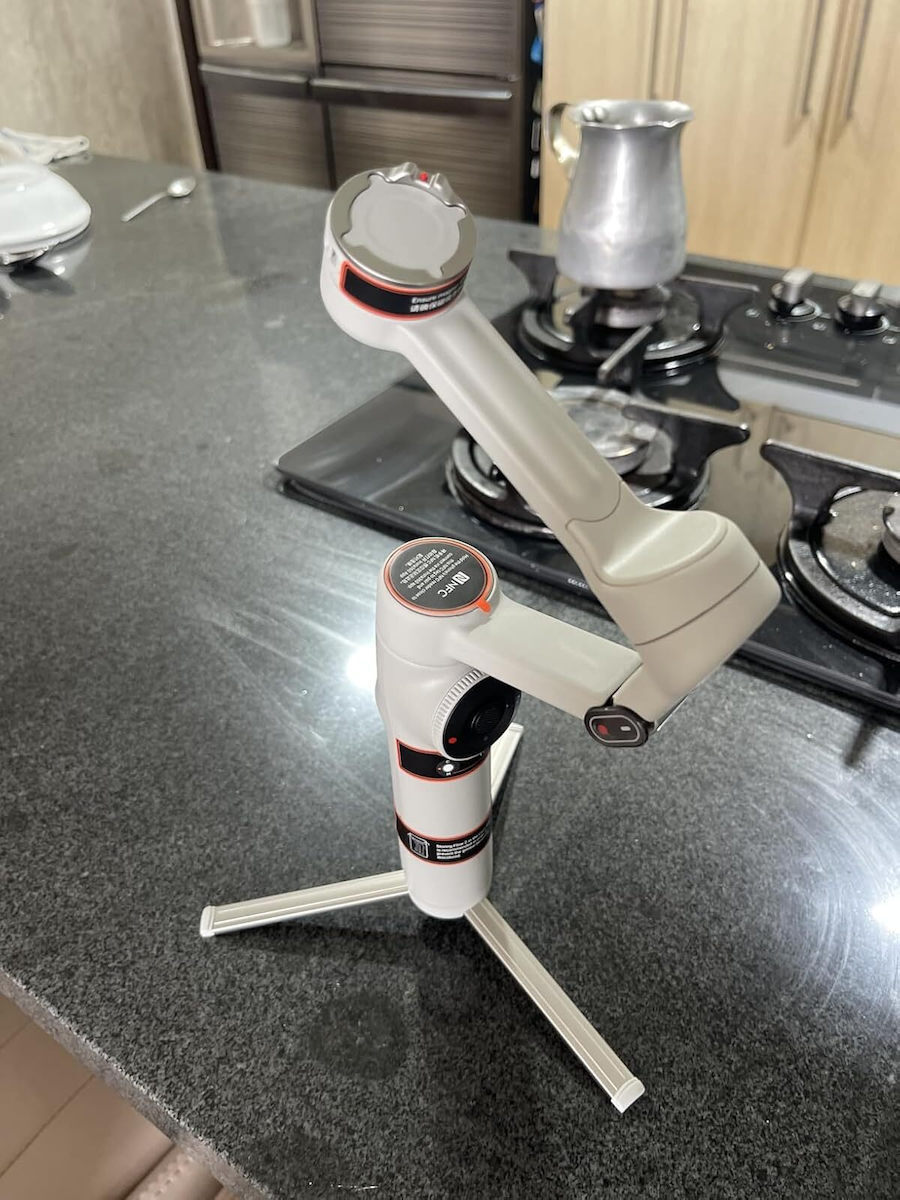
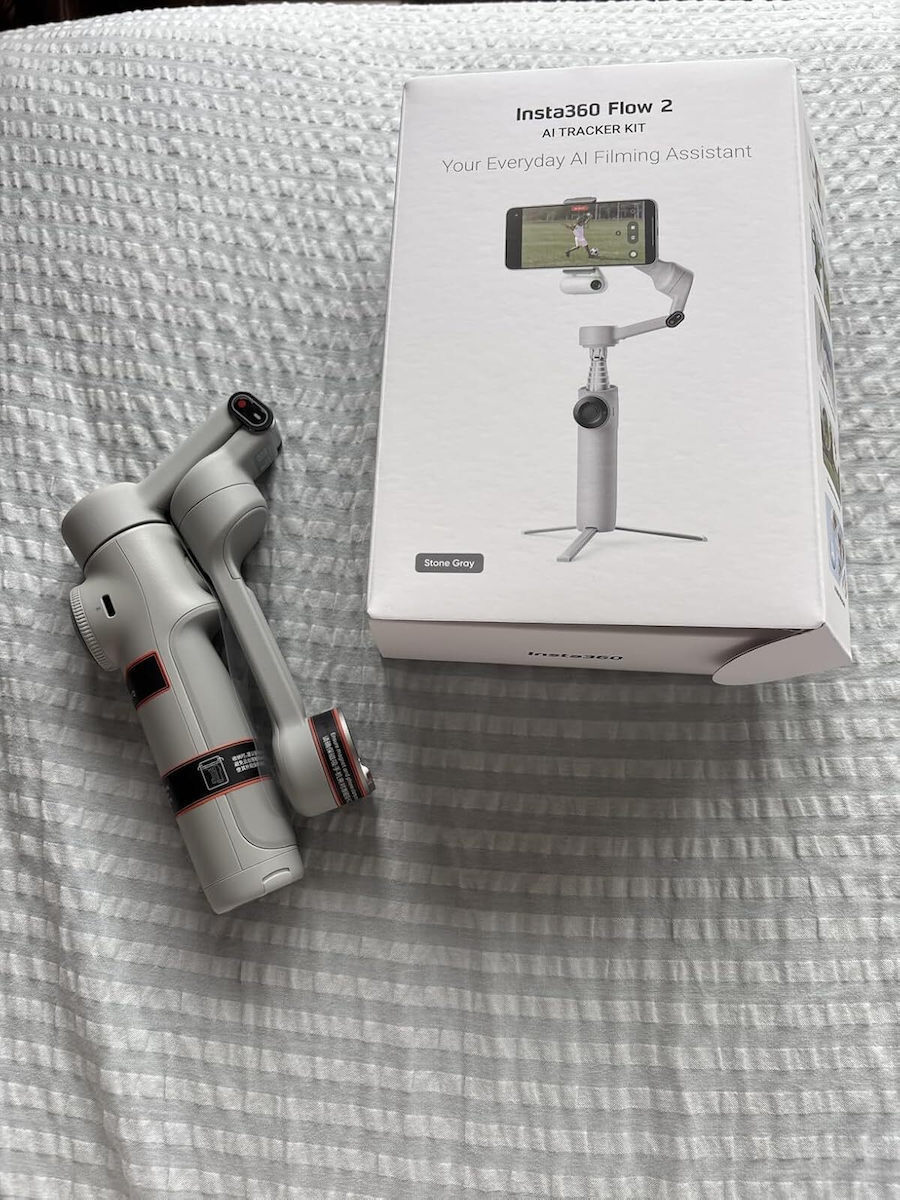
This is the insta360 Flow 2 Kit, a gimbal, selfie stick, and tripod 3-in-1, with three-axis stabilization, and its strong point is that thanks to the AI Tracker included in the Kit, it can lock the gimbal onto you and you can use any app you want, not necessarily the company's app, and go live on social media or shoot videos with the phone's native app, even with the rear camera, something that is impossible with most gimbals.
The tracker also has a powerful light, the buttons give you endless possibilities, such as switching from vertical to horizontal orientation, starting and stopping recording, zooming with the wheel, and manually controlling the orientation with the joystick in the center.
It is a very compact construction so you can even put it in your pocket,
as soon as you open it, it starts working, the phone goes in and out very easily thanks to the magnetic clip, on which you can also put other devices like an action camera,
It has a socket to screw it onto other tripods and accessories,
You can charge your phone via the gimbal,
It also works with gestures, so you can place the phone with the gimbal far away, and take photos or record video,
Αυτό είναι το insta360 Flow 2 Kit, gimbal, selfie stick και τρίποδο 3 σε ένα, με σταθεροποίηση τριών αξόνων και το δυνατό του χαρτί είναι ότι χάρη στο AI Tracker που έρχεται με το Kit, μπορεί και κλειδώνει το gimbal Πάνω σου και μπορείς να χρησιμοποιείς όποια εφαρμογή θες και όχι αναγκαστικά αυτήν της εταιρείας, και να κάνεις live στα social ή να τραβάς βίντεο με την native εφαρμογή του κινητού, ακόμα και με την πίσω κάμερα, κάτι που στα περισσότερα gimbal είναι αδύνατο.
Το tracker έχει και δυνατό φακό, τα κουμπιά που έχει σου δίνου άπειρες δυνατότητες, όπως να γυρνάς από κάθετο σε οριζόντιο προσανατολισμό, να ξεκινάς και να σταματάς εγγραφή, να κάνεις ζουμ με την ροδέλα, αλλά και να χειρίζεσαι manual τον προσανατολισμό με τον μοχλό στο κέντρο.
Είναι πολύ compact κατασκευή για να το βάζεις ακόμα και στην τσέπη σου,
με το που το ανοίγεις ξεκινάει να λειτουργεί, το κινητό μπαινοβγαίνει πανεύκολα χάρη στο μαγνητικό κλιπ, στο οποίο βάζεις κ άλλες συσκευές όπως action camera,
Έχει υποδοχή για να το βιδώσεις σε άλλα τρίποδα και αξεσουάρ,
Μπορείς να φορτίζεις το κινητό σου μέσω του gimbal,
Λειτουργεί και με χειρονομίες, για να τοποθετείς μακριά το κινητό με το gimbal, και να τραβάς φωτο ή να γράφει βίντεο,
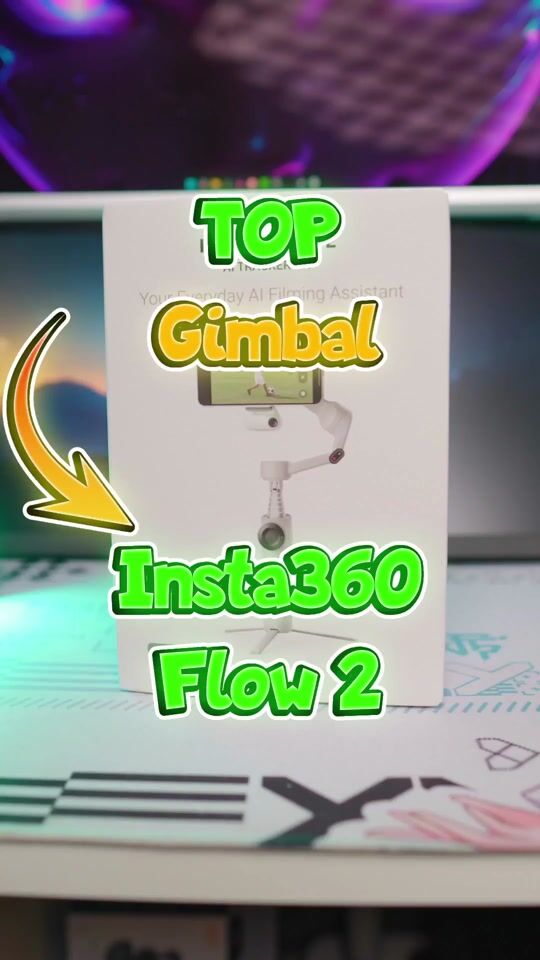
The Flow 2 with AI Tracker is the right purchase for Android.
The Flow 2 Pro is mainly for iPhone, because on iPhone it connects directly with the camera app.
The Flow 2 AI Tracker Bundle has perfect tracking on all apps (Tiktok, Zoom, Instagram, WhatsApp), it just doesn't have a selfie mirror and 360 infinite pan. It rotates up to 180. But it is clearly cheaper than the Pro.
I got it on sale. They are always having sales. I had put it on my wishlist and got a notification.
Το Flow 2 με AI Tracker είναι η σωστή αγορά για Android.
To Flow 2 Pro είναι κυρίως για iPhone. γιατί στο iPhone συνδέεται απευθείας και με το camera app.
Το Flow 2 AI Tracker Bundle έχει τέλειο Tracking σε όλα τα apps (Tiktok zoom intsagram whatsapp) απλά δεν έχει selfie mirror και 360 infinite pan. γυρνάει μέχρι 180. Αλλά είναι σαφώς φτηνότερο από το Pro.
Το πήρα σε προσφορά. κάνουν συνέχεια προσφορές. Το είχα βάλει σε καρδούλα και μου ήρθε ειδοποίηση.
Verified purchase
Perfect!! Worth the money!
Τέλειο!! αξίζει τα λεφτά του!
Verified purchase
Verified purchase
Verified purchase
In the reviews, users do not specify whether they use the gimbal with an Android phone or an iPhone. I’m sharing my own review based on my experience with the device.
I bought the Insta360 Flow 2 AI Tracker Bundle gimbal for my Honor Magic8 Lite phone. I just managed to get it on the last day of the sale. I installed the Insta360 app on my phone according to the instructions. I should point out that I’m a complete beginner and this is my first time using a gimbal. At first, I was impressed by the features it offers. Through the app and without the AI Tracker, it can recognize one or more faces very easily, start recording using the gimbal button, zoom using the wheel, provide excellent stabilization, and offer many other conveniences.
However, after watching the first video, as well as the subsequent ones I recorded, I was disappointed. The video was unacceptable, with distorted colors and dense vertical red or blue lines in various parts of the image. No matter how hard I tried, the result was the same.
In the end, the Insta360 app recommended by the manufacturer is designed to work exclusively on iPhones, not on Android, which is what I have. Besides, in the instructional video for using the Insta360 Flow 2, the presenter uses an iPhone.
After that, I uninstalled the Insta360 app and used the gimbal without it. The video was crystal clear, but the gimbal’s functions using its buttons were limited. Recording video this way cannot be started using the button, but must be started from the phone screen. Zooming cannot be done with the wheel, and there is no recognition of one or multiple faces on the phone screen.
Then I connected the gimbal to my phone via Bluetooth. Most of the functions were enabled, such as the shutter button, which could start and stop video recording or take a photo, as well as zooming by turning the gimbal’s wheel. When used together with the AI Tracker accessory, the gimbal’s functionality was restored. However, face recognition and tracking are handled by the accessory itself, not by the phone’s software. That’s why it enables Auto-Tracking in any camera app you use on your Android phone.
However, make sure the AI Tracker accessory is inserted and firmly locked into the Type-C port. Press the two ends, which open like a clothespin and lock onto the sides of the port. Press the button on the back, directly opposite the gimbal’s front buttons, once; the AI Tracker’s red light turns green, and only then does it lock onto a face. If you press it a second time, it turns off and the light turns red. If the AI Tracker is not inserted correctly, the red light will not turn green. That’s what happened to me at first, and I couldn’t figure out what was wrong.
When there are many people in a room, such as around a large table, enabling the AI Tracker is not convenient, so it’s best to leave it disabled. This is because it may lock onto the nearest face, and the phone will automatically turn toward that person as you try to record the others.
Στις αξιολογήσεις οι χρήστες δεν διευκρινίζουν αν χρησιμοποιούν το gimbal σε κινητό με android ή σε κινητό iFhone. Σας παραθέτω τη δική μου κριτική με βάση τη χρήση της συσκευής.
Αγόρασα το Gimbal Insta360 Flow 2 AI Tracker Bundle για το κινητό μου μάρκας Honor Magic8 Lite. Το πρόλαβα την τελευταία ημέρα της προσφοράς. Εγκατέστησα στο κινητό την εφαρμογή Insta360 σύμφωνα με τις οδηγίες. Να επισημάνω ότι είμαι τελείως αρχάριος και χρησιμοποιώ gimbal για πρώτη φορά. Εντυπωσιάστηκα στην αρχή με τις δυνατότητες που προσφέρει. Μέσω της εφαρμογής και χωρίς το AI Tracker, πανεύκολη αναγνώριση ενός ή περισσότερων προσώπων, δυνατότητα εγγραφής από το κουμπί του gimbal, zoom από τη ροδέλα, σταθεροποίηση πάρα πολύ καλή και πολλές άλλες ευκολίες.
Βλέποντας όμως το πρώτο βίντεο, αλλά και τα επόμενα που τράβηξα, απογοητεύτηκα. Απαράδεκτο βίντεο με αλλοιωμένα χρώματα και με πυκνές κάθετες κόκκινες ή μπλε γραμμές σε διάφορα σημεία της εικόνας. Όσο κι αν προσπάθησα, το αποτέλεσμα ήταν το ίδιο.
Τελικά η εφαρμογή Insta360 που προτείνει ο κατασκευαστής είναι φτιαγμένη για να δουλεύει αποκλειστικά σε iPhone και όχι σε Android που έχω εγώ. Εξάλλου στο εκπαιδευτικό βίντεο για τη χρήση του Insta360 Flow 2, η παρουσιάστρια χρησιμοποιεί κινητό iPhone.
Μετά από αυτό, απεγκατέστησα την εφαρμογή Insta360 και χρησιμοποίησα το gimbal χωρίς αυτήν. Το βίντεο ήταν πεντακάθαρο, αλλά οι λειτουργία του gimbal μέσω των πλήκτρων περιορισμένη. Η έναρξη της εγγραφής του βίντεο με αυτόν τον τρόπο δε γίνεται από το πλήκτρο, αλλά από την οθόνη του κινητού. Το zoom δε γίνεται με τη ροδέλα και δεν υπάρχει η αναγνώριση ενός ή πολλαπλών προσώπων στην οθόνη του κινητού.
Στη συνέχεια σύνδεσα το gimbal με το κινητό μέσω bluetooth. Οι περισσότερες λειτουργίες ενεργοποιήθηκαν, όπως το κουμπί λήψης (Shutter) το οποίο ενεργοποιήθηκε ξεκινώντας και σταματώντας την εγγραφή του βίντεο ή πραγματοποιώντας τη λήψη μιας φωτογραφίας με αυτό, αλλά και το zoom που γίνεται γυρίζοντας τη ροδέλα του gimpal. Σε συνδυασμό με το εξάρτημα AI Tracker η λειτουργία του gimbal αποκαταστάθηκε. Όμως, η αναγνώριση προσώπου και η κίνηση υπολογίζονται από το ίδιο το αξεσουάρ και όχι από το λογισμικό του τηλεφώνου. Γι΄ αυτό ξεκλειδώνει το Auto-Tracking σε οποιαδήποτε εφαρμογή κάμερας χρησιμοποιείτε στο android κινητό σας.
Προσέξτε όμως το εξάρτημα AI Tracker πρέπει να μπει και να κλειδώσει καλά στη θύρα type c. Πιέζετε τις δύο άκρες οι οποίες ανοίγουν σαν μανταλάκι και κλειδώνουν στις άκρες της θύρας. Πατώντας μια φορά το κουμπί που βρίσκεται πίσω, διαμετρικά αντίθετα από τα μπροστινά πλήκτρα του gimbal, το κόκκινο λαμπάκι του AI Tracker γίνεται πράσινο και τότε μόνο κλειδώνει πάνω στο πρόσωπο. Αν το πατήσετε 2η φορά, απενεργοποιείται και το λαμπάκι γίνεται κόκκινο. Αν δεν μπει σωστά το AI Tracker, το κόκκινο λαπμπάκι δεν πρόκειται να γίνει πράσινο. Έτσι την πάτησα στην αρχή και δεν μπορούσα να καταλάβω τι φταίει.
Όταν υπάρχουν πολλά άτομα σε έναν χώρο, όπως π.χ. γύρω από ένα μεγάλο τραπέζι, η ενεργοποίηση του AI Tracker δε βολεύει και καλά είναι να το έχετε απενεργοποιημένο. Αυτό γιατί μπορεί να κλειδώσει πάνω στο κοντινότερο πρόσωπο και το κινητό να στρίβει αυτόματα προς αυτό καθώς προσπαθείτε να τραβήξετε βίντεο τα υπόλοιπα άτομα.
This is the insta360 Flow 2 Kit, a gimbal, selfie stick, and tripod 3-in-1, with three-axis stabilization, and its strong point is that thanks to the AI Tracker included in the Kit, it can lock the gimbal onto you and you can use any app you want, not necessarily the company's app, and go live on social media or shoot videos with the phone's native app, even with the rear camera, something that is impossible with most gimbals.
The tracker also has a powerful light, the buttons give you endless possibilities, such as switching from vertical to horizontal orientation, starting and stopping recording, zooming with the wheel, and manually controlling the orientation with the joystick in the center.
It is a very compact construction so you can even put it in your pocket,
as soon as you open it, it starts working, the phone goes in and out very easily thanks to the magnetic clip, on which you can also put other devices like an action camera,
It has a socket to screw it onto other tripods and accessories,
You can charge your phone via the gimbal,
It also works with gestures, so you can place the phone with the gimbal far away, and take photos or record video,
Αυτό είναι το insta360 Flow 2 Kit, gimbal, selfie stick και τρίποδο 3 σε ένα, με σταθεροποίηση τριών αξόνων και το δυνατό του χαρτί είναι ότι χάρη στο AI Tracker που έρχεται με το Kit, μπορεί και κλειδώνει το gimbal Πάνω σου και μπορείς να χρησιμοποιείς όποια εφαρμογή θες και όχι αναγκαστικά αυτήν της εταιρείας, και να κάνεις live στα social ή να τραβάς βίντεο με την native εφαρμογή του κινητού, ακόμα και με την πίσω κάμερα, κάτι που στα περισσότερα gimbal είναι αδύνατο.
Το tracker έχει και δυνατό φακό, τα κουμπιά που έχει σου δίνου άπειρες δυνατότητες, όπως να γυρνάς από κάθετο σε οριζόντιο προσανατολισμό, να ξεκινάς και να σταματάς εγγραφή, να κάνεις ζουμ με την ροδέλα, αλλά και να χειρίζεσαι manual τον προσανατολισμό με τον μοχλό στο κέντρο.
Είναι πολύ compact κατασκευή για να το βάζεις ακόμα και στην τσέπη σου,
με το που το ανοίγεις ξεκινάει να λειτουργεί, το κινητό μπαινοβγαίνει πανεύκολα χάρη στο μαγνητικό κλιπ, στο οποίο βάζεις κ άλλες συσκευές όπως action camera,
Έχει υποδοχή για να το βιδώσεις σε άλλα τρίποδα και αξεσουάρ,
Μπορείς να φορτίζεις το κινητό σου μέσω του gimbal,
Λειτουργεί και με χειρονομίες, για να τοποθετείς μακριά το κινητό με το gimbal, και να τραβάς φωτο ή να γράφει βίντεο,
The Flow 2 with AI Tracker is the right purchase for Android.
The Flow 2 Pro is mainly for iPhone, because on iPhone it connects directly with the camera app.
The Flow 2 AI Tracker Bundle has perfect tracking on all apps (Tiktok, Zoom, Instagram, WhatsApp), it just doesn't have a selfie mirror and 360 infinite pan. It rotates up to 180. But it is clearly cheaper than the Pro.
I got it on sale. They are always having sales. I had put it on my wishlist and got a notification.
Το Flow 2 με AI Tracker είναι η σωστή αγορά για Android.
To Flow 2 Pro είναι κυρίως για iPhone. γιατί στο iPhone συνδέεται απευθείας και με το camera app.
Το Flow 2 AI Tracker Bundle έχει τέλειο Tracking σε όλα τα apps (Tiktok zoom intsagram whatsapp) απλά δεν έχει selfie mirror και 360 infinite pan. γυρνάει μέχρι 180. Αλλά είναι σαφώς φτηνότερο από το Pro.
Το πήρα σε προσφορά. κάνουν συνέχεια προσφορές. Το είχα βάλει σε καρδούλα και μου ήρθε ειδοποίηση.
Perfect!! Worth the money!
Τέλειο!! αξίζει τα λεφτά του!
19 users have this product and can help you
Ask for the productInsta360 Flow 2
Everyday AI Cinematography Assistant
Included in the package:
Manufacturer: Insta360
Weight: 0.7kg
Specifications are collected from official manufacturer websites. Please verify the specifications before proceeding with your final purchase. If you notice any problem you can report it here.
In the reviews, users do not specify whether they use the gimbal with an Android phone or an iPhone. I’m sharing my own review based on my experience with the device.
I bought the Insta360 Flow 2 AI Tracker Bundle gimbal for my Honor Magic8 Lite phone. I just managed to get it on the last day of the sale. I installed the Insta360 app on my phone according to the instructions. I should point out that I’m a complete beginner and this is my first time using a gimbal. At first, I was impressed by the features it offers. Through the app and without the AI Tracker, it can recognize one or more faces very easily, start recording using the gimbal button, zoom using the wheel, provide excellent stabilization, and offer many other conveniences.
However, after watching the first video, as well as the subsequent ones I recorded, I was disappointed. The video was unacceptable, with distorted colors and dense vertical red or blue lines in various parts of the image. No matter how hard I tried, the result was the same.
In the end, the Insta360 app recommended by the manufacturer is designed to work exclusively on iPhones, not on Android, which is what I have. Besides, in the instructional video for using the Insta360 Flow 2, the presenter uses an iPhone.
After that, I uninstalled the Insta360 app and used the gimbal without it. The video was crystal clear, but the gimbal’s functions using its buttons were limited. Recording video this way cannot be started using the button, but must be started from the phone screen. Zooming cannot be done with the wheel, and there is no recognition of one or multiple faces on the phone screen.
Then I connected the gimbal to my phone via Bluetooth. Most of the functions were enabled, such as the shutter button, which could start and stop video recording or take a photo, as well as zooming by turning the gimbal’s wheel. When used together with the AI Tracker accessory, the gimbal’s functionality was restored. However, face recognition and tracking are handled by the accessory itself, not by the phone’s software. That’s why it enables Auto-Tracking in any camera app you use on your Android phone.
However, make sure the AI Tracker accessory is inserted and firmly locked into the Type-C port. Press the two ends, which open like a clothespin and lock onto the sides of the port. Press the button on the back, directly opposite the gimbal’s front buttons, once; the AI Tracker’s red light turns green, and only then does it lock onto a face. If you press it a second time, it turns off and the light turns red. If the AI Tracker is not inserted correctly, the red light will not turn green. That’s what happened to me at first, and I couldn’t figure out what was wrong.
When there are many people in a room, such as around a large table, enabling the AI Tracker is not convenient, so it’s best to leave it disabled. This is because it may lock onto the nearest face, and the phone will automatically turn toward that person as you try to record the others.
Στις αξιολογήσεις οι χρήστες δεν διευκρινίζουν αν χρησιμοποιούν το gimbal σε κινητό με android ή σε κινητό iFhone. Σας παραθέτω τη δική μου κριτική με βάση τη χρήση της συσκευής.
Αγόρασα το Gimbal Insta360 Flow 2 AI Tracker Bundle για το κινητό μου μάρκας Honor Magic8 Lite. Το πρόλαβα την τελευταία ημέρα της προσφοράς. Εγκατέστησα στο κινητό την εφαρμογή Insta360 σύμφωνα με τις οδηγίες. Να επισημάνω ότι είμαι τελείως αρχάριος και χρησιμοποιώ gimbal για πρώτη φορά. Εντυπωσιάστηκα στην αρχή με τις δυνατότητες που προσφέρει. Μέσω της εφαρμογής και χωρίς το AI Tracker, πανεύκολη αναγνώριση ενός ή περισσότερων προσώπων, δυνατότητα εγγραφής από το κουμπί του gimbal, zoom από τη ροδέλα, σταθεροποίηση πάρα πολύ καλή και πολλές άλλες ευκολίες.
Βλέποντας όμως το πρώτο βίντεο, αλλά και τα επόμενα που τράβηξα, απογοητεύτηκα. Απαράδεκτο βίντεο με αλλοιωμένα χρώματα και με πυκνές κάθετες κόκκινες ή μπλε γραμμές σε διάφορα σημεία της εικόνας. Όσο κι αν προσπάθησα, το αποτέλεσμα ήταν το ίδιο.
Τελικά η εφαρμογή Insta360 που προτείνει ο κατασκευαστής είναι φτιαγμένη για να δουλεύει αποκλειστικά σε iPhone και όχι σε Android που έχω εγώ. Εξάλλου στο εκπαιδευτικό βίντεο για τη χρήση του Insta360 Flow 2, η παρουσιάστρια χρησιμοποιεί κινητό iPhone.
Μετά από αυτό, απεγκατέστησα την εφαρμογή Insta360 και χρησιμοποίησα το gimbal χωρίς αυτήν. Το βίντεο ήταν πεντακάθαρο, αλλά οι λειτουργία του gimbal μέσω των πλήκτρων περιορισμένη. Η έναρξη της εγγραφής του βίντεο με αυτόν τον τρόπο δε γίνεται από το πλήκτρο, αλλά από την οθόνη του κινητού. Το zoom δε γίνεται με τη ροδέλα και δεν υπάρχει η αναγνώριση ενός ή πολλαπλών προσώπων στην οθόνη του κινητού.
Στη συνέχεια σύνδεσα το gimbal με το κινητό μέσω bluetooth. Οι περισσότερες λειτουργίες ενεργοποιήθηκαν, όπως το κουμπί λήψης (Shutter) το οποίο ενεργοποιήθηκε ξεκινώντας και σταματώντας την εγγραφή του βίντεο ή πραγματοποιώντας τη λήψη μιας φωτογραφίας με αυτό, αλλά και το zoom που γίνεται γυρίζοντας τη ροδέλα του gimpal. Σε συνδυασμό με το εξάρτημα AI Tracker η λειτουργία του gimbal αποκαταστάθηκε. Όμως, η αναγνώριση προσώπου και η κίνηση υπολογίζονται από το ίδιο το αξεσουάρ και όχι από το λογισμικό του τηλεφώνου. Γι΄ αυτό ξεκλειδώνει το Auto-Tracking σε οποιαδήποτε εφαρμογή κάμερας χρησιμοποιείτε στο android κινητό σας.
Προσέξτε όμως το εξάρτημα AI Tracker πρέπει να μπει και να κλειδώσει καλά στη θύρα type c. Πιέζετε τις δύο άκρες οι οποίες ανοίγουν σαν μανταλάκι και κλειδώνουν στις άκρες της θύρας. Πατώντας μια φορά το κουμπί που βρίσκεται πίσω, διαμετρικά αντίθετα από τα μπροστινά πλήκτρα του gimbal, το κόκκινο λαμπάκι του AI Tracker γίνεται πράσινο και τότε μόνο κλειδώνει πάνω στο πρόσωπο. Αν το πατήσετε 2η φορά, απενεργοποιείται και το λαμπάκι γίνεται κόκκινο. Αν δεν μπει σωστά το AI Tracker, το κόκκινο λαπμπάκι δεν πρόκειται να γίνει πράσινο. Έτσι την πάτησα στην αρχή και δεν μπορούσα να καταλάβω τι φταίει.
Όταν υπάρχουν πολλά άτομα σε έναν χώρο, όπως π.χ. γύρω από ένα μεγάλο τραπέζι, η ενεργοποίηση του AI Tracker δε βολεύει και καλά είναι να το έχετε απενεργοποιημένο. Αυτό γιατί μπορεί να κλειδώσει πάνω στο κοντινότερο πρόσωπο και το κινητό να στρίβει αυτόματα προς αυτό καθώς προσπαθείτε να τραβήξετε βίντεο τα υπόλοιπα άτομα.
This is the insta360 Flow 2 Kit, a gimbal, selfie stick, and tripod 3-in-1, with three-axis stabilization, and its strong point is that thanks to the AI Tracker included in the Kit, it can lock the gimbal onto you and you can use any app you want, not necessarily the company's app, and go live on social media or shoot videos with the phone's native app, even with the rear camera, something that is impossible with most gimbals.
The tracker also has a powerful light, the buttons give you endless possibilities, such as switching from vertical to horizontal orientation, starting and stopping recording, zooming with the wheel, and manually controlling the orientation with the joystick in the center.
It is a very compact construction so you can even put it in your pocket,
as soon as you open it, it starts working, the phone goes in and out very easily thanks to the magnetic clip, on which you can also put other devices like an action camera,
It has a socket to screw it onto other tripods and accessories,
You can charge your phone via the gimbal,
It also works with gestures, so you can place the phone with the gimbal far away, and take photos or record video,
Αυτό είναι το insta360 Flow 2 Kit, gimbal, selfie stick και τρίποδο 3 σε ένα, με σταθεροποίηση τριών αξόνων και το δυνατό του χαρτί είναι ότι χάρη στο AI Tracker που έρχεται με το Kit, μπορεί και κλειδώνει το gimbal Πάνω σου και μπορείς να χρησιμοποιείς όποια εφαρμογή θες και όχι αναγκαστικά αυτήν της εταιρείας, και να κάνεις live στα social ή να τραβάς βίντεο με την native εφαρμογή του κινητού, ακόμα και με την πίσω κάμερα, κάτι που στα περισσότερα gimbal είναι αδύνατο.
Το tracker έχει και δυνατό φακό, τα κουμπιά που έχει σου δίνου άπειρες δυνατότητες, όπως να γυρνάς από κάθετο σε οριζόντιο προσανατολισμό, να ξεκινάς και να σταματάς εγγραφή, να κάνεις ζουμ με την ροδέλα, αλλά και να χειρίζεσαι manual τον προσανατολισμό με τον μοχλό στο κέντρο.
Είναι πολύ compact κατασκευή για να το βάζεις ακόμα και στην τσέπη σου,
με το που το ανοίγεις ξεκινάει να λειτουργεί, το κινητό μπαινοβγαίνει πανεύκολα χάρη στο μαγνητικό κλιπ, στο οποίο βάζεις κ άλλες συσκευές όπως action camera,
Έχει υποδοχή για να το βιδώσεις σε άλλα τρίποδα και αξεσουάρ,
Μπορείς να φορτίζεις το κινητό σου μέσω του gimbal,
Λειτουργεί και με χειρονομίες, για να τοποθετείς μακριά το κινητό με το gimbal, και να τραβάς φωτο ή να γράφει βίντεο,
The Flow 2 with AI Tracker is the right purchase for Android.
The Flow 2 Pro is mainly for iPhone, because on iPhone it connects directly with the camera app.
The Flow 2 AI Tracker Bundle has perfect tracking on all apps (Tiktok, Zoom, Instagram, WhatsApp), it just doesn't have a selfie mirror and 360 infinite pan. It rotates up to 180. But it is clearly cheaper than the Pro.
I got it on sale. They are always having sales. I had put it on my wishlist and got a notification.
Το Flow 2 με AI Tracker είναι η σωστή αγορά για Android.
To Flow 2 Pro είναι κυρίως για iPhone. γιατί στο iPhone συνδέεται απευθείας και με το camera app.
Το Flow 2 AI Tracker Bundle έχει τέλειο Tracking σε όλα τα apps (Tiktok zoom intsagram whatsapp) απλά δεν έχει selfie mirror και 360 infinite pan. γυρνάει μέχρι 180. Αλλά είναι σαφώς φτηνότερο από το Pro.
Το πήρα σε προσφορά. κάνουν συνέχεια προσφορές. Το είχα βάλει σε καρδούλα και μου ήρθε ειδοποίηση.
Verified purchase
Perfect!! Worth the money!
Τέλειο!! αξίζει τα λεφτά του!
Verified purchase
Verified purchase
Verified purchase
In the reviews, users do not specify whether they use the gimbal with an Android phone or an iPhone. I’m sharing my own review based on my experience with the device.
I bought the Insta360 Flow 2 AI Tracker Bundle gimbal for my Honor Magic8 Lite phone. I just managed to get it on the last day of the sale. I installed the Insta360 app on my phone according to the instructions. I should point out that I’m a complete beginner and this is my first time using a gimbal. At first, I was impressed by the features it offers. Through the app and without the AI Tracker, it can recognize one or more faces very easily, start recording using the gimbal button, zoom using the wheel, provide excellent stabilization, and offer many other conveniences.
However, after watching the first video, as well as the subsequent ones I recorded, I was disappointed. The video was unacceptable, with distorted colors and dense vertical red or blue lines in various parts of the image. No matter how hard I tried, the result was the same.
In the end, the Insta360 app recommended by the manufacturer is designed to work exclusively on iPhones, not on Android, which is what I have. Besides, in the instructional video for using the Insta360 Flow 2, the presenter uses an iPhone.
After that, I uninstalled the Insta360 app and used the gimbal without it. The video was crystal clear, but the gimbal’s functions using its buttons were limited. Recording video this way cannot be started using the button, but must be started from the phone screen. Zooming cannot be done with the wheel, and there is no recognition of one or multiple faces on the phone screen.
Then I connected the gimbal to my phone via Bluetooth. Most of the functions were enabled, such as the shutter button, which could start and stop video recording or take a photo, as well as zooming by turning the gimbal’s wheel. When used together with the AI Tracker accessory, the gimbal’s functionality was restored. However, face recognition and tracking are handled by the accessory itself, not by the phone’s software. That’s why it enables Auto-Tracking in any camera app you use on your Android phone.
However, make sure the AI Tracker accessory is inserted and firmly locked into the Type-C port. Press the two ends, which open like a clothespin and lock onto the sides of the port. Press the button on the back, directly opposite the gimbal’s front buttons, once; the AI Tracker’s red light turns green, and only then does it lock onto a face. If you press it a second time, it turns off and the light turns red. If the AI Tracker is not inserted correctly, the red light will not turn green. That’s what happened to me at first, and I couldn’t figure out what was wrong.
When there are many people in a room, such as around a large table, enabling the AI Tracker is not convenient, so it’s best to leave it disabled. This is because it may lock onto the nearest face, and the phone will automatically turn toward that person as you try to record the others.
Στις αξιολογήσεις οι χρήστες δεν διευκρινίζουν αν χρησιμοποιούν το gimbal σε κινητό με android ή σε κινητό iFhone. Σας παραθέτω τη δική μου κριτική με βάση τη χρήση της συσκευής.
Αγόρασα το Gimbal Insta360 Flow 2 AI Tracker Bundle για το κινητό μου μάρκας Honor Magic8 Lite. Το πρόλαβα την τελευταία ημέρα της προσφοράς. Εγκατέστησα στο κινητό την εφαρμογή Insta360 σύμφωνα με τις οδηγίες. Να επισημάνω ότι είμαι τελείως αρχάριος και χρησιμοποιώ gimbal για πρώτη φορά. Εντυπωσιάστηκα στην αρχή με τις δυνατότητες που προσφέρει. Μέσω της εφαρμογής και χωρίς το AI Tracker, πανεύκολη αναγνώριση ενός ή περισσότερων προσώπων, δυνατότητα εγγραφής από το κουμπί του gimbal, zoom από τη ροδέλα, σταθεροποίηση πάρα πολύ καλή και πολλές άλλες ευκολίες.
Βλέποντας όμως το πρώτο βίντεο, αλλά και τα επόμενα που τράβηξα, απογοητεύτηκα. Απαράδεκτο βίντεο με αλλοιωμένα χρώματα και με πυκνές κάθετες κόκκινες ή μπλε γραμμές σε διάφορα σημεία της εικόνας. Όσο κι αν προσπάθησα, το αποτέλεσμα ήταν το ίδιο.
Τελικά η εφαρμογή Insta360 που προτείνει ο κατασκευαστής είναι φτιαγμένη για να δουλεύει αποκλειστικά σε iPhone και όχι σε Android που έχω εγώ. Εξάλλου στο εκπαιδευτικό βίντεο για τη χρήση του Insta360 Flow 2, η παρουσιάστρια χρησιμοποιεί κινητό iPhone.
Μετά από αυτό, απεγκατέστησα την εφαρμογή Insta360 και χρησιμοποίησα το gimbal χωρίς αυτήν. Το βίντεο ήταν πεντακάθαρο, αλλά οι λειτουργία του gimbal μέσω των πλήκτρων περιορισμένη. Η έναρξη της εγγραφής του βίντεο με αυτόν τον τρόπο δε γίνεται από το πλήκτρο, αλλά από την οθόνη του κινητού. Το zoom δε γίνεται με τη ροδέλα και δεν υπάρχει η αναγνώριση ενός ή πολλαπλών προσώπων στην οθόνη του κινητού.
Στη συνέχεια σύνδεσα το gimbal με το κινητό μέσω bluetooth. Οι περισσότερες λειτουργίες ενεργοποιήθηκαν, όπως το κουμπί λήψης (Shutter) το οποίο ενεργοποιήθηκε ξεκινώντας και σταματώντας την εγγραφή του βίντεο ή πραγματοποιώντας τη λήψη μιας φωτογραφίας με αυτό, αλλά και το zoom που γίνεται γυρίζοντας τη ροδέλα του gimpal. Σε συνδυασμό με το εξάρτημα AI Tracker η λειτουργία του gimbal αποκαταστάθηκε. Όμως, η αναγνώριση προσώπου και η κίνηση υπολογίζονται από το ίδιο το αξεσουάρ και όχι από το λογισμικό του τηλεφώνου. Γι΄ αυτό ξεκλειδώνει το Auto-Tracking σε οποιαδήποτε εφαρμογή κάμερας χρησιμοποιείτε στο android κινητό σας.
Προσέξτε όμως το εξάρτημα AI Tracker πρέπει να μπει και να κλειδώσει καλά στη θύρα type c. Πιέζετε τις δύο άκρες οι οποίες ανοίγουν σαν μανταλάκι και κλειδώνουν στις άκρες της θύρας. Πατώντας μια φορά το κουμπί που βρίσκεται πίσω, διαμετρικά αντίθετα από τα μπροστινά πλήκτρα του gimbal, το κόκκινο λαμπάκι του AI Tracker γίνεται πράσινο και τότε μόνο κλειδώνει πάνω στο πρόσωπο. Αν το πατήσετε 2η φορά, απενεργοποιείται και το λαμπάκι γίνεται κόκκινο. Αν δεν μπει σωστά το AI Tracker, το κόκκινο λαπμπάκι δεν πρόκειται να γίνει πράσινο. Έτσι την πάτησα στην αρχή και δεν μπορούσα να καταλάβω τι φταίει.
Όταν υπάρχουν πολλά άτομα σε έναν χώρο, όπως π.χ. γύρω από ένα μεγάλο τραπέζι, η ενεργοποίηση του AI Tracker δε βολεύει και καλά είναι να το έχετε απενεργοποιημένο. Αυτό γιατί μπορεί να κλειδώσει πάνω στο κοντινότερο πρόσωπο και το κινητό να στρίβει αυτόματα προς αυτό καθώς προσπαθείτε να τραβήξετε βίντεο τα υπόλοιπα άτομα.
This is the insta360 Flow 2 Kit, a gimbal, selfie stick, and tripod 3-in-1, with three-axis stabilization, and its strong point is that thanks to the AI Tracker included in the Kit, it can lock the gimbal onto you and you can use any app you want, not necessarily the company's app, and go live on social media or shoot videos with the phone's native app, even with the rear camera, something that is impossible with most gimbals.
The tracker also has a powerful light, the buttons give you endless possibilities, such as switching from vertical to horizontal orientation, starting and stopping recording, zooming with the wheel, and manually controlling the orientation with the joystick in the center.
It is a very compact construction so you can even put it in your pocket,
as soon as you open it, it starts working, the phone goes in and out very easily thanks to the magnetic clip, on which you can also put other devices like an action camera,
It has a socket to screw it onto other tripods and accessories,
You can charge your phone via the gimbal,
It also works with gestures, so you can place the phone with the gimbal far away, and take photos or record video,
Αυτό είναι το insta360 Flow 2 Kit, gimbal, selfie stick και τρίποδο 3 σε ένα, με σταθεροποίηση τριών αξόνων και το δυνατό του χαρτί είναι ότι χάρη στο AI Tracker που έρχεται με το Kit, μπορεί και κλειδώνει το gimbal Πάνω σου και μπορείς να χρησιμοποιείς όποια εφαρμογή θες και όχι αναγκαστικά αυτήν της εταιρείας, και να κάνεις live στα social ή να τραβάς βίντεο με την native εφαρμογή του κινητού, ακόμα και με την πίσω κάμερα, κάτι που στα περισσότερα gimbal είναι αδύνατο.
Το tracker έχει και δυνατό φακό, τα κουμπιά που έχει σου δίνου άπειρες δυνατότητες, όπως να γυρνάς από κάθετο σε οριζόντιο προσανατολισμό, να ξεκινάς και να σταματάς εγγραφή, να κάνεις ζουμ με την ροδέλα, αλλά και να χειρίζεσαι manual τον προσανατολισμό με τον μοχλό στο κέντρο.
Είναι πολύ compact κατασκευή για να το βάζεις ακόμα και στην τσέπη σου,
με το που το ανοίγεις ξεκινάει να λειτουργεί, το κινητό μπαινοβγαίνει πανεύκολα χάρη στο μαγνητικό κλιπ, στο οποίο βάζεις κ άλλες συσκευές όπως action camera,
Έχει υποδοχή για να το βιδώσεις σε άλλα τρίποδα και αξεσουάρ,
Μπορείς να φορτίζεις το κινητό σου μέσω του gimbal,
Λειτουργεί και με χειρονομίες, για να τοποθετείς μακριά το κινητό με το gimbal, και να τραβάς φωτο ή να γράφει βίντεο,
The Flow 2 with AI Tracker is the right purchase for Android.
The Flow 2 Pro is mainly for iPhone, because on iPhone it connects directly with the camera app.
The Flow 2 AI Tracker Bundle has perfect tracking on all apps (Tiktok, Zoom, Instagram, WhatsApp), it just doesn't have a selfie mirror and 360 infinite pan. It rotates up to 180. But it is clearly cheaper than the Pro.
I got it on sale. They are always having sales. I had put it on my wishlist and got a notification.
Το Flow 2 με AI Tracker είναι η σωστή αγορά για Android.
To Flow 2 Pro είναι κυρίως για iPhone. γιατί στο iPhone συνδέεται απευθείας και με το camera app.
Το Flow 2 AI Tracker Bundle έχει τέλειο Tracking σε όλα τα apps (Tiktok zoom intsagram whatsapp) απλά δεν έχει selfie mirror και 360 infinite pan. γυρνάει μέχρι 180. Αλλά είναι σαφώς φτηνότερο από το Pro.
Το πήρα σε προσφορά. κάνουν συνέχεια προσφορές. Το είχα βάλει σε καρδούλα και μου ήρθε ειδοποίηση.
Perfect!! Worth the money!
Τέλειο!! αξίζει τα λεφτά του!

Your report helps us take action by understanding the issues our users face with various types of content
Be the first to leave a comment!