Unlimited creativity and a new dimension in navigation await beginners and professionals with the Antigravity A1 8K 360 Drone Standard Bundle. Using the power of Insta360 algorithms, the top and
Unlimited creativity and a new dimension in navigation await beginners and professionals with the Antigravity A1 8K 360 Drone Standard Bundle. Using the power of Insta360 algorithms, the top and bottom lenses merge into a single 360° shot without the drone appearing in the final video.
You're covered by the statutory 2-year warranty. Contact us and we'll handle the entire process with the store, ensuring your issue is resolved with prompt support through a repair, replacement, or refund.
What if I change my mind?
No problem, as long as it's within 14 days. We'll come pick it up or you can choose the Skroutz Point that suits you, completely free for up to 2 times per year, and we'll refund your money. Get Skroutz Plus to enjoy unlimited free returns.
Do you want to gift it?
You select "Gift order" in the cart. We do not include a receipt in the package and provide an electronic exchange card, just in case.
You can select additional services after adding the product to the cart.
Wednesday, September 2, 2026
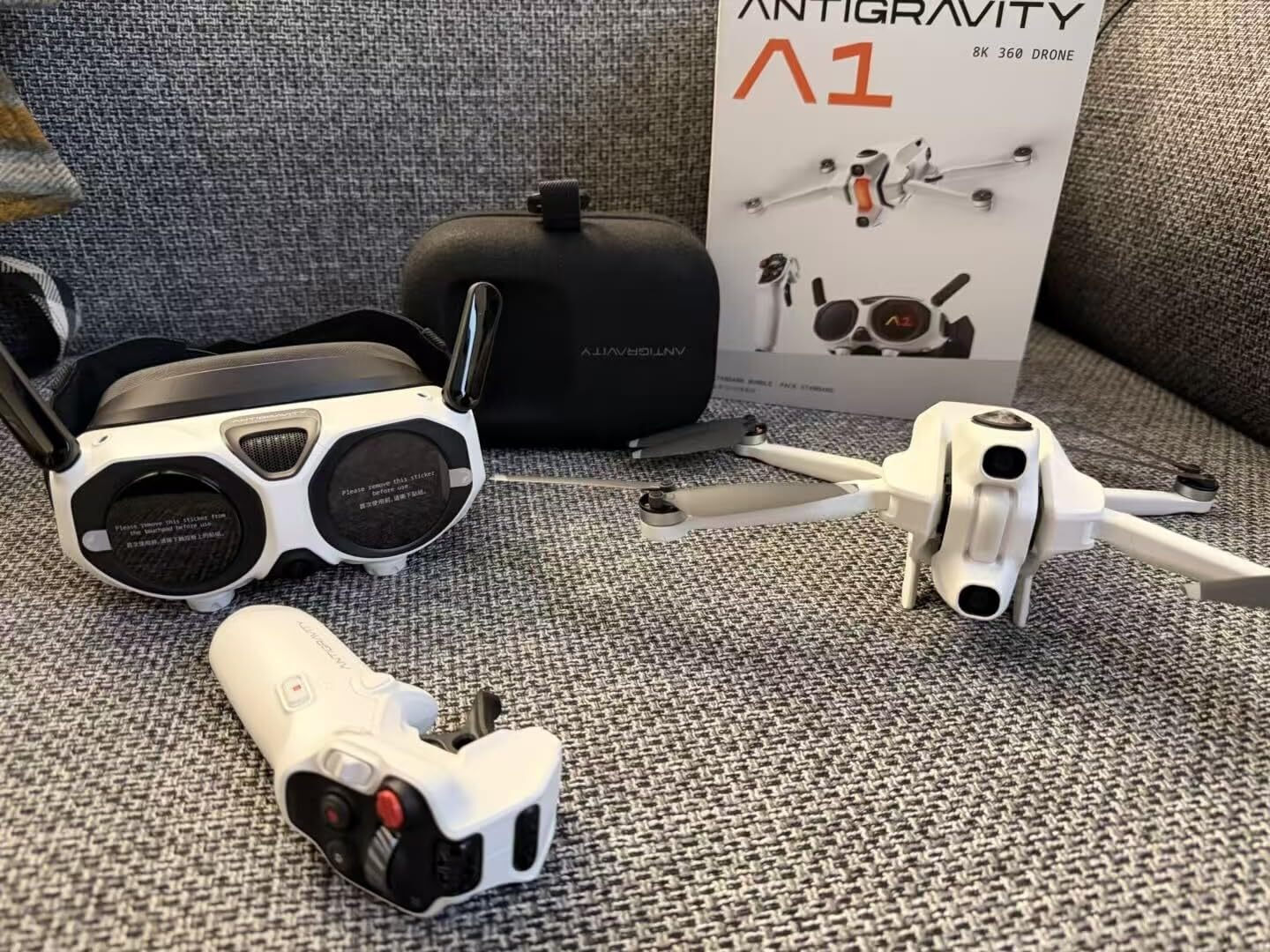
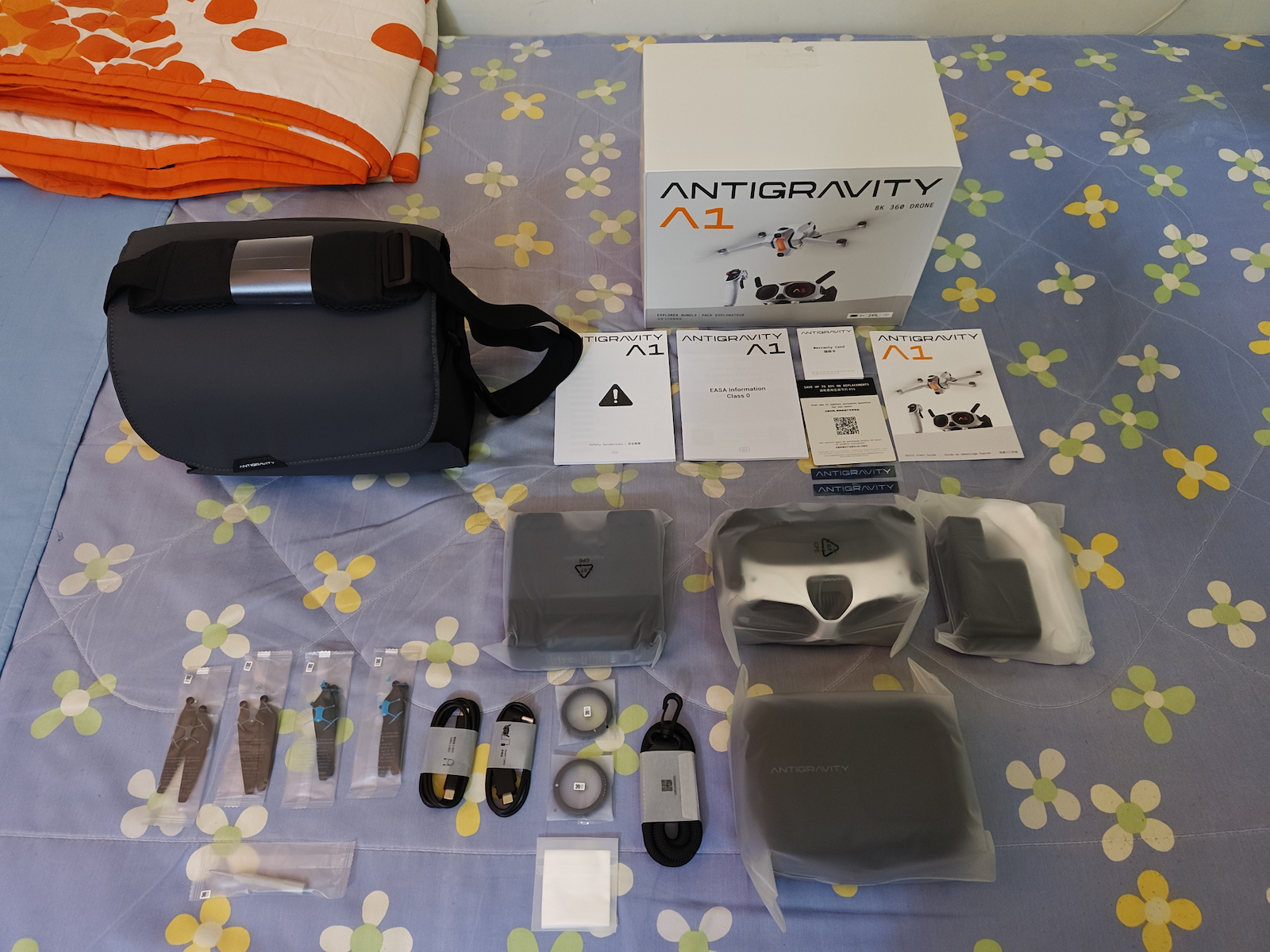
I have just received my first Drone for 999 Euros, which I chose purely because FPV goggles are included and you pilot much better compared to piloting a Drone just by looking at the screen on a controller.
As soon as I unpacked the things and saw:
* The Drone
* And the Controller
...I can tell you that I got scared. They are so small that the photos and the various videos on YouTube really deceive you.
You say: "Now this is a Drone? And this is a Controller?"
Could they be fake toys? Camouflaged? And yet...
They are incredibly small, but their capabilities are incredible.
Everything came together inside this small black bag (2nd photo), where you can carry the little bag wherever you go.
On any trip.
Just each time you will spend about 5-10 minutes until you take them out of the little bags and get them ready to fly.
And at the end... after the flight, until you put them back carefully into the bags (especially the Drone), it will take you about 5-10 minutes.
.
I had planned to get the "Antigravity A1 Infinity Bundle" with the High-Capacity Batteries, but the Drone would have a label saying C1 category.
That is, you need to get a "Drone Pilot License"
(and renew it every 5 years) because with the High-Capacity batteries the Drone exceeds 249g grams.
.
So I chose this specific Drone
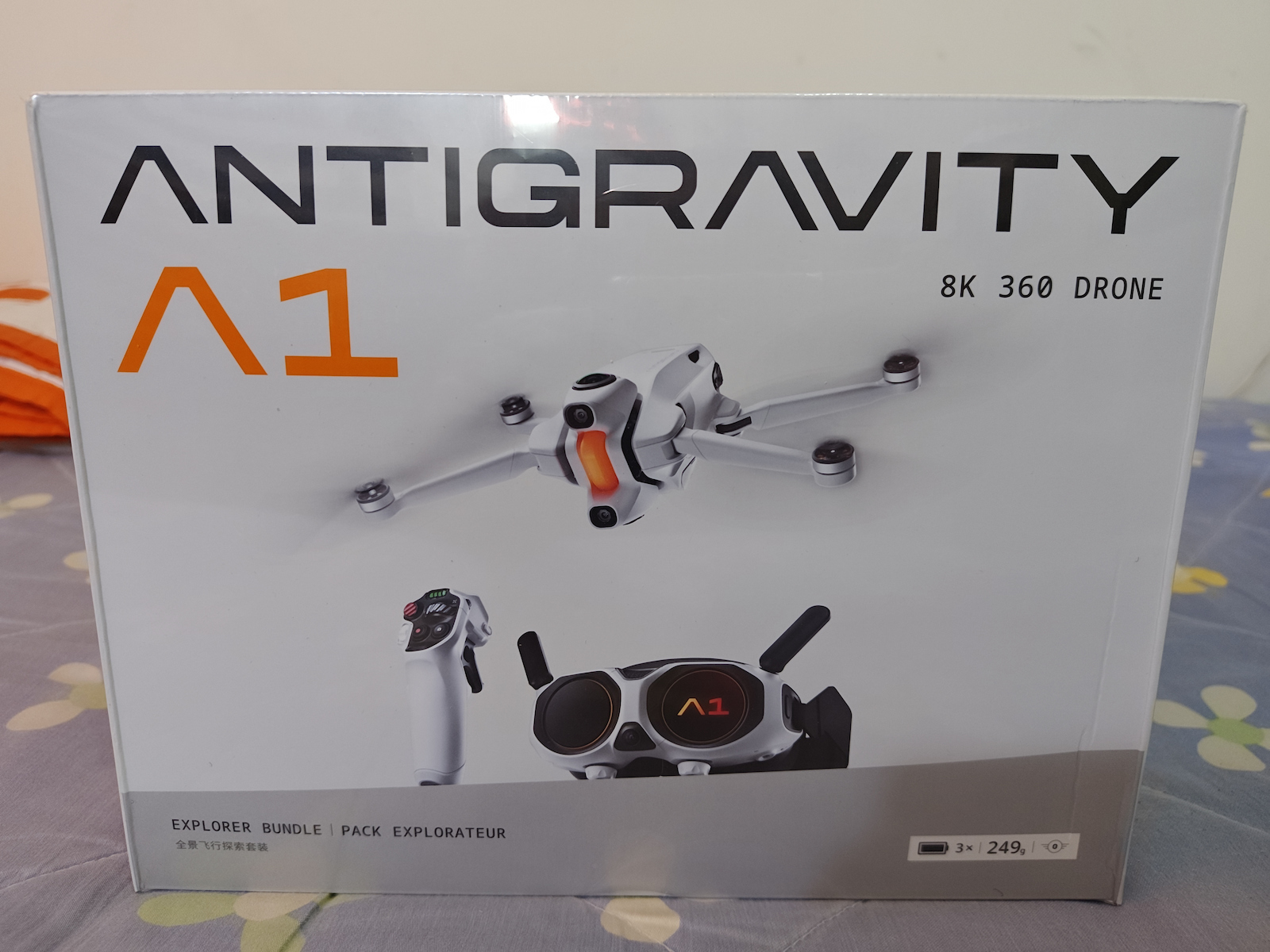
"Antigravity A1 Explorer Bundle" with the Standard-Capacity Batteries (not High-Capacity), because it is (and has a label) C0 category, and thus no "Drone Pilot License" is required as long as it is under 249g grams.
(Not that if I want to load it - Camouflaged - with High-Capacity Batteries, I can't... Who will check you? Will all the Police be carrying precision scales? HaHaHa)
.
Anyway, this whole package of the "Antigravity A1 Explorer Bundle" meaning as a box inside the wrapping (sealed), as soon as you receive it, you wonder: "Did I pay so much money for this small box?"
And as mentioned above, it deceives you. This "Antigravity A1 Explorer Bundle" package should cost less.
Just when you take the Drone out of the little bag, until the moment you put it back into the little bag (after the flight), you will handle it with great reverence, because it seems so delicate that you think even with your fingers you will damage it.
.
P.S.:
Finally, I should mention that the first time you remove everything from the box:
You should dedicate at least 1 hour I would say, or maybe even more, to doing Updates on the following:
* A1 Drone — Firmware Update.
* Vision Goggles — Firmware Update.
* Grip Controller / Motion Controller — Firmware Update.
IMPORTANT:
To "ACTIVATE" (Enable) all 3 above, because I struggled to understand how to Activate all 3 together...
And there are many who do not know how to Update a Drone...
You must have your Smartphone battery full, at least up to 80% for sure, and Data (Internet browsing data, either from a package, or from a promotion, etc...)
And since you have "Mobile Data", and of course the batteries fully charged in:
* A1 Drone
* Vision Goggles
* Grip Controller
You must enable on your Smartphone:
* Wi-Fi
* Bluetooth
* Location
* Data (the data for browsing the Internet)
* Flight Mode turned off, since the Smartphone is used as a Tablet without a SIM card inside.
And you go into the app for your Antigravity A1 Drone, the "Antigravity App", and proceed to ACTIVATE (Enable) according to the instructions of the "Antigravity App".
- The Updates for all 3 devices:
* A1 Drone
* Vision Goggles
* Grip Controller / Motion Controller
are all done together in one step, through the "Vision Goggles"
You do not update each one separately, above.
1ST FLIGHT AND ON EVERY FLIGHT:
IN WHAT ORDER do you TURN ON the devices before the flight:
Grip Controller → Vision Goggles → Drone.
IN WHAT ORDER do you TURN OFF after the flight:
Drone → Vision Goggles → Grip Controller
Τεταρτη 2 Σεπτεμβρίου 2026
Μολις εχω παραλαβει το 1ο μου Drone στα 999 Ευρω, το οποιο διαλεξα καθαρα, επειδη συμπεριλαμβανονται και γυαλιά FPV και πιλοταρεις πολυ καλυτερα σε σχεση με το να πιλοταρεις ενα Drone, απλα κοιταζοντας την οθονη σε ενα χειριστηριο.
Μολις ξεπακέταρα τα πραγματα και ειδα:
* Το Drone
* Και το Χειριστηριο
...μπορω να σας πω οτι μ'επιασε φόβος. Είναι τόσο μικρά, που οι φωτογραφίες και τα διαφορα βιντεος στο Youtube, σε ξεγελάνε πραγματικά.
Λες: "Τωρα αυτο ειναι Drone; Και αυτο Χειριστηριο;"
Μηπως ειναι ψευτικα παιχνιδια; Καμουφλαρισμένα; Και όμως...
Ειναι απιστευτα μικρά, αλλα οι δυνατότητες τους ειναι απιστευτες.
Ηρθαν ολα μαζι μεσα σε αυτην την μικρη μαυρη τσαντα (2η φωτό), οπου μπορειτε να κουβαλειτε την τσαντούλα οποδηποτε κι αν πάτε.
Σε οποιαδηποτε εκδρομη.
Απλα καθε φορα θα αφιερωνετε κανα 5-10λεπτο μεχρι να τα βγαλετε απο τις σακουλιτσες και να τα ετοιμασετε για να πεταξετε.
Οπως και στο Τελος... μετα την πτήση, μεχρι να τα βαλετε πισω στις σακκούλες προσεχτικα (ειδικα το Drone), θα σας παρει κανα 5-10λεπτο.
.
Ειχα σκοπό να παρω το "Antigravity A1 Infinity Bundle" με τις Υψηλης Χωρητικοτητας Μπαταριες, αλλα το Drone θα ειχε ταμπελιτσα που θα εγραφε C1 κατηγοριας.
Δηλαδη χρειαζεται να βγαλεις "Αδεια Χειριστη Drone"
(και να την ανανεωνεις καθε 5 χρονια) επειδη με τις Υψηλης χωρητικοτητας μπαταριες το Drone ξεπερνα τα 249gr γραμμάρια.
.
Ετσι διαλεξα αυτο το συγκεκριμενο Drone
"Αntigravity A1 Explorer Bundle" με τις Κανονικής Χωρητικότητας Μπαταριες (oxi Υψηλης χωρητικοτητας), γιατι ειναι (και εχει ταμπελιτσα) C0 κατηγοριας, και ετσι δεν απαιτείται "Αδεια Χειριστη Drone" εφοσον ειναι κατω απο 249gr γραμμάρια.
(οχι οτι αμα θελω να του φορτωσω - Καμουφλαρισμένα - Μπαταριες Υψηλής Χωρητικότητας Μπαταριες, δε μπορω... Ποιος θα σε ελέγξει; Θα κουβαλανε ολοι οι Αστυνομικοι, Ζυγαριές Ακριβείας; ΧαΧαΧα)
.
Παντως ολο αυτο το πακετο του "Αntigravity A1 Explorer Bundle" δηλαδη σαν κουτί μεσα στην μεμβράνη (Σφραγισμένο), μολις το παραλαβεις, αναρωτιεσαι: "Πληρωσα τοσα λεφτα γι'αυτο το μικρό κουτί";
Και οπως αναφερα παραπάνω, σε ξεγελά. Θα επρεπε να κοστιζει πιο λιγοτερο αυτό το πακετο "Αntigravity A1 Explorer Bundle".
Απλα οταν θα βγαζετε το Drone απο την σακκουλίτσα, μεχρι και την στιγμη που θα το τοποθετειτε παλι πισω στη σακουλίτσα (μετα την πτηση), θα το πιανετε με μεγαλη ευλάβεια, γιατι φαινεται τοσο ευαισθητο, που νομιζεις οτι με τα δαχτυλα σου κιολας, θα του κανεις ζημια.
.
Υ.Σ.:
Τελος να αναφερω, οτι την 1η φορα που θα αφαιρεσετε ολα τα πραγματα απο το κουτι:
Θα πρεπει να αφιερωσετε το λιγοτερο 1 ωρα θα ελεγα ή ισως και παραπάνω, με το να κανετε Update στα παρακάτω:
* A1 Drone — Firmware Update.
* Vision Goggles — Firmware Update.
* Grip Controller / Motion Controller — Firmware Update.
ΣΗΜΑΝΤΙΚΟ:
Για να κάνετε "ACTIVATE" (Ενεργοποίηση) και στα 3 από πάνω, επειδη εγω δυσκολευτηκα να καταλαβω πως κανεις Activate (Ενεργοποίηση) και στα 3 μαζι...
Και υπαρχουν πολλοι που δεν γνωριζουν πως κανεις Update σε Drone...
Θα πρεπει να εχετε στο Smartphone σας γεματη μπαταρια, εστω μεχρι 80% σιγουρα, και Data (Δεδομένα για σερφαρισμα στο Ιντερνετ, ειτε απο πακετο, ειτε απο προσφορα κλπ...)
Και εφοσον εχετε "Mobile Data", και φυσικα γεματες τις μπαταριες σε:
* A1 Drone
* Vision Goggles
* Grip Controller
Υποχρεωτικα Ενεργοποιειται στο Smartphone σας:
* Wi-Fi
* Bluetooth
* Location (Τοποθεσία)
* Data (τα Δεδομένα για το σερφάρισμα στο Ιντερνετ)
* Απενεργοποιημένο το Flight Mode (Πτήση Αεροπλάνου) εφοσον χρησιμοποιειται το Smartphone ως Ταμπλέτα διχως Sim κάρτα μεσα.
Και μπαινετε στην Εφαρμογή του Antigravity A1 Drone σας, την "Antigravity App" και προχωρειτε στο ACTIVATE (Ενεργοποίηση) με βαση τις οδηγίες της εφαρμογης "Antigravity App".
- Τα Updates και για τις 3 συσκευες:
* A1 Drone
* Vision Goggles
* Grip Controller / Motion Controller
γινονται ολα μαζι συλλογικά με 1 κινηση, μεσω των γυαλιών "Vision Goggles"
Δεν γινεται και δεν κάνετε δηλαδη Update ξεχωριστα το καθενα, απο πανω.
1η ΠΤΗΣΗ ΚΑΙ ΣΕ ΚΑΘΕ ΠΤΗΣΗ:
ΜΕ ΠΟΙΑ ΣΕΙΡΑ ΕΝΕΡΓΟΠΟΙΕΙΣ τις συσκευές, πριν την Πτήση:
Grip Controller (Χειριστηριο) → Vision Goggles (γυαλιά) → Drone.
ΜΕ ΠΟΙΑ ΣΕΙΡΑ ΑΠΕΝΕΡΓΟΠΟΙΕΙΣ μετά την πτήση:
Drone → Vision Goggles (γυαλιά) → Grip Controller (Χειριστηριο)
I have the Avata 2, the Avata 360, but this one does what I can't do with the others; to shoot content in 360 it's magical and super easy in post-processing, it does everything by itself. You become a little professional cinematographer without any knowledge. Also, the immersion with the goggles when you turn your head is incredible.
Έχω το avata 2 το avata 360 αλλα το συγκεκριμένο κάνει ότι δεν μπορώ με τα αλλα, για να τραβήξεις content σε 360 είναι μαγικό και πανευκολο στο post προψεσσινγ τα κάνει όλα μόνο του. Γίνεσαι ένας μικρός επαγγελματιας cinematographer χωρις γνώσεις. Επίσης το immersion με τα γυαλια όταν στριβεις το κεφαλι είναι απιστευτο.
The future is here. A drone completely different from anything available until today. A unique flying experience and image far from the ordinary. Any comparison with another DJI drone only (because all the others are toys) would be unfair both for this one and for its competitors. A new era begins and the ANTIGRAVITY A1, thanks to INSTA360's expertise, seems to have the upper hand
Το μέλλον είναι εδώ. Ένα drone τελείως διαφορετικό απο όσα κυκλοφορούν μέχρι σήμερα. Μοναδική πτητική εμπειρία και εικόνα πολυ μακριά απο τα συνηθισμένα. Οποιαδήποτε σύγκριση με άλλο drone της DJI και μόνο (γιατι όλα τα άλλα ειναι παιχνίδια) θα ήταν άδικη τόσο για το συγκεκριμένο όσο και για τα αντίπαλα. Μια νέα εποχή ξεκινά και το ANTIGRAVITY A1 χάρη στην τεχνογνωσία της INSTA360 δείχνει να εχει το πάνω χέρι
It is a Drone by Insta360.
No matter how many videos you watch, you won't understand the feeling unless you wear the headset. The sensation of takeoff is extremely realistic.
The motion controller works! After 10 minutes you stop thinking about it and just fly.
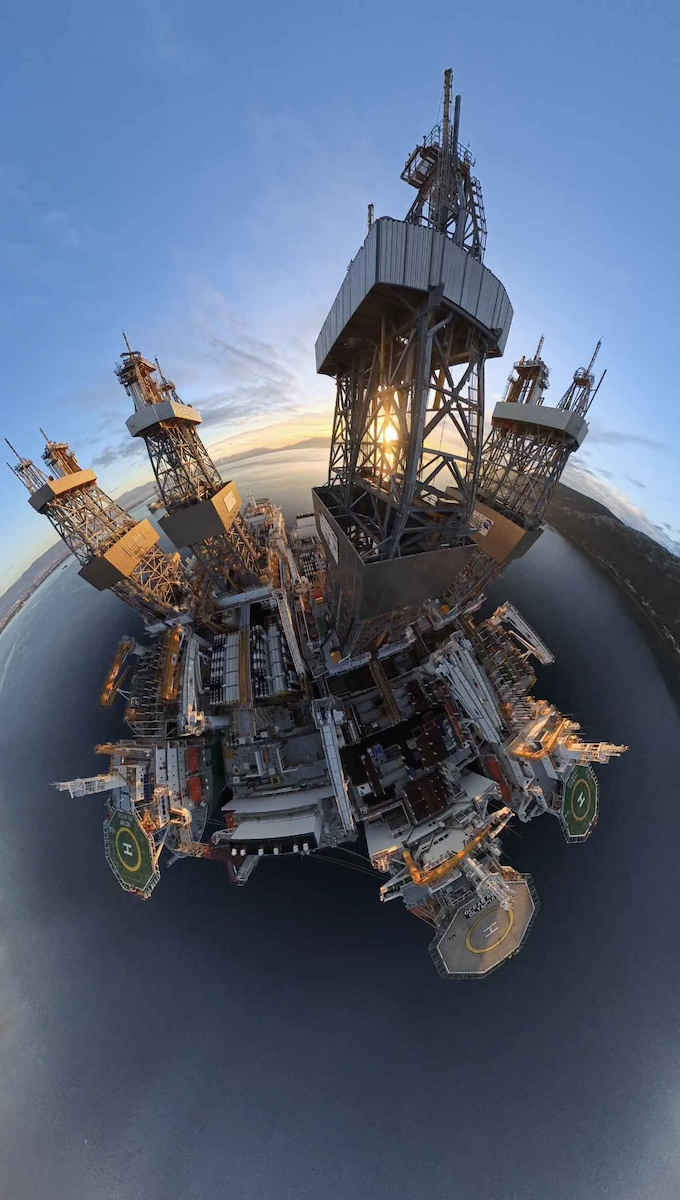
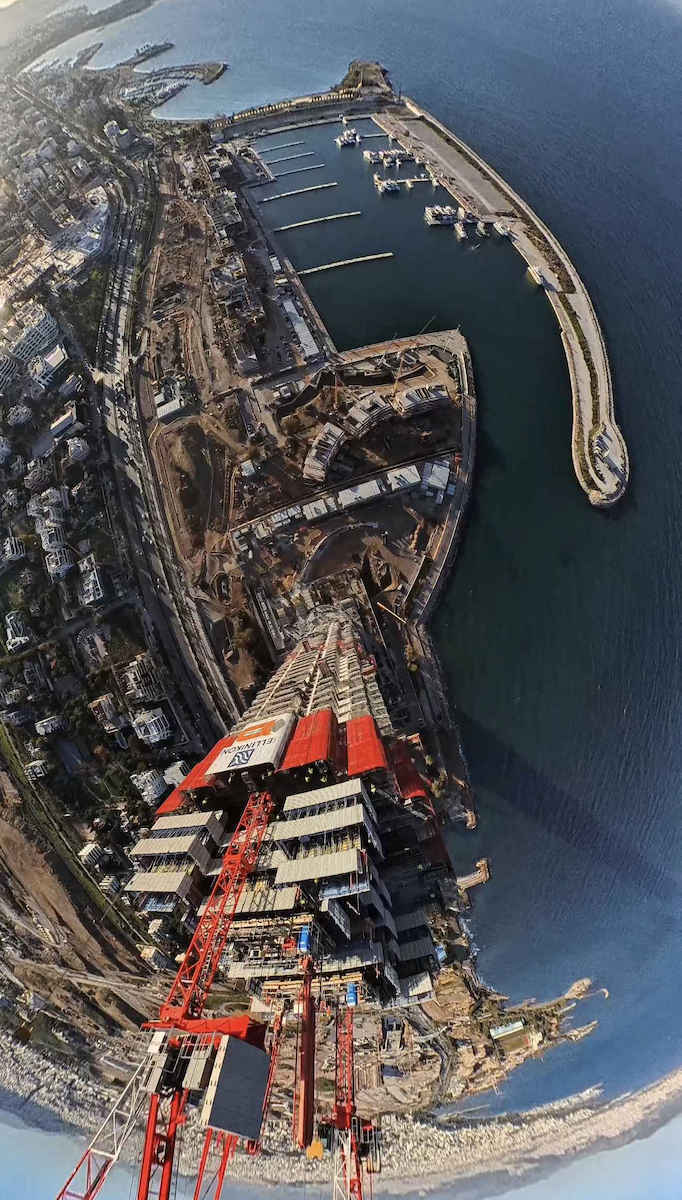
Meanwhile, the cameras record everything in 360, the drone is invisible, and the app does the editing by itself (if you want), and does an excellent job.
Είναι Drone της Insta360.
Όσα βίντεο και να δεις, δε θα καταλάβεις την αίσθηση αν δε φορέσεις την κάσκα. Η αίσθηση της απογείωσης είναι εξαιρετικά ρεαλιστική.
Το motion controller δουλεύει! Μετά από 10 λεπτά σταματάς να το σκέφτεσαι και απλά πετάς.
Εντωμεταξύ οι κάμερες καταγράφουν τα πάντα 360, το drone είναι αόρατο και η εφαρμογή φτιάχνει το edit μόνη της (αν θες), και κάνει εξαιρετική δουλειά.
Wednesday, September 2, 2026
I have just received my first Drone for 999 Euros, which I chose purely because FPV goggles are included and you pilot much better compared to piloting a Drone just by looking at the screen on a controller.
As soon as I unpacked the things and saw:
* The Drone
* And the Controller
...I can tell you that I got scared. They are so small that the photos and the various videos on YouTube really deceive you.
You say: "Now this is a Drone? And this is a Controller?"
Could they be fake toys? Camouflaged? And yet...
They are incredibly small, but their capabilities are incredible.
Everything came together inside this small black bag (2nd photo), where you can carry the little bag wherever you go.
On any trip.
Just each time you will spend about 5-10 minutes until you take them out of the little bags and get them ready to fly.
And at the end... after the flight, until you put them back carefully into the bags (especially the Drone), it will take you about 5-10 minutes.
.
I had planned to get the "Antigravity A1 Infinity Bundle" with the High-Capacity Batteries, but the Drone would have a label saying C1 category.
That is, you need to get a "Drone Pilot License"
(and renew it every 5 years) because with the High-Capacity batteries the Drone exceeds 249g grams.
.
So I chose this specific Drone
"Antigravity A1 Explorer Bundle" with the Standard-Capacity Batteries (not High-Capacity), because it is (and has a label) C0 category, and thus no "Drone Pilot License" is required as long as it is under 249g grams.
(Not that if I want to load it - Camouflaged - with High-Capacity Batteries, I can't... Who will check you? Will all the Police be carrying precision scales? HaHaHa)
.
Anyway, this whole package of the "Antigravity A1 Explorer Bundle" meaning as a box inside the wrapping (sealed), as soon as you receive it, you wonder: "Did I pay so much money for this small box?"
And as mentioned above, it deceives you. This "Antigravity A1 Explorer Bundle" package should cost less.
Just when you take the Drone out of the little bag, until the moment you put it back into the little bag (after the flight), you will handle it with great reverence, because it seems so delicate that you think even with your fingers you will damage it.
.
P.S.:
Finally, I should mention that the first time you remove everything from the box:
You should dedicate at least 1 hour I would say, or maybe even more, to doing Updates on the following:
* A1 Drone — Firmware Update.
* Vision Goggles — Firmware Update.
* Grip Controller / Motion Controller — Firmware Update.
IMPORTANT:
To "ACTIVATE" (Enable) all 3 above, because I struggled to understand how to Activate all 3 together...
And there are many who do not know how to Update a Drone...
You must have your Smartphone battery full, at least up to 80% for sure, and Data (Internet browsing data, either from a package, or from a promotion, etc...)
And since you have "Mobile Data", and of course the batteries fully charged in:
* A1 Drone
* Vision Goggles
* Grip Controller
You must enable on your Smartphone:
* Wi-Fi
* Bluetooth
* Location
* Data (the data for browsing the Internet)
* Flight Mode turned off, since the Smartphone is used as a Tablet without a SIM card inside.
And you go into the app for your Antigravity A1 Drone, the "Antigravity App", and proceed to ACTIVATE (Enable) according to the instructions of the "Antigravity App".
- The Updates for all 3 devices:
* A1 Drone
* Vision Goggles
* Grip Controller / Motion Controller
are all done together in one step, through the "Vision Goggles"
You do not update each one separately, above.
1ST FLIGHT AND ON EVERY FLIGHT:
IN WHAT ORDER do you TURN ON the devices before the flight:
Grip Controller → Vision Goggles → Drone.
IN WHAT ORDER do you TURN OFF after the flight:
Drone → Vision Goggles → Grip Controller
Τεταρτη 2 Σεπτεμβρίου 2026
Μολις εχω παραλαβει το 1ο μου Drone στα 999 Ευρω, το οποιο διαλεξα καθαρα, επειδη συμπεριλαμβανονται και γυαλιά FPV και πιλοταρεις πολυ καλυτερα σε σχεση με το να πιλοταρεις ενα Drone, απλα κοιταζοντας την οθονη σε ενα χειριστηριο.
Μολις ξεπακέταρα τα πραγματα και ειδα:
* Το Drone
* Και το Χειριστηριο
...μπορω να σας πω οτι μ'επιασε φόβος. Είναι τόσο μικρά, που οι φωτογραφίες και τα διαφορα βιντεος στο Youtube, σε ξεγελάνε πραγματικά.
Λες: "Τωρα αυτο ειναι Drone; Και αυτο Χειριστηριο;"
Μηπως ειναι ψευτικα παιχνιδια; Καμουφλαρισμένα; Και όμως...
Ειναι απιστευτα μικρά, αλλα οι δυνατότητες τους ειναι απιστευτες.
Ηρθαν ολα μαζι μεσα σε αυτην την μικρη μαυρη τσαντα (2η φωτό), οπου μπορειτε να κουβαλειτε την τσαντούλα οποδηποτε κι αν πάτε.
Σε οποιαδηποτε εκδρομη.
Απλα καθε φορα θα αφιερωνετε κανα 5-10λεπτο μεχρι να τα βγαλετε απο τις σακουλιτσες και να τα ετοιμασετε για να πεταξετε.
Οπως και στο Τελος... μετα την πτήση, μεχρι να τα βαλετε πισω στις σακκούλες προσεχτικα (ειδικα το Drone), θα σας παρει κανα 5-10λεπτο.
.
Ειχα σκοπό να παρω το "Antigravity A1 Infinity Bundle" με τις Υψηλης Χωρητικοτητας Μπαταριες, αλλα το Drone θα ειχε ταμπελιτσα που θα εγραφε C1 κατηγοριας.
Δηλαδη χρειαζεται να βγαλεις "Αδεια Χειριστη Drone"
(και να την ανανεωνεις καθε 5 χρονια) επειδη με τις Υψηλης χωρητικοτητας μπαταριες το Drone ξεπερνα τα 249gr γραμμάρια.
.
Ετσι διαλεξα αυτο το συγκεκριμενο Drone
"Αntigravity A1 Explorer Bundle" με τις Κανονικής Χωρητικότητας Μπαταριες (oxi Υψηλης χωρητικοτητας), γιατι ειναι (και εχει ταμπελιτσα) C0 κατηγοριας, και ετσι δεν απαιτείται "Αδεια Χειριστη Drone" εφοσον ειναι κατω απο 249gr γραμμάρια.
(οχι οτι αμα θελω να του φορτωσω - Καμουφλαρισμένα - Μπαταριες Υψηλής Χωρητικότητας Μπαταριες, δε μπορω... Ποιος θα σε ελέγξει; Θα κουβαλανε ολοι οι Αστυνομικοι, Ζυγαριές Ακριβείας; ΧαΧαΧα)
.
Παντως ολο αυτο το πακετο του "Αntigravity A1 Explorer Bundle" δηλαδη σαν κουτί μεσα στην μεμβράνη (Σφραγισμένο), μολις το παραλαβεις, αναρωτιεσαι: "Πληρωσα τοσα λεφτα γι'αυτο το μικρό κουτί";
Και οπως αναφερα παραπάνω, σε ξεγελά. Θα επρεπε να κοστιζει πιο λιγοτερο αυτό το πακετο "Αntigravity A1 Explorer Bundle".
Απλα οταν θα βγαζετε το Drone απο την σακκουλίτσα, μεχρι και την στιγμη που θα το τοποθετειτε παλι πισω στη σακουλίτσα (μετα την πτηση), θα το πιανετε με μεγαλη ευλάβεια, γιατι φαινεται τοσο ευαισθητο, που νομιζεις οτι με τα δαχτυλα σου κιολας, θα του κανεις ζημια.
.
Υ.Σ.:
Τελος να αναφερω, οτι την 1η φορα που θα αφαιρεσετε ολα τα πραγματα απο το κουτι:
Θα πρεπει να αφιερωσετε το λιγοτερο 1 ωρα θα ελεγα ή ισως και παραπάνω, με το να κανετε Update στα παρακάτω:
* A1 Drone — Firmware Update.
* Vision Goggles — Firmware Update.
* Grip Controller / Motion Controller — Firmware Update.
ΣΗΜΑΝΤΙΚΟ:
Για να κάνετε "ACTIVATE" (Ενεργοποίηση) και στα 3 από πάνω, επειδη εγω δυσκολευτηκα να καταλαβω πως κανεις Activate (Ενεργοποίηση) και στα 3 μαζι...
Και υπαρχουν πολλοι που δεν γνωριζουν πως κανεις Update σε Drone...
Θα πρεπει να εχετε στο Smartphone σας γεματη μπαταρια, εστω μεχρι 80% σιγουρα, και Data (Δεδομένα για σερφαρισμα στο Ιντερνετ, ειτε απο πακετο, ειτε απο προσφορα κλπ...)
Και εφοσον εχετε "Mobile Data", και φυσικα γεματες τις μπαταριες σε:
* A1 Drone
* Vision Goggles
* Grip Controller
Υποχρεωτικα Ενεργοποιειται στο Smartphone σας:
* Wi-Fi
* Bluetooth
* Location (Τοποθεσία)
* Data (τα Δεδομένα για το σερφάρισμα στο Ιντερνετ)
* Απενεργοποιημένο το Flight Mode (Πτήση Αεροπλάνου) εφοσον χρησιμοποιειται το Smartphone ως Ταμπλέτα διχως Sim κάρτα μεσα.
Και μπαινετε στην Εφαρμογή του Antigravity A1 Drone σας, την "Antigravity App" και προχωρειτε στο ACTIVATE (Ενεργοποίηση) με βαση τις οδηγίες της εφαρμογης "Antigravity App".
- Τα Updates και για τις 3 συσκευες:
* A1 Drone
* Vision Goggles
* Grip Controller / Motion Controller
γινονται ολα μαζι συλλογικά με 1 κινηση, μεσω των γυαλιών "Vision Goggles"
Δεν γινεται και δεν κάνετε δηλαδη Update ξεχωριστα το καθενα, απο πανω.
1η ΠΤΗΣΗ ΚΑΙ ΣΕ ΚΑΘΕ ΠΤΗΣΗ:
ΜΕ ΠΟΙΑ ΣΕΙΡΑ ΕΝΕΡΓΟΠΟΙΕΙΣ τις συσκευές, πριν την Πτήση:
Grip Controller (Χειριστηριο) → Vision Goggles (γυαλιά) → Drone.
ΜΕ ΠΟΙΑ ΣΕΙΡΑ ΑΠΕΝΕΡΓΟΠΟΙΕΙΣ μετά την πτήση:
Drone → Vision Goggles (γυαλιά) → Grip Controller (Χειριστηριο)
I have the Avata 2, the Avata 360, but this one does what I can't do with the others; to shoot content in 360 it's magical and super easy in post-processing, it does everything by itself. You become a little professional cinematographer without any knowledge. Also, the immersion with the goggles when you turn your head is incredible.
Έχω το avata 2 το avata 360 αλλα το συγκεκριμένο κάνει ότι δεν μπορώ με τα αλλα, για να τραβήξεις content σε 360 είναι μαγικό και πανευκολο στο post προψεσσινγ τα κάνει όλα μόνο του. Γίνεσαι ένας μικρός επαγγελματιας cinematographer χωρις γνώσεις. Επίσης το immersion με τα γυαλια όταν στριβεις το κεφαλι είναι απιστευτο.
The future is here. A drone completely different from anything available until today. A unique flying experience and image far from the ordinary. Any comparison with another DJI drone only (because all the others are toys) would be unfair both for this one and for its competitors. A new era begins and the ANTIGRAVITY A1, thanks to INSTA360's expertise, seems to have the upper hand
Το μέλλον είναι εδώ. Ένα drone τελείως διαφορετικό απο όσα κυκλοφορούν μέχρι σήμερα. Μοναδική πτητική εμπειρία και εικόνα πολυ μακριά απο τα συνηθισμένα. Οποιαδήποτε σύγκριση με άλλο drone της DJI και μόνο (γιατι όλα τα άλλα ειναι παιχνίδια) θα ήταν άδικη τόσο για το συγκεκριμένο όσο και για τα αντίπαλα. Μια νέα εποχή ξεκινά και το ANTIGRAVITY A1 χάρη στην τεχνογνωσία της INSTA360 δείχνει να εχει το πάνω χέρι
It is a Drone by Insta360.
No matter how many videos you watch, you won't understand the feeling unless you wear the headset. The sensation of takeoff is extremely realistic.
The motion controller works! After 10 minutes you stop thinking about it and just fly.
Meanwhile, the cameras record everything in 360, the drone is invisible, and the app does the editing by itself (if you want), and does an excellent job.
Είναι Drone της Insta360.
Όσα βίντεο και να δεις, δε θα καταλάβεις την αίσθηση αν δε φορέσεις την κάσκα. Η αίσθηση της απογείωσης είναι εξαιρετικά ρεαλιστική.
Το motion controller δουλεύει! Μετά από 10 λεπτά σταματάς να το σκέφτεσαι και απλά πετάς.
Εντωμεταξύ οι κάμερες καταγράφουν τα πάντα 360, το drone είναι αόρατο και η εφαρμογή φτιάχνει το edit μόνη της (αν θες), και κάνει εξαιρετική δουλειά.
Unlimited creativity and a new dimension in navigation await beginners and professionals with the Antigravity A1 8K 360 Drone Standard Bundle. Using the power of Insta360 algorithms, the top and bottom lenses merge into a single 360° shot without the drone appearing in the final video. Capturing every angle in up to 8K resolution, you can reframe the perfect shot later and incorporate different views into your content from a single flight. The navigation experience expands as much as your content creation with the included Vision FPV goggles and Grip controller. Head tracking allows you to look around as you fly for a realistic navigation experience unlike any other.
Fly once for infinite results
Full 360°: Publish full 360° videos from the drone to show the world from every angle.
Frame Later: By capturing every angle in 8K resolution, you don’t need to frame the perfect shot on the day you fly. Move the viewpoint during editing to select the angle you like best.
Endless Edits: The full 360° 8K footage you shoot instantly records every view from the drone. With this feature, you can create dynamic content by shifting and editing footage from the side, behind, above, or below the drone as it flies.
Social Media Master: With the sky fully captured, you can easily choose any aspect ratio to crop social media content. From a single video, you can create 1:1 posts, 16:9 videos, 9:16 reels, and much more.
Sky Genie Flight Functions
Choose from a selection of programmed flight maneuvers to easily and quickly film a subject with cinematic results:
Arc Shot: Flies towards a subject, partially circles it, and then flies backward.
Spiral Ascent: Flies around a subject while simultaneously gaining altitude.
Oval Orbit: Flies around a subject in an oval pattern, first moving away and then approaching.
Auto Editing
While the A1 allows you to take your time framing shots later and to edit 360° footage without limits, sometimes you just need a polished, ready-to-upload video right now. Antigravity offers two one-tap auto-editing options.
One-Tap Cinematics: With a single tap in the Antigravity app, the main subjects in your 360° footage are identified, highlights are automatically detected, and cinematic movements are selected and added. All of this is synchronized with the music you have chosen. It's an ideal solution for creating dynamic, professional-quality videos in minutes for quick sharing on social media. Free your frame: Easily reframe your shots with a single tap. Tap to smoothly move the viewpoint in your shot from front to side, or downward, or behind the A1.
Share the Adventure
Friends and family can experience what it's like to virtually sit in the cockpit of the A1, fly, and look around at the scenery. In real time. Without having to pilot the drone. Simply use the Sky Path feature to set a flight route that the A1 will automatically follow. Then, give the Vision goggles to the first viewer and let them sit back and enjoy the show.
Automatic Landing System
The futuristic cinematography and flight of the Antigravity A1 are also reflected in its operation. Once you activate the A1, the landing gear automatically folds to allow you to place it safely on the ground. Once you take off, the landing gear automatically folds in and out just before you land.
Safety First
In addition to built-in obstacle avoidance, the Antigravity offers multiple features to ensure you have a safe flight with the A1.
FreeMotion: This feature automatically aligns the nose of the A1 with the flight direction, giving the forward-facing sensors optimal positioning for obstacle avoidance while you look around with the Vision goggles.
Payload Detection: If you add weight to the A1, it will automatically highlight excess weight during takeoff, triggering an immediate landing to prevent misuse of the A1.
With the press of a button, you can activate the Return to Home feature, which will make the A1 plot a course back to the takeoff point while using obstacle avoidance to stay safe along the way.
While the ability to look around as you fly is an exciting experience, it is important to keep track of where the drone is going. Navigation Assist helps with this by overlaying a smaller screen that shows the front view of the A1.
Antigravity Vision
Immersion in VR Quality: Traditional FPV gives you a view of the action from the cockpit forward, but the Vision goggles and the A1 go further with head tracking. Use FreeMotion mode to lock the flight forward and take a look around, as if you were actually in the cockpit.
External Display: One of the external "eyes" of the Vision goggles is actually an external display. As you fly through canyons and navigate tight spots, everyone around you can watch what you see and share the excitement.
OmniLink 360: Antigravity's transmission system is designed to provide a stable, real-time image of your flight to the Vision goggles from a distance of up to 6.2 miles.
Virtual Cockpits: Blurring the lines between imagination and reality, this feature enhances the feeling of being in a cockpit by overlaying the video feed with one. Choose a traditional airplane view with a windshield, fake propeller, and control panel, or go for a medieval setting and make it look like you're flying on the back of a dragon!
Replay Viewing: Use the massive simulation screen of the Vision goggles to rewatch previous flights, watch a movie, or enjoy other immersive content.
Anti-Gravity Handle
No skills? No problem. The Handle is a one-handed remote control for the A1, designed to provide intuitive motion control of the drone. Use the built-in flight controller, the panoramic motion dial, and the buttons, or use it like a magic wand to point where you want the A1 to take you.
FPV Mode: With first-person view, simply tilt your wrist to tilt the A1 right or left like a video game. FreeMotion Mode: Designed for everyone, this mode makes flying as easy as aiming and pulling the trigger. Hold out your hand and point the Handle in any direction. Wherever you move your hand, the A1 will fly there. Point it upward to gain altitude or to the right or left for side flight. You can even slowly rotate in place while flying sideways to capture an orbit of an object.
Additional Details A1
Use Deep Track to select a subject and let the A1 follow it while filming.
Flight battery included
Up to 24 minutes of flight time
Regulation-free flight with a weight of 249 g
Interchangeable lenses
GNSS satellite navigation
Flight speed up to 35.8 mph
Foldable design
Dual-band Wi-Fi 5 (802.11ac) and Bluetooth support
Additional Vision Details
Pancake lenses with 1" micro-OLED displays
2560 x 2560 resolution per eye
DFOV 90° (approx.)
View a 200" (equivalent) screen with HDR10+
Diopter adjustment +2D to -5D (works with corrective lenses for extended range)
Specifications are collected from official manufacturer websites. Please verify the specifications before proceeding with your final purchase. If you notice any problem you can report it here.
Wednesday, September 2, 2026
I have just received my first Drone for 999 Euros, which I chose purely because FPV goggles are included and you pilot much better compared to piloting a Drone just by looking at the screen on a controller.
As soon as I unpacked the things and saw:
* The Drone
* And the Controller
...I can tell you that I got scared. They are so small that the photos and the various videos on YouTube really deceive you.
You say: "Now this is a Drone? And this is a Controller?"
Could they be fake toys? Camouflaged? And yet...
They are incredibly small, but their capabilities are incredible.
Everything came together inside this small black bag (2nd photo), where you can carry the little bag wherever you go.
On any trip.
Just each time you will spend about 5-10 minutes until you take them out of the little bags and get them ready to fly.
And at the end... after the flight, until you put them back carefully into the bags (especially the Drone), it will take you about 5-10 minutes.
.
I had planned to get the "Antigravity A1 Infinity Bundle" with the High-Capacity Batteries, but the Drone would have a label saying C1 category.
That is, you need to get a "Drone Pilot License"
(and renew it every 5 years) because with the High-Capacity batteries the Drone exceeds 249g grams.
.
So I chose this specific Drone
"Antigravity A1 Explorer Bundle" with the Standard-Capacity Batteries (not High-Capacity), because it is (and has a label) C0 category, and thus no "Drone Pilot License" is required as long as it is under 249g grams.
(Not that if I want to load it - Camouflaged - with High-Capacity Batteries, I can't... Who will check you? Will all the Police be carrying precision scales? HaHaHa)
.
Anyway, this whole package of the "Antigravity A1 Explorer Bundle" meaning as a box inside the wrapping (sealed), as soon as you receive it, you wonder: "Did I pay so much money for this small box?"
And as mentioned above, it deceives you. This "Antigravity A1 Explorer Bundle" package should cost less.
Just when you take the Drone out of the little bag, until the moment you put it back into the little bag (after the flight), you will handle it with great reverence, because it seems so delicate that you think even with your fingers you will damage it.
.
P.S.:
Finally, I should mention that the first time you remove everything from the box:
You should dedicate at least 1 hour I would say, or maybe even more, to doing Updates on the following:
* A1 Drone — Firmware Update.
* Vision Goggles — Firmware Update.
* Grip Controller / Motion Controller — Firmware Update.
IMPORTANT:
To "ACTIVATE" (Enable) all 3 above, because I struggled to understand how to Activate all 3 together...
And there are many who do not know how to Update a Drone...
You must have your Smartphone battery full, at least up to 80% for sure, and Data (Internet browsing data, either from a package, or from a promotion, etc...)
And since you have "Mobile Data", and of course the batteries fully charged in:
* A1 Drone
* Vision Goggles
* Grip Controller
You must enable on your Smartphone:
* Wi-Fi
* Bluetooth
* Location
* Data (the data for browsing the Internet)
* Flight Mode turned off, since the Smartphone is used as a Tablet without a SIM card inside.
And you go into the app for your Antigravity A1 Drone, the "Antigravity App", and proceed to ACTIVATE (Enable) according to the instructions of the "Antigravity App".
- The Updates for all 3 devices:
* A1 Drone
* Vision Goggles
* Grip Controller / Motion Controller
are all done together in one step, through the "Vision Goggles"
You do not update each one separately, above.
1ST FLIGHT AND ON EVERY FLIGHT:
IN WHAT ORDER do you TURN ON the devices before the flight:
Grip Controller → Vision Goggles → Drone.
IN WHAT ORDER do you TURN OFF after the flight:
Drone → Vision Goggles → Grip Controller
Τεταρτη 2 Σεπτεμβρίου 2026
Μολις εχω παραλαβει το 1ο μου Drone στα 999 Ευρω, το οποιο διαλεξα καθαρα, επειδη συμπεριλαμβανονται και γυαλιά FPV και πιλοταρεις πολυ καλυτερα σε σχεση με το να πιλοταρεις ενα Drone, απλα κοιταζοντας την οθονη σε ενα χειριστηριο.
Μολις ξεπακέταρα τα πραγματα και ειδα:
* Το Drone
* Και το Χειριστηριο
...μπορω να σας πω οτι μ'επιασε φόβος. Είναι τόσο μικρά, που οι φωτογραφίες και τα διαφορα βιντεος στο Youtube, σε ξεγελάνε πραγματικά.
Λες: "Τωρα αυτο ειναι Drone; Και αυτο Χειριστηριο;"
Μηπως ειναι ψευτικα παιχνιδια; Καμουφλαρισμένα; Και όμως...
Ειναι απιστευτα μικρά, αλλα οι δυνατότητες τους ειναι απιστευτες.
Ηρθαν ολα μαζι μεσα σε αυτην την μικρη μαυρη τσαντα (2η φωτό), οπου μπορειτε να κουβαλειτε την τσαντούλα οποδηποτε κι αν πάτε.
Σε οποιαδηποτε εκδρομη.
Απλα καθε φορα θα αφιερωνετε κανα 5-10λεπτο μεχρι να τα βγαλετε απο τις σακουλιτσες και να τα ετοιμασετε για να πεταξετε.
Οπως και στο Τελος... μετα την πτήση, μεχρι να τα βαλετε πισω στις σακκούλες προσεχτικα (ειδικα το Drone), θα σας παρει κανα 5-10λεπτο.
.
Ειχα σκοπό να παρω το "Antigravity A1 Infinity Bundle" με τις Υψηλης Χωρητικοτητας Μπαταριες, αλλα το Drone θα ειχε ταμπελιτσα που θα εγραφε C1 κατηγοριας.
Δηλαδη χρειαζεται να βγαλεις "Αδεια Χειριστη Drone"
(και να την ανανεωνεις καθε 5 χρονια) επειδη με τις Υψηλης χωρητικοτητας μπαταριες το Drone ξεπερνα τα 249gr γραμμάρια.
.
Ετσι διαλεξα αυτο το συγκεκριμενο Drone
"Αntigravity A1 Explorer Bundle" με τις Κανονικής Χωρητικότητας Μπαταριες (oxi Υψηλης χωρητικοτητας), γιατι ειναι (και εχει ταμπελιτσα) C0 κατηγοριας, και ετσι δεν απαιτείται "Αδεια Χειριστη Drone" εφοσον ειναι κατω απο 249gr γραμμάρια.
(οχι οτι αμα θελω να του φορτωσω - Καμουφλαρισμένα - Μπαταριες Υψηλής Χωρητικότητας Μπαταριες, δε μπορω... Ποιος θα σε ελέγξει; Θα κουβαλανε ολοι οι Αστυνομικοι, Ζυγαριές Ακριβείας; ΧαΧαΧα)
.
Παντως ολο αυτο το πακετο του "Αntigravity A1 Explorer Bundle" δηλαδη σαν κουτί μεσα στην μεμβράνη (Σφραγισμένο), μολις το παραλαβεις, αναρωτιεσαι: "Πληρωσα τοσα λεφτα γι'αυτο το μικρό κουτί";
Και οπως αναφερα παραπάνω, σε ξεγελά. Θα επρεπε να κοστιζει πιο λιγοτερο αυτό το πακετο "Αntigravity A1 Explorer Bundle".
Απλα οταν θα βγαζετε το Drone απο την σακκουλίτσα, μεχρι και την στιγμη που θα το τοποθετειτε παλι πισω στη σακουλίτσα (μετα την πτηση), θα το πιανετε με μεγαλη ευλάβεια, γιατι φαινεται τοσο ευαισθητο, που νομιζεις οτι με τα δαχτυλα σου κιολας, θα του κανεις ζημια.
.
Υ.Σ.:
Τελος να αναφερω, οτι την 1η φορα που θα αφαιρεσετε ολα τα πραγματα απο το κουτι:
Θα πρεπει να αφιερωσετε το λιγοτερο 1 ωρα θα ελεγα ή ισως και παραπάνω, με το να κανετε Update στα παρακάτω:
* A1 Drone — Firmware Update.
* Vision Goggles — Firmware Update.
* Grip Controller / Motion Controller — Firmware Update.
ΣΗΜΑΝΤΙΚΟ:
Για να κάνετε "ACTIVATE" (Ενεργοποίηση) και στα 3 από πάνω, επειδη εγω δυσκολευτηκα να καταλαβω πως κανεις Activate (Ενεργοποίηση) και στα 3 μαζι...
Και υπαρχουν πολλοι που δεν γνωριζουν πως κανεις Update σε Drone...
Θα πρεπει να εχετε στο Smartphone σας γεματη μπαταρια, εστω μεχρι 80% σιγουρα, και Data (Δεδομένα για σερφαρισμα στο Ιντερνετ, ειτε απο πακετο, ειτε απο προσφορα κλπ...)
Και εφοσον εχετε "Mobile Data", και φυσικα γεματες τις μπαταριες σε:
* A1 Drone
* Vision Goggles
* Grip Controller
Υποχρεωτικα Ενεργοποιειται στο Smartphone σας:
* Wi-Fi
* Bluetooth
* Location (Τοποθεσία)
* Data (τα Δεδομένα για το σερφάρισμα στο Ιντερνετ)
* Απενεργοποιημένο το Flight Mode (Πτήση Αεροπλάνου) εφοσον χρησιμοποιειται το Smartphone ως Ταμπλέτα διχως Sim κάρτα μεσα.
Και μπαινετε στην Εφαρμογή του Antigravity A1 Drone σας, την "Antigravity App" και προχωρειτε στο ACTIVATE (Ενεργοποίηση) με βαση τις οδηγίες της εφαρμογης "Antigravity App".
- Τα Updates και για τις 3 συσκευες:
* A1 Drone
* Vision Goggles
* Grip Controller / Motion Controller
γινονται ολα μαζι συλλογικά με 1 κινηση, μεσω των γυαλιών "Vision Goggles"
Δεν γινεται και δεν κάνετε δηλαδη Update ξεχωριστα το καθενα, απο πανω.
1η ΠΤΗΣΗ ΚΑΙ ΣΕ ΚΑΘΕ ΠΤΗΣΗ:
ΜΕ ΠΟΙΑ ΣΕΙΡΑ ΕΝΕΡΓΟΠΟΙΕΙΣ τις συσκευές, πριν την Πτήση:
Grip Controller (Χειριστηριο) → Vision Goggles (γυαλιά) → Drone.
ΜΕ ΠΟΙΑ ΣΕΙΡΑ ΑΠΕΝΕΡΓΟΠΟΙΕΙΣ μετά την πτήση:
Drone → Vision Goggles (γυαλιά) → Grip Controller (Χειριστηριο)
I have the Avata 2, the Avata 360, but this one does what I can't do with the others; to shoot content in 360 it's magical and super easy in post-processing, it does everything by itself. You become a little professional cinematographer without any knowledge. Also, the immersion with the goggles when you turn your head is incredible.
Έχω το avata 2 το avata 360 αλλα το συγκεκριμένο κάνει ότι δεν μπορώ με τα αλλα, για να τραβήξεις content σε 360 είναι μαγικό και πανευκολο στο post προψεσσινγ τα κάνει όλα μόνο του. Γίνεσαι ένας μικρός επαγγελματιας cinematographer χωρις γνώσεις. Επίσης το immersion με τα γυαλια όταν στριβεις το κεφαλι είναι απιστευτο.
The future is here. A drone completely different from anything available until today. A unique flying experience and image far from the ordinary. Any comparison with another DJI drone only (because all the others are toys) would be unfair both for this one and for its competitors. A new era begins and the ANTIGRAVITY A1, thanks to INSTA360's expertise, seems to have the upper hand
Το μέλλον είναι εδώ. Ένα drone τελείως διαφορετικό απο όσα κυκλοφορούν μέχρι σήμερα. Μοναδική πτητική εμπειρία και εικόνα πολυ μακριά απο τα συνηθισμένα. Οποιαδήποτε σύγκριση με άλλο drone της DJI και μόνο (γιατι όλα τα άλλα ειναι παιχνίδια) θα ήταν άδικη τόσο για το συγκεκριμένο όσο και για τα αντίπαλα. Μια νέα εποχή ξεκινά και το ANTIGRAVITY A1 χάρη στην τεχνογνωσία της INSTA360 δείχνει να εχει το πάνω χέρι
It is a Drone by Insta360.
No matter how many videos you watch, you won't understand the feeling unless you wear the headset. The sensation of takeoff is extremely realistic.
The motion controller works! After 10 minutes you stop thinking about it and just fly.
Meanwhile, the cameras record everything in 360, the drone is invisible, and the app does the editing by itself (if you want), and does an excellent job.
Είναι Drone της Insta360.
Όσα βίντεο και να δεις, δε θα καταλάβεις την αίσθηση αν δε φορέσεις την κάσκα. Η αίσθηση της απογείωσης είναι εξαιρετικά ρεαλιστική.
Το motion controller δουλεύει! Μετά από 10 λεπτά σταματάς να το σκέφτεσαι και απλά πετάς.
Εντωμεταξύ οι κάμερες καταγράφουν τα πάντα 360, το drone είναι αόρατο και η εφαρμογή φτιάχνει το edit μόνη της (αν θες), και κάνει εξαιρετική δουλειά.
Wednesday, September 2, 2026
I have just received my first Drone for 999 Euros, which I chose purely because FPV goggles are included and you pilot much better compared to piloting a Drone just by looking at the screen on a controller.
As soon as I unpacked the things and saw:
* The Drone
* And the Controller
...I can tell you that I got scared. They are so small that the photos and the various videos on YouTube really deceive you.
You say: "Now this is a Drone? And this is a Controller?"
Could they be fake toys? Camouflaged? And yet...
They are incredibly small, but their capabilities are incredible.
Everything came together inside this small black bag (2nd photo), where you can carry the little bag wherever you go.
On any trip.
Just each time you will spend about 5-10 minutes until you take them out of the little bags and get them ready to fly.
And at the end... after the flight, until you put them back carefully into the bags (especially the Drone), it will take you about 5-10 minutes.
.
I had planned to get the "Antigravity A1 Infinity Bundle" with the High-Capacity Batteries, but the Drone would have a label saying C1 category.
That is, you need to get a "Drone Pilot License"
(and renew it every 5 years) because with the High-Capacity batteries the Drone exceeds 249g grams.
.
So I chose this specific Drone
"Antigravity A1 Explorer Bundle" with the Standard-Capacity Batteries (not High-Capacity), because it is (and has a label) C0 category, and thus no "Drone Pilot License" is required as long as it is under 249g grams.
(Not that if I want to load it - Camouflaged - with High-Capacity Batteries, I can't... Who will check you? Will all the Police be carrying precision scales? HaHaHa)
.
Anyway, this whole package of the "Antigravity A1 Explorer Bundle" meaning as a box inside the wrapping (sealed), as soon as you receive it, you wonder: "Did I pay so much money for this small box?"
And as mentioned above, it deceives you. This "Antigravity A1 Explorer Bundle" package should cost less.
Just when you take the Drone out of the little bag, until the moment you put it back into the little bag (after the flight), you will handle it with great reverence, because it seems so delicate that you think even with your fingers you will damage it.
.
P.S.:
Finally, I should mention that the first time you remove everything from the box:
You should dedicate at least 1 hour I would say, or maybe even more, to doing Updates on the following:
* A1 Drone — Firmware Update.
* Vision Goggles — Firmware Update.
* Grip Controller / Motion Controller — Firmware Update.
IMPORTANT:
To "ACTIVATE" (Enable) all 3 above, because I struggled to understand how to Activate all 3 together...
And there are many who do not know how to Update a Drone...
You must have your Smartphone battery full, at least up to 80% for sure, and Data (Internet browsing data, either from a package, or from a promotion, etc...)
And since you have "Mobile Data", and of course the batteries fully charged in:
* A1 Drone
* Vision Goggles
* Grip Controller
You must enable on your Smartphone:
* Wi-Fi
* Bluetooth
* Location
* Data (the data for browsing the Internet)
* Flight Mode turned off, since the Smartphone is used as a Tablet without a SIM card inside.
And you go into the app for your Antigravity A1 Drone, the "Antigravity App", and proceed to ACTIVATE (Enable) according to the instructions of the "Antigravity App".
- The Updates for all 3 devices:
* A1 Drone
* Vision Goggles
* Grip Controller / Motion Controller
are all done together in one step, through the "Vision Goggles"
You do not update each one separately, above.
1ST FLIGHT AND ON EVERY FLIGHT:
IN WHAT ORDER do you TURN ON the devices before the flight:
Grip Controller → Vision Goggles → Drone.
IN WHAT ORDER do you TURN OFF after the flight:
Drone → Vision Goggles → Grip Controller
Τεταρτη 2 Σεπτεμβρίου 2026
Μολις εχω παραλαβει το 1ο μου Drone στα 999 Ευρω, το οποιο διαλεξα καθαρα, επειδη συμπεριλαμβανονται και γυαλιά FPV και πιλοταρεις πολυ καλυτερα σε σχεση με το να πιλοταρεις ενα Drone, απλα κοιταζοντας την οθονη σε ενα χειριστηριο.
Μολις ξεπακέταρα τα πραγματα και ειδα:
* Το Drone
* Και το Χειριστηριο
...μπορω να σας πω οτι μ'επιασε φόβος. Είναι τόσο μικρά, που οι φωτογραφίες και τα διαφορα βιντεος στο Youtube, σε ξεγελάνε πραγματικά.
Λες: "Τωρα αυτο ειναι Drone; Και αυτο Χειριστηριο;"
Μηπως ειναι ψευτικα παιχνιδια; Καμουφλαρισμένα; Και όμως...
Ειναι απιστευτα μικρά, αλλα οι δυνατότητες τους ειναι απιστευτες.
Ηρθαν ολα μαζι μεσα σε αυτην την μικρη μαυρη τσαντα (2η φωτό), οπου μπορειτε να κουβαλειτε την τσαντούλα οποδηποτε κι αν πάτε.
Σε οποιαδηποτε εκδρομη.
Απλα καθε φορα θα αφιερωνετε κανα 5-10λεπτο μεχρι να τα βγαλετε απο τις σακουλιτσες και να τα ετοιμασετε για να πεταξετε.
Οπως και στο Τελος... μετα την πτήση, μεχρι να τα βαλετε πισω στις σακκούλες προσεχτικα (ειδικα το Drone), θα σας παρει κανα 5-10λεπτο.
.
Ειχα σκοπό να παρω το "Antigravity A1 Infinity Bundle" με τις Υψηλης Χωρητικοτητας Μπαταριες, αλλα το Drone θα ειχε ταμπελιτσα που θα εγραφε C1 κατηγοριας.
Δηλαδη χρειαζεται να βγαλεις "Αδεια Χειριστη Drone"
(και να την ανανεωνεις καθε 5 χρονια) επειδη με τις Υψηλης χωρητικοτητας μπαταριες το Drone ξεπερνα τα 249gr γραμμάρια.
.
Ετσι διαλεξα αυτο το συγκεκριμενο Drone
"Αntigravity A1 Explorer Bundle" με τις Κανονικής Χωρητικότητας Μπαταριες (oxi Υψηλης χωρητικοτητας), γιατι ειναι (και εχει ταμπελιτσα) C0 κατηγοριας, και ετσι δεν απαιτείται "Αδεια Χειριστη Drone" εφοσον ειναι κατω απο 249gr γραμμάρια.
(οχι οτι αμα θελω να του φορτωσω - Καμουφλαρισμένα - Μπαταριες Υψηλής Χωρητικότητας Μπαταριες, δε μπορω... Ποιος θα σε ελέγξει; Θα κουβαλανε ολοι οι Αστυνομικοι, Ζυγαριές Ακριβείας; ΧαΧαΧα)
.
Παντως ολο αυτο το πακετο του "Αntigravity A1 Explorer Bundle" δηλαδη σαν κουτί μεσα στην μεμβράνη (Σφραγισμένο), μολις το παραλαβεις, αναρωτιεσαι: "Πληρωσα τοσα λεφτα γι'αυτο το μικρό κουτί";
Και οπως αναφερα παραπάνω, σε ξεγελά. Θα επρεπε να κοστιζει πιο λιγοτερο αυτό το πακετο "Αntigravity A1 Explorer Bundle".
Απλα οταν θα βγαζετε το Drone απο την σακκουλίτσα, μεχρι και την στιγμη που θα το τοποθετειτε παλι πισω στη σακουλίτσα (μετα την πτηση), θα το πιανετε με μεγαλη ευλάβεια, γιατι φαινεται τοσο ευαισθητο, που νομιζεις οτι με τα δαχτυλα σου κιολας, θα του κανεις ζημια.
.
Υ.Σ.:
Τελος να αναφερω, οτι την 1η φορα που θα αφαιρεσετε ολα τα πραγματα απο το κουτι:
Θα πρεπει να αφιερωσετε το λιγοτερο 1 ωρα θα ελεγα ή ισως και παραπάνω, με το να κανετε Update στα παρακάτω:
* A1 Drone — Firmware Update.
* Vision Goggles — Firmware Update.
* Grip Controller / Motion Controller — Firmware Update.
ΣΗΜΑΝΤΙΚΟ:
Για να κάνετε "ACTIVATE" (Ενεργοποίηση) και στα 3 από πάνω, επειδη εγω δυσκολευτηκα να καταλαβω πως κανεις Activate (Ενεργοποίηση) και στα 3 μαζι...
Και υπαρχουν πολλοι που δεν γνωριζουν πως κανεις Update σε Drone...
Θα πρεπει να εχετε στο Smartphone σας γεματη μπαταρια, εστω μεχρι 80% σιγουρα, και Data (Δεδομένα για σερφαρισμα στο Ιντερνετ, ειτε απο πακετο, ειτε απο προσφορα κλπ...)
Και εφοσον εχετε "Mobile Data", και φυσικα γεματες τις μπαταριες σε:
* A1 Drone
* Vision Goggles
* Grip Controller
Υποχρεωτικα Ενεργοποιειται στο Smartphone σας:
* Wi-Fi
* Bluetooth
* Location (Τοποθεσία)
* Data (τα Δεδομένα για το σερφάρισμα στο Ιντερνετ)
* Απενεργοποιημένο το Flight Mode (Πτήση Αεροπλάνου) εφοσον χρησιμοποιειται το Smartphone ως Ταμπλέτα διχως Sim κάρτα μεσα.
Και μπαινετε στην Εφαρμογή του Antigravity A1 Drone σας, την "Antigravity App" και προχωρειτε στο ACTIVATE (Ενεργοποίηση) με βαση τις οδηγίες της εφαρμογης "Antigravity App".
- Τα Updates και για τις 3 συσκευες:
* A1 Drone
* Vision Goggles
* Grip Controller / Motion Controller
γινονται ολα μαζι συλλογικά με 1 κινηση, μεσω των γυαλιών "Vision Goggles"
Δεν γινεται και δεν κάνετε δηλαδη Update ξεχωριστα το καθενα, απο πανω.
1η ΠΤΗΣΗ ΚΑΙ ΣΕ ΚΑΘΕ ΠΤΗΣΗ:
ΜΕ ΠΟΙΑ ΣΕΙΡΑ ΕΝΕΡΓΟΠΟΙΕΙΣ τις συσκευές, πριν την Πτήση:
Grip Controller (Χειριστηριο) → Vision Goggles (γυαλιά) → Drone.
ΜΕ ΠΟΙΑ ΣΕΙΡΑ ΑΠΕΝΕΡΓΟΠΟΙΕΙΣ μετά την πτήση:
Drone → Vision Goggles (γυαλιά) → Grip Controller (Χειριστηριο)
I have the Avata 2, the Avata 360, but this one does what I can't do with the others; to shoot content in 360 it's magical and super easy in post-processing, it does everything by itself. You become a little professional cinematographer without any knowledge. Also, the immersion with the goggles when you turn your head is incredible.
Έχω το avata 2 το avata 360 αλλα το συγκεκριμένο κάνει ότι δεν μπορώ με τα αλλα, για να τραβήξεις content σε 360 είναι μαγικό και πανευκολο στο post προψεσσινγ τα κάνει όλα μόνο του. Γίνεσαι ένας μικρός επαγγελματιας cinematographer χωρις γνώσεις. Επίσης το immersion με τα γυαλια όταν στριβεις το κεφαλι είναι απιστευτο.
The future is here. A drone completely different from anything available until today. A unique flying experience and image far from the ordinary. Any comparison with another DJI drone only (because all the others are toys) would be unfair both for this one and for its competitors. A new era begins and the ANTIGRAVITY A1, thanks to INSTA360's expertise, seems to have the upper hand
Το μέλλον είναι εδώ. Ένα drone τελείως διαφορετικό απο όσα κυκλοφορούν μέχρι σήμερα. Μοναδική πτητική εμπειρία και εικόνα πολυ μακριά απο τα συνηθισμένα. Οποιαδήποτε σύγκριση με άλλο drone της DJI και μόνο (γιατι όλα τα άλλα ειναι παιχνίδια) θα ήταν άδικη τόσο για το συγκεκριμένο όσο και για τα αντίπαλα. Μια νέα εποχή ξεκινά και το ANTIGRAVITY A1 χάρη στην τεχνογνωσία της INSTA360 δείχνει να εχει το πάνω χέρι
It is a Drone by Insta360.
No matter how many videos you watch, you won't understand the feeling unless you wear the headset. The sensation of takeoff is extremely realistic.
The motion controller works! After 10 minutes you stop thinking about it and just fly.
Meanwhile, the cameras record everything in 360, the drone is invisible, and the app does the editing by itself (if you want), and does an excellent job.
Είναι Drone της Insta360.
Όσα βίντεο και να δεις, δε θα καταλάβεις την αίσθηση αν δε φορέσεις την κάσκα. Η αίσθηση της απογείωσης είναι εξαιρετικά ρεαλιστική.
Το motion controller δουλεύει! Μετά από 10 λεπτά σταματάς να το σκέφτεσαι και απλά πετάς.
Εντωμεταξύ οι κάμερες καταγράφουν τα πάντα 360, το drone είναι αόρατο και η εφαρμογή φτιάχνει το edit μόνη της (αν θες), και κάνει εξαιρετική δουλειά.




Be the first to leave a comment!