Keyboards

Slim LX3 Numeric Keypad

The Satechi Slim LX3 numeric keypad connects via a wired USB-C connection and includes a built-in USB-A adapter for devices with a matching port. It features a numeric keypad and navigation keys,...

The Satechi Slim LX3 numeric keypad connects via a wired USB-C connection and includes a built-in USB-A adapter for devices with a matching port. It features a numeric keypad and navigation keys, while the Mac/Windows mode switch adapts the keys to the operating system in use. The low-profile keys and slim design support typing, data entry, and working with...

See full description See full description

Top specs

  • Keyboard Language Numeric
  • See all
53 27 €
Delivery Wed, 02 Dec - Tue, 08 Dec
2,50 € to a Skroutz Point
Do you want it with Free shipping?
From ePoint Store
Μαρκόπουλο Μεσογαίας, Αττικής
20+ pieces
See Keyboards & Mice on the page of ePoint Store
What if it breaks?

You're covered by the statutory 2-year warranty. Contact us and we'll handle the entire process with the store, ensuring your issue is resolved with prompt support through a repair, replacement, or refund.

What if I change my mind?

No problem, as long as it's within 14 days. We'll come pick it up or you can choose the Skroutz Point that suits you, completely free for up to 2 times per year, and we'll refund your money. Get Skroutz Plus to enjoy unlimited free returns.

Vengeance

Η Black Friday φέτος είναι Wednesday

Το Vault άνοιξε: VENGEANCE Gaming PCs σε τιμές Black Friday.
Discover here Discover here
Η Black Friday φέτος είναι Wednesday

Description

Description

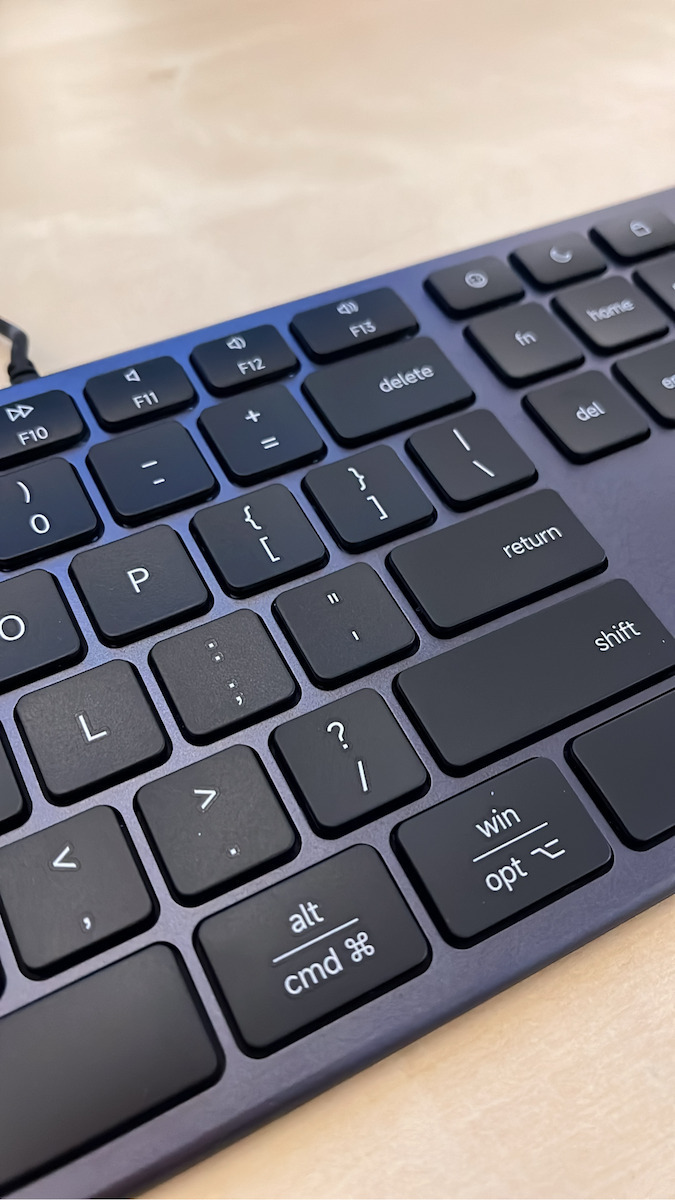
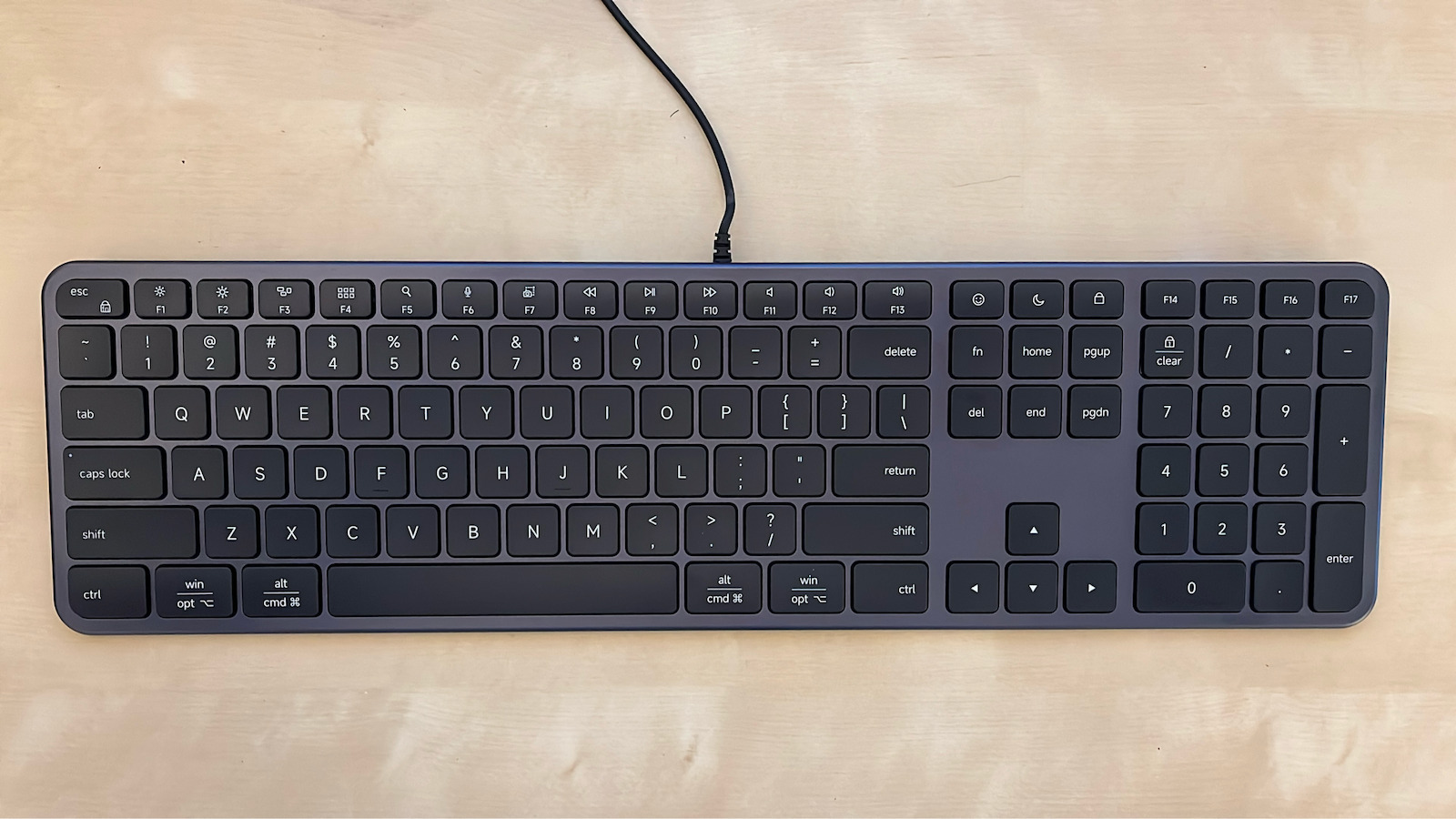
The Satechi Slim LX3 numeric keypad connects via a wired USB-C connection and includes a built-in USB-A adapter for devices with a matching port. It features a numeric keypad and navigation keys, while the Mac/Windows mode switch adapts the keys to the operating system in use. The low-profile keys and slim design support typing, data entry, and working with documents and spreadsheets.

The 120 cm cable lets you position the keypad on your desk without a wireless connection or pairing. It connects instantly, with no charging or installation required.

  • Type: Numeric keypad
  • Connection: Wired USB-C with built-in USB-A adapter
  • Layout: QWERTY
  • Numeric keypad: Yes
  • Navigation keys: Yes
  • Mode: Mac/Windows
  • Keys: Low-profile
  • Cable length: 120 cm
  • Compatibility: macOS, Windows, ChromeOS, iPadOS, and devices with a USB-C or USB-A port
  • Color: Black
  • Package contents: Slim LX3 keypad with integrated cable, user manual

Manufacturer

See full description

Specifications

Specifications

Product Details

Type
Numeric Keypad
Usage
for Universal Devices
Keyboard Language
Numeric
Volume Control Keys
No
Multimedia Keys
No
with Num Pad
Yes
Colour
Black
Wrist Rest
No
Foldable
No
Silent Keys
No
Multiple Device Connection
No

Connectivity

Wireless
No
Login
USB

Important information

Specifications are collected from official manufacturer websites. Please verify the specifications before proceeding with your final purchase. If you notice any problem you can report it here.

See all specifications

Reviews (1)

Reviews

  1. 1
  2. 4 stars
    0
  3. 3 stars
    0
  4. 2 stars
    0
  5. 1 star
    0
Review this product

Reviews by our members

  • Marion_J

    Verified purchase

    I switched from a Microsoft keyboard to this one and I’m very happy with it. I was looking for a keyboard with low-profile keys, a minimalist design, and the same layout as Microsoft keyboards. It has quite a few similarities to an Apple keyboard, while on the back it has a switch for selecting Mac or PC.
    The cable is relatively short, but I connected it directly to my monitor, so it wasn’t an issue for me.
    One small observation is the keyboard’s incline. If someone is used to keyboards with feet at the back, this will probably seem quite a bit flatter, as it doesn’t have much of an incline. Nevertheless, it’s easy to get used to.

    Translated from Greek ·
    Did you find this review helpful?
  • I switched from a Microsoft keyboard to this one and I’m very happy with it. I was looking for a keyboard with low-profile keys, a minimalist design, and the same layout as Microsoft keyboards. It has quite a few similarities to an Apple keyboard, while on the back it has a switch for selecting Mac or PC.
    The cable is relatively short, but I connected it directly to my monitor, so it wasn’t an issue for me.
    One small observation is the keyboard’s incline. If someone is used to keyboards with feet at the back, this will probably seem quite a bit flatter, as it doesn’t have much of an incline. Nevertheless, it’s easy to get used to.

    Translated from Greek ·
    0
  • See all
Questions

Questions

Do you have a question about the product?

1 user has this product and can help you

Ask for the product

Description & Specifications

The Satechi Slim LX3 numeric keypad connects via a wired USB-C connection and includes a built-in USB-A adapter for devices with a matching port. It features a numeric keypad and navigation keys, while the Mac/Windows mode switch adapts the keys to the operating system in use. The low-profile keys and slim design support typing, data entry, and working with documents and spreadsheets.

The 120 cm cable lets you position the keypad on your desk without a wireless connection or pairing. It connects instantly, with no charging or installation required.

  • Type: Numeric keypad
  • Connection: Wired USB-C with built-in USB-A adapter
  • Layout: QWERTY
  • Numeric keypad: Yes
  • Navigation keys: Yes
  • Mode: Mac/Windows
  • Keys: Low-profile
  • Cable length: 120 cm
  • Compatibility: macOS, Windows, ChromeOS, iPadOS, and devices with a USB-C or USB-A port
  • Color: Black
  • Package contents: Slim LX3 keypad with integrated cable, user manual

Manufacturer

Product Details

Type
Numeric Keypad
Usage
for Universal Devices
Keyboard Language
Numeric
Volume Control Keys
No
Multimedia Keys
No
with Num Pad
Yes
Colour
Black
Wrist Rest
No
Foldable
No
Silent Keys
No
Multiple Device Connection
No

Connectivity

Wireless
No
Login
USB

Important information

Specifications are collected from official manufacturer websites. Please verify the specifications before proceeding with your final purchase. If you notice any problem you can report it here.
Reviews (1)

  1. 1
  2. 4 stars
    0
  3. 3 stars
    0
  4. 2 stars
    0
  5. 1 star
    0
Review this product

Reviews by our members

  • Marion_J

    Verified purchase

    I switched from a Microsoft keyboard to this one and I’m very happy with it. I was looking for a keyboard with low-profile keys, a minimalist design, and the same layout as Microsoft keyboards. It has quite a few similarities to an Apple keyboard, while on the back it has a switch for selecting Mac or PC.
    The cable is relatively short, but I connected it directly to my monitor, so it wasn’t an issue for me.
    One small observation is the keyboard’s incline. If someone is used to keyboards with feet at the back, this will probably seem quite a bit flatter, as it doesn’t have much of an incline. Nevertheless, it’s easy to get used to.

    Translated from Greek ·
    Did you find this review helpful?
  • I switched from a Microsoft keyboard to this one and I’m very happy with it. I was looking for a keyboard with low-profile keys, a minimalist design, and the same layout as Microsoft keyboards. It has quite a few similarities to an Apple keyboard, while on the back it has a switch for selecting Mac or PC.
    The cable is relatively short, but I connected it directly to my monitor, so it wasn’t an issue for me.
    One small observation is the keyboard’s incline. If someone is used to keyboards with feet at the back, this will probably seem quite a bit flatter, as it doesn’t have much of an incline. Nevertheless, it’s easy to get used to.

    Translated from Greek ·
    0
  • See all
53,27 €
2,50 € to a Skroutz Point