

Οδηγός αγοράς για Gaming Ποντίκια
Όλα όσα χρειάζεται να ξέρεις πριν αγοράσεις ποντίκι για την απόλυτη gaming εμπειρία!
Αν είσαι σε αναζήτηση για gaming ποντίκι και έχεις μπερδευτεί με τις χιλιάδες επιλογές που υπάρχουν ή δεν έχεις ιδέα από που να ξεκινήσεις και τι χρειάζεται να προσέξεις, τότε είσαι στο σωστό σημείο. Μην ανησυχείς αν είσαι αρχάριος στην gaming κοινότητα και ούτε αν πιστεύεις ότι η μόνη διαφορά από ένα απλό ποντίκι είναι ότι είναι πολύχρωμο. Πάμε να δούμε αναλυτικά τους διαφορετικούς τύπους και τις επιμέρους δυνατότητες και λειτουργίες των διάφορων ποντικιών, που υπάρχουν στην αγορά, ώστε να μπορέσεις να κατανοήσεις, να συγκρίνεις και να καταλήξεις στο ιδανικό για 'σένα.
1. Συνδεσιμότητα
Τρόπος Σύνδεσης
Η επιλογή της σύνδεσης ενός gaming ποντικιού με τον υπολογιστή είναι, συνήθως, εύκολη υπόθεση, μιας και δε χωρά αμφιβολία πως τα ποντίκια με καλώδιο, έχουν καλύτερο χρόνο απόκρισης και προτιμούνται από τους gamers.
Παρόλα αυτά, αναλόγως τον τύπο του παιχνιδιού, τη συχνότητα χρήσης ή και το level του gamer, ένα ασύρματο ποντίκι μπορεί να αποτελεί ιδανικότερη επιλογή, από το κλασικό ενσύρματο.
- Ενσύρματα ποντίκια: Πρόκειται για τον πιο συνηθισμένο τρόπο σύνδεσης gaming ποντικιών με τον υπολογιστή, καθώς η σύνδεση με καλώδιο προσφέρει μικρότερο χρόνο απόκρισης. Λόγω της αμεσότητας της σύνδεσης, υπάρχει καλύτερη και πιο άμεση επικοινωνία του ενσύρματου ποντικιού με τον υπολογιστή σε ελάχιστο χρόνο, κάτι που είναι απαραίτητο σε gaming περιβάλλον.
- Ασύρματα ποντίκια: Από την άλλη πλευρά τα ασύρματα ποντίκια, όπως μαρτυρά και η ονομασία τους συνδέονται μέσω ασύρματης πηγής με τον υπολογιστή, χωρίς καλώδιο. Προσφέρουν μεγαλύτερη ελευθερία κινήσεων αλλά δεν προτιμούνται από τους gamers, καθώς σε σχέση με την σύνδεση με καλώδιο έχουν μεγαλύτερο χρόνο απόκρισης.
- Ενσύρματα & ασύρματα ποντίκια: Υπάρχει, πάντα, και η επιλογή ενός ποντικιού, το οποίο συνδυάζει ασύρματη & ενσύρματη χρήση. Αυτά τα ποντίκια δίνουν τη δυνατότητα είτε ασύρματης σύνδεσης, είτε σύνδεσης με καλώδιο, προσφέροντας μεγαλύτερη ελευθερία κινήσεων συνδυάζοντας την ασύρματη σύνδεση στην καθημερινή χρήση με τους χαμηλούς χρόνους απόκρισης, που απαιτούνται στο gaming.
Μέσο Σύνδεσης
Τα ποντίκια που προορίζονται για gaming, μπορούν να συνδεθούν με τον υπολογιστή είτε μέσω καλωδίου με USB, είτε ασύρματα μέσω Bluetooth ή Wi-fi.

2. Αισθητήρας
Το Α και το Ω σε ένα gaming ποντίκι είναι η ταχύτητα απόκρισης, γεγονός που επηρεάζει τα πάντα, ενώ παράλληλα όλα επηρεάζονται από αυτό. Πάμε να δούμε ποιους τύπους αισθητήρα συναντάμε και πως επηρεάζεται το παιχνίδι, με βάση την ανάλυση του αισθητήρα.
Τύπος Αισθητήρα
Ο αισθητήρας είναι ο μηχανισμός με τον οποίο το ποντίκι καταλαβαίνει σε τι απόσταση και με τι ταχύτητα το κουνάει ο χρήστης, ώστε να μεταφράσει την κίνηση αυτή σε κίνηση του κέρσορα στην οθόνη. Υπάρχουν αρκετοί διαφορετικοί τύποι, όπως ο αισθητήρας BlueSpot, ο αισθητήρας V-Track και ο ο αισθητήρας IR, που είναι λιγότερο διαδεδομένοι. Με πιο δημοφιλείς τον οπτικό αισθητήρα (optical) και -λιγότερο- τον αισθητήρα με laser, που χρησιμοποιούνται στην πλειοψηφία των gaming ποντικιών. Πάμε να δούμε πιο αναλυτικά αυτούς τους 2 τύπους και τις διαφορές τους.
- Αισθητήρας Optical: Πρόκειται για τον πιο συνηθισμένο τύπο αισθητήρα σε ποντίκια για gaming. Είναι πιο ελαφρύς, ανθεκτικός και ακριβής από τους laser σε μη γυαλιστερές επιφάνειες.
-
Αισθητήρας Laser: Οι laser αισθητήρες προσφέρουν μεγάλη ευαισθησία, υψηλή ανάλυση και μπορούν να χρησιμοποιηθούν ακόμα και σε γυαλιστερές επιφάνειες.
Οι περισσότεροι gamers χρησιμοποιούν χαμηλή ανάλυση, ώστε να μπορούν να έχουν μεγαλύτερη ακρίβεια (ειδικά σε FPS παιχνίδια), και χρησιμοποιούν τα ποντίκια σε μη γυαλιστερές επιφάνειες όπως gaming mousepads.
Ανάλυση Αισθητήρα
Η ανάλυση αισθητήρα αφορά το πόσο μικρές αλλαγές στην επιφάνεια μπορεί να αναγνωρίσει ο αισθητήρας και είναι μετρήσιμη σε Dots Per Inch (DPI). Στην πράξη δηλαδή, με μεγαλύτερη ανάλυση πραγματοποιούνται μεγάλες κινήσεις, απαιτώντας λιγότερη κίνηση από το ποντίκι. Για παράδειγμα, πολλοί gamers προτιμούν χαμηλή ανάλυση, ώστε να έχουν μεγαλύτερη ακρίβεια σε FPS παιχνίδια, ενώ προτιμούν μεγαλύτερη ανάλυση σε real-time strategy παιχνίδια.
Πολλά ποντίκια διαθέτουν ρύθμιση, είτε μέσω λογισμικού, είτε με κουμπιά, ώστε να μπορούν να λειτουργήσουν και σε χαμηλότερες αναλύσεις, ενώ τα περισσότερα έχουν δυνατότητα ρύθμισης των DPI, για λειτουργία -κατά βούληση- σε μικρότερη ανάλυση.
Συνήθως οι αναλύσεις που προτιμούνται είναι:
- 400-800 DPI για MOBA (π.χ.: League of Legends, DOTA)
- 400-1000 DPI για FPS (π.χ.: Counter-Strike, Call of Duty, Doom)
- 1000-1200 DPI για RTS (π.χ.: StarCraft, Age of Empires)
- 1000-1600 DPI για MMORPG (π.χ.: World of Warcraft, Elder Scrolls)
Οι υψηλότερες αναλύσεις είναι πιο σπάνια χρήσιμες και κυρίως χρησιμοποιούνται για εντυπωσιασμό από τους κατασκευαστές.
3. Κουμπιά
Αριθμός Κουμπιών
Ο αριθμός των κουμπιών έχει να κάνει με τις έξτρα δυνατότητες και λειτουργίες που μπορεί να προσφέρει το κάθε ποντίκι. Είναι πολύ σημαντικά κατά τη διάρκεια του gaming, μιας και μπορούν να γλιτώσουν χρόνο, προσδίδοντας μεγαλύτερη απόδοση και παραγωγικότητα. Ποντίκια με αυξημένο αριθμό πλήκτρων είναι χρήσιμα κυρίως σε MMO παιχνίδια.
Προγραμματιζόμενα Κουμπιά
Σχεδόν όλα τα κουμπιά, που διαθέτουν τα περισσότερα gaming ποντίκια είναι προγραμματιζόμενα. Αυτό δίνει τη δυνατότητα στο χρήστη να ορίσει συγκεκριμένες ενέργειες (shortcuts) που θα έκανε ενδεχομένως με τη βοήθεια του gaming πληκτρολογίου, ώστε πατώντας το εκάστοτε κουμπί να εκτελείται και η αντίστοιχη ενέργεια. Έτσι, ειδικά σε online multiplayer παιχνίδια θα φανούν πολύ βοηθητικά, για πιο άμεσο και γρήγορο gaming.
Κουμπί Sniper
Με το κουμπί Sniper μπορείς να πραγματοποιήσεις προσωρινά εναλλαγές των DPI, δηλαδή στην ανάλυση του αισθητήρα. Ένα χρήσιμο κουμπί ειδικά σε παιχνίδια FPS, που η διαφορετική απόκριση και η γρήγορη εναλλαγή παίζουν σημαντικό ρόλο, ώστε να έχεις ταχύτητα, αλλά και ακρίβεια - όλα την κατάλληλη στιγμή.
4. Σχεδιασμός
Ο σχεδιασμός ενός ποντικιού παίζει σημαντικό ρόλο, ειδικά όταν μιλάμε για gaming, που απαιτεί χρόνο. Οπότε, ένας gamer θέλει ένα ποντίκι εργονομικό και ξεκούραστο, που να μπορεί να το χειριστεί με οποιοδήποτε από τα δύο χέρια, τον βολεύει. Η πλειοψηφία των ποντικιών για gaming χρήση προορίζεται για δεξιόχειρες, ωστόσο υπάρχει ποικιλία και σε ποντίκια, σχεδιασμένα για χρήση και με τα δύο χέρια, που βολεύουν και τους αριστερόχειρες.
5. Επιπλέον χαρακτηριστικά
Ρύθμιση Βάρους
Πρόκειται για μία πολύ βολική δυνατότητα για το χρήστη, μιας και το ποντίκι συνοδεύεται από βαρίδια, ώστε ο gamer να μπορεί να προσαρμόσει το βάρος στις προτιμήσεις και τις ανάγκες του. Η ρύθμιση βάρους, προτείνεται σε παιχνίδια που απαιτείται μεγάλη σταθερότητα και ακρίβεια κινήσεων.
RGB Lighting
Τα περισσότερα ποντίκια για gaming διαθέτουν το χαρακτηριστικό ενσωματωμένο RGB φωτισμό πολλαπλών χρωμάτων, που τα ξεχωρίζει οπτικά από τα απλά ποντίκια για υπολογιστή. Ο RGB φωτισμός μπορεί να πάρει διάφορες αποχρώσεις, συνδυάζοντας τα χρώματα κόκκινο, πράσινο και μπλε, προσφέροντας μοντέρνο αισθητικό αποτέλεσμα.
Αυτονομία Μπαταρίας
Στα ασύρματα ποντίκια, η μέγιστη διάρκεια ζωής της μπαταρίας είναι πολύ σημαντική. Όσο περισσότερη αυτονομία διαθέτει ένα ποντίκι, τόσες περισσότερες ώρες αδιάκοπου gaming μπορεί να προσφέρει στο χρήστη. Αν επιλέξεις, λοιπόν, ένα ασύρματο ποντίκι, είναι καλό να λάβεις υπόψη σου και αυτή την παράμετρο και φυσικά να θυμάσαι κάθε πότε θα χρειαστεί να το φορτίσεις, ώστε να μην ξεμείνεις ποτέ...από πολεμοφόδια.
6. Διαστάσεις & βάρος
Ακόμη και οι διαστάσεις και το βάρος παίζουν σημαντικό ρόλο σε ένα ποντίκι για gaming. Οι ατελείωτες ώρες παιχνιδιού, γεννούν την ανάγκη για ένα ποντίκι "στα μέτρα" του κάθε gamer. Ένα πιο βαρύ ποντίκι από τη φύση του, μπορεί να φανεί χρήσιμο σε παιχνίδια που απαιτούν ακρίβεια, ενώ ένα πιο ελαφρύ προσφέρει μεγαλύτερη ευελιξία κινήσεων και ταχύτητα.
7. Τι "τύπος λαβής" είσαι;

Τέλος, κάτι που χρειάζεται να ξέρεις πριν προχωρήσεις σε αγορά ενός gaming ποντικιού είναι ότι αναλόγως τα παιχνίδια που θέλεις να παίζεις, η λαβή που κρατάς το ποντίκι αλλάζει. Υπάρχουν 3 διαφορετικοί τύποι λαβής. Πάμε να τους δούμε αναλυτικά:
Claw grip
Πρόκειται για το πιο ευέλικτο από τα στυλ λαβής. Προσφέρει μεγαλύτερη ακρίβεια και περισσότερη κινητικότητα στον καρπό, πράγμα που σημαίνει ότι η λαβή με νύχια λειτουργεί για κάθε παιχνίδι και κάθε ποντίκι.
Τα MOBA και MMO παιχνίδια, όπως το League of Legends και το World of Warcraft απαιτούν ακρίβεια για την κίνηση και μικρές προσαρμογές για τα μενού του παιχνιδιού. Tο claw grip παρέχει και τα δύο.
Top επιλογές για claw grip

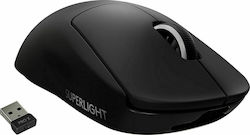


Palm grip
Σε αυτό το είδος λαβής πρωταγωνιστεί η παλάμη. Καθώς ολόκληρη η παλάμη και τα δάχτυλα έρχονται σε επαφή με το ποντίκι, του δίνουν τη δυνατότητα να παρέχει μεγαλύτερη πρόσφυση, ενώ οι κινήσεις προέρχονται από τον αντιβράχιο και τον αγκώνα.
Το palm grip θεωρείται το πιο ακριβές κράτημα, καθώς οι κινήσεις από το χέρι και τον αγκώνα είναι πιο ακριβείς από τις άκρες ή ολόκληρα τα δάχτυλα. Οι περισσότεροι επαγγελματίες παίκτες FPS προτιμούν αυτόν τύπο λαβής.
Top επιλογές για palm grip


Fingertip grip
Καθώς μόνο οι άκρες των δακτύλων έρχονται σε επαφή με το ποντίκι, αυτό το στυλ λαβής επιτρέπει μικρότερες, πιο γρήγορες κινήσεις. Αυτό σημαίνει ότι η λαβή με τα δάχτυλα προτείνεται για ορισμένα παιχνίδια FPS, όπως το Apex Legends και το Fortnite, που έχουν πιο γρήγορο ρυθμό και εστιάζουν στην ταχύτητα.
Δυστυχώς, με το fingertip grip θυσιάζεται η ακρίβεια, καθώς οι κινήσεις που γίνονται μόνο με τα δάχτυλα είναι γρήγορες, αλλά όχι τόσο ακριβείς.
Top επιλογές για fingertip grip


Μην ξεχνάς! Λαμβάνοντας υπόψη τα παραπάνω επιμέρους χαρακτηριστικά και συνδυάζοντας εκείνα που ταιριάζουν στις ανάγκες και τη χρήση που θέλεις να κάνεις στο gaming ποντίκι σου, μπορείς να καταλήξεις στην ιδανική επιλογή για εσένα. Πριν αποφασίσεις, μπορείς να ρίξεις μια ματιά και στις κριτικές άλλων χρηστών, ώστε να δεις και τη δική τους γνώμη και εμπειρία, που μπορεί να σε βοηθήσουν να καταλήξεις πολύ πιο εύκολα στην τελική απόφαση.
Αν ενδιαφέρεσαι και για ποντίκι υπολογιστή, μπορείς να ρίξεις μια ματιά στον αναλυτικό οδηγό για ποντίκια.
Σχετικά Άρθρα
Οδηγός αγοράς για Πληκτρολόγια
Τα καλύτερα gaming πληκτρολόγια της αγοράς
Τα καλύτερα gaming ποντίκια της αγοράς
Άφησε πρώτος το σχόλιό σου!