

TV-Box: Wähle das Beste für deine Bedürfnisse
Möchten Sie Ihren alten Fernseher "smart" machen, ohne ihn ersetzen zu müssen, oder vielleicht Ihren Smart-TV aufrüsten, der nicht... smart genug ist? Wir haben die Lösung: TV Box!
Was ist ein TV-Box und wie funktioniert es?
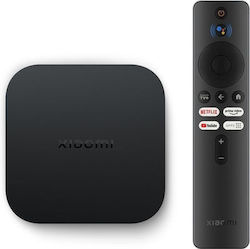
Der TV-Box ist im Wesentlichen ein Computer mit einem Betriebssystem, das dem von Mobilgeräten (z.B. Smartphones und Tablets) und Smart TVs ähnelt. Damit kannst du beliebte Anwendungen wie Spotify, Netflix herunterladen und deine Lieblingsfilme und -videos online ansehen, über USB oder eine Festplatte. Er lässt sich einfach mit einem einfachen HDMI-Kabel an deinen Fernseher anschließen.




Welche technischen Eigenschaften sollte ich beachten?
1. Arbeitsspeicher RAM
Der RAM beeinflusst sowohl die Fähigkeit des Geräts, Multitasking durchzuführen, als auch die reibungslose Funktion der Apps und des Streamings.
Wenn deine Bedürfnisse ziemlich einfach sind und sich darauf beschränken, casual Serien und Filme zu sehen, zum Beispiel auf Netflix in 1080p-Auflösung, dann ist ein Gerät mit mindestens 2GB RAM zufriedenstellend.
Wenn du viele Apps ausführen und in 4K-Auflösung ohne Probleme ansehen möchtest, dann wähle etwas mit mindestens 3GB.
Schließlich, falls du das TV-Box für Gaming oder Streaming in 6K oder 8K verwendest, suche nach einem Gerät mit mindestens 4GB.
2. Betriebssystem
Wie bei Smartphones haben auch TV-Boxen ihr eigenes Betriebssystem. Die beliebtesten Betriebssysteme für TV-Boxen sind Android und iOS.
Android
Die Mehrheit der TV-Boxen läuft mit einem Android-Betriebssystem. Es ist eine Variante des bekannten Systems, das auch auf Smartphones, Tablets und einigen Fernsehern verwendet wird. Du kannst auch TV-Boxen mit Google Assistant wählen, um die Steuerung per Sprachbefehlen zu ermöglichen.
iOS
Wenn du bereits ein iPhone, iPad, Mac hast und möchtest, dass dein Fernseher zum selben Ökosystem gehört, ist das Apple TV Box mit tvOS-Betriebssystem genau das Richtige! Es ist natürlich teurer im Vergleich zu einer Android-basierten TV-Box, bietet aber exklusive Funktionen wie die Siri, den intelligenten Assistenten von Apple, der dir die Steuerung des TV-Box per Sprachbefehlen ermöglicht.
Linux
Das Linux-Betriebssystem ist ebenfalls recht beliebt. Es verfügt hauptsächlich über vorinstallierte Apps, meistens nur grundlegende. Zudem gibt es weniger Updates im Vergleich zu anderen Betriebssystemen.
Roku OS
TV-Boxen mit Roku-Betriebssystem bieten Zugriff auf Multimedia-Inhalte aus verschiedenen Quellen und kombinieren eine einfachere Benutzeroberfläche. Ideal für Nutzer, die mit Technologie nicht so vertraut sind.
3. Bildqualität (Auflösung)
Wie Fernseher können auch TV-Boxen Bildqualität in den Werten HD Ready (720p), Full HD (1080p), 4K Ultra HD und 8K Ultra HD wiedergeben. Derzeit ist 4K Ultra HD am weitesten verbreitet. Das gewählte TV-Box sollte mit der Auflösung deines Fernsehers kompatibel sein, wobei dies kein Hindernis darstellt. Ein höher auflösendes TV-Box als dein Fernseher funktioniert trotzdem, passt sich aber an die niedrigere Qualität des Fernsehers an.
HDR-Funktion Das HDR (High Dynamic Range) erweitert den Farbraum der Inhalte, die auf deinem Fernseher übertragen werden, und erzeugt lebendigere Bilder mit verbessertem Kontrast im Vergleich zum herkömmlichen SDR (Standard Dynamic Range).
#SkroutzTip
Wenn du das TV-Box nur für Streaming-Inhalte aus dem Internet verwendest, wirst du möglicherweise nicht so häufig Filme oder Serien in so hoher Auflösung finden.

4. Konnektivität
WIFI & Ethernet
Wie bereits erwähnt, verbindet sich das TV-Box mit deinem Fernseher über ein HDMI-Kabel. Für die Internetverbindung verbinden sich die meisten TV-Boxen automatisch über Wifi. Wenn die Telefonsteckdose in der Nähe des Fernsehers ist, ist eine Verbindung mit einem Ethernet-Kabel stabiler. Wenn der Router weit entfernt ist und die Verbindung instabil ist, kannst du ein Powerline-Set verwenden. Diese werden in eine normale Steckdose gesteckt und übertragen das Internetsignal mit maximaler Geschwindigkeit an jeden Punkt im Haus.
5. Anschlüsse
Die meisten TV-Boxen auf dem Markt verfügen über zwei grundlegende USB-Anschlüsse, um Peripheriegeräte wie USB-Sticks, externe Festplatten, Tastaturen usw. anzuschließen.
Die gängigsten USB-Verbindungstypen bei TV-Boxen sind die Standards USB 2.0 und USB 3.0. USB 2.0 ist die ältere Version mit langsameren Datenübertragungsgeschwindigkeiten (480 Mbit/s), während USB 3.0 schnellere Datenübertragung, schnellere Dateilesung und -übertragung (5 Gbit/s) bietet und mit älteren Versionen kompatibel ist.
6. Kartenleser
Wenn du die Möglichkeit zur Speicherausweitung haben möchtest, wähle ein TV-Box mit Speicherkartensteckplatz. So hast du mehr Platz für deine Lieblingsvideos, Fotos usw.
Und wenn du beim Kauf des TV-Box eine Speicherkarte dazu kaufen möchtest, schau, welche Kartenarten unterstützt werden, und finde die passende für dich.
Möchtest du dein Erlebnis noch weiter verbessern? Kombiniere das TV-Box, das deine Bedürfnisse erfüllt, mit einem Soundbar oder einem Heimkino-System für ein verbessertes audiovisuelles Erlebnis!
Mit einer Mehrfachsteckdose reduzierst du das Risiko, dass deine Geräte bei plötzlichen Spannungsschwankungen oder Stromausfällen beschädigt werden. Außerdem ist es eine gute Wahl, da die Steckdosen im Haus nie genug sind!
Wenn das TV-Box nicht die richtige Wahl für deine Bedürfnisse ist und du deinen alten Fernseher austauschen möchtest, schau dir die Vorschläge von Skroutz für die besten Smart-TVs in jeder Kategorie und Preisklasse an. Bei Skroutz findest du alles, was du brauchst, um dein Lieblingscontent auf jedem Bildschirm zu genießen!
Relevante Artikel

Die besten TV-Boxen
Welche TV soll ich kaufen? – Kaufberatung für Fernseher
Ratgeber: Wie man eine TV-Halterung auswählt
Sei der Erste, der einen Kommentar hinterlässt!