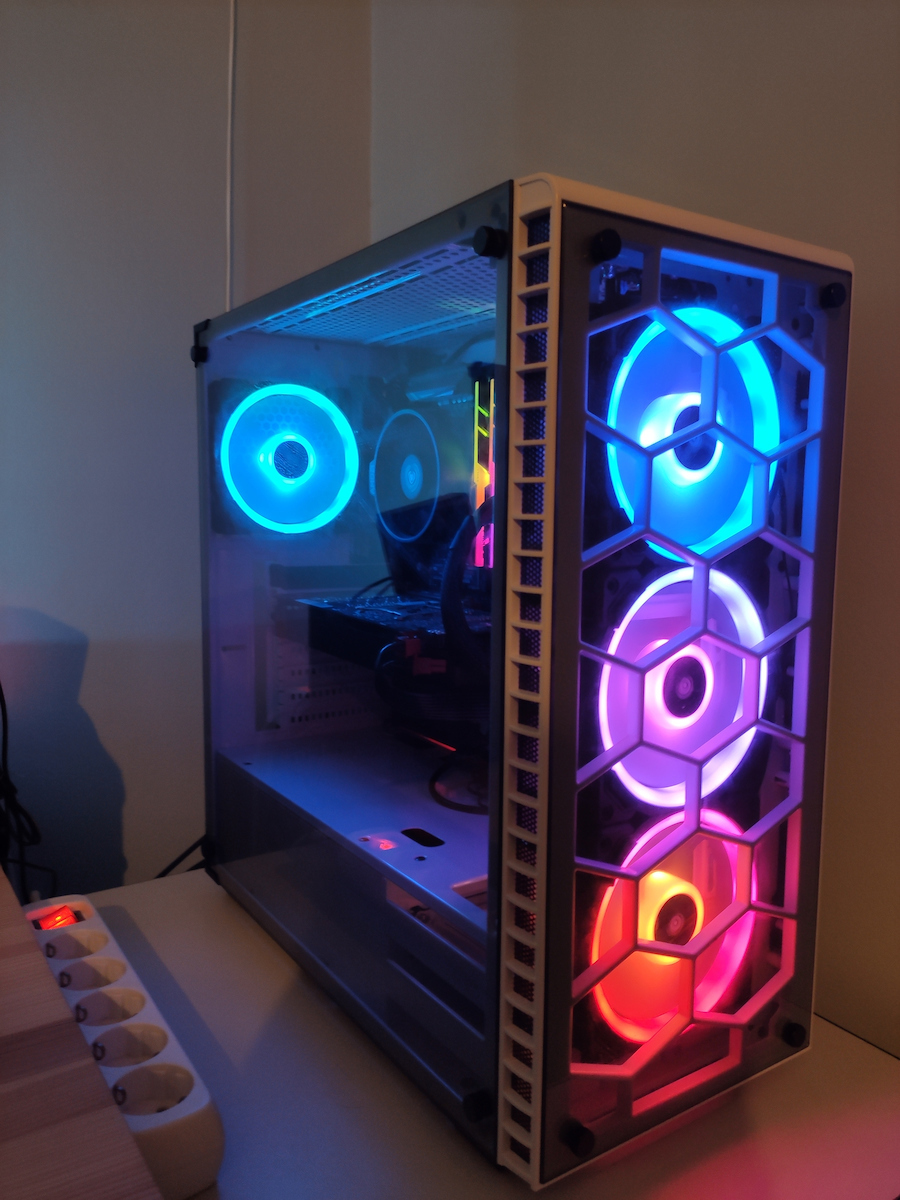
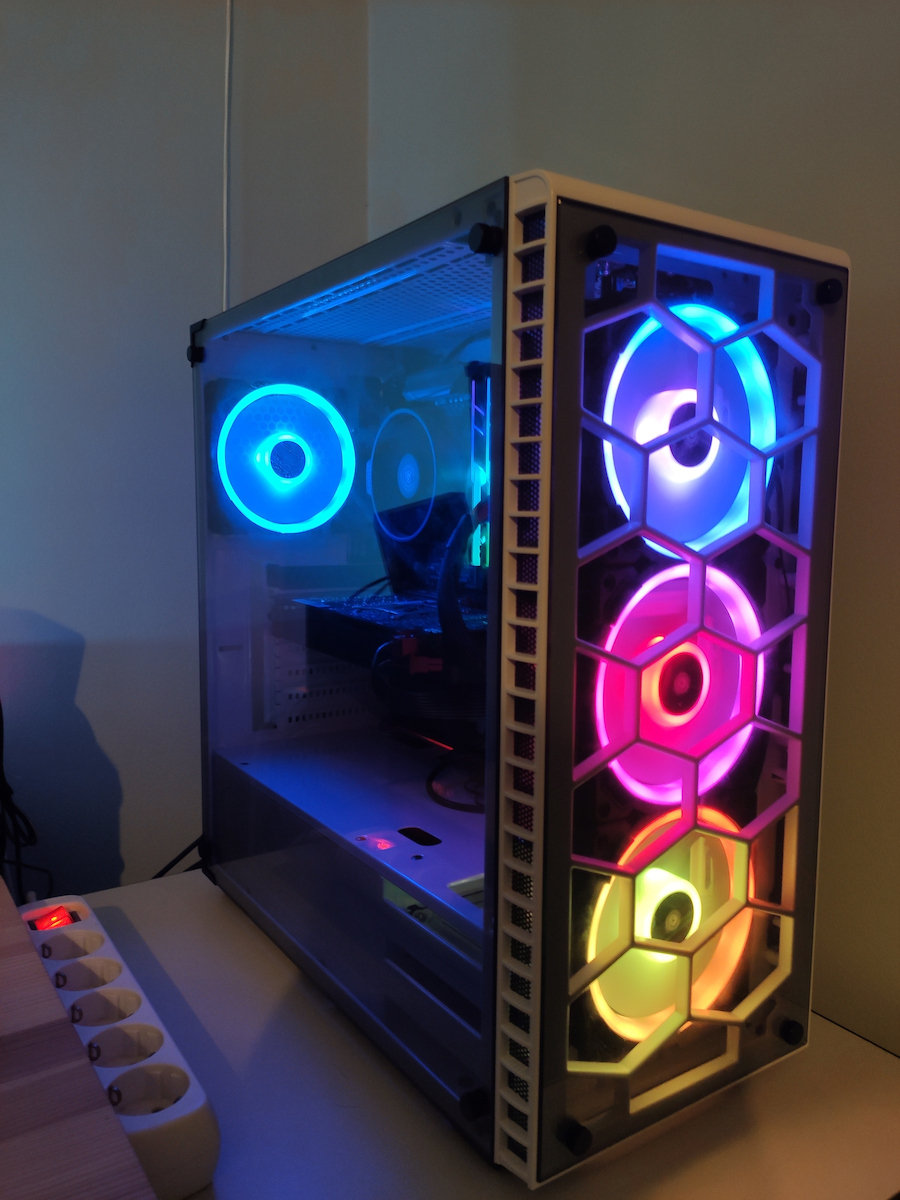
With the iCue software, you can synchronize the lighting on all compatible devices such as memory, fans, LED strips, keyboards, mice, etc.
Συνδέονται μόνο οι αυτοί η ανεμιστήρες στο hub η μπορώ να βάλω και άλλους ανεμιστήρες της corsair ;;;;
Set the delivery location to see products according to your choice.
Three-fan pack with 16 independent LEDs in 2 rings around the fan and a Lightning Node for control, compatible with Corsair iCUE.
See full descriptionWith the iCue software, you can synchronize the lighting on all compatible devices such as memory, fans, LED strips, keyboards, mice, etc.
The Corsair LL120 RGB LED PWM fan features 16 independent RGB LEDs in two separate light loops to create vibrant lighting and visual effects.
Using an optimized 120 mm fan blade and PWM control, adjust the fan speed anywhere from 600 RPM to 1,500 RPM for precise noise and airflow tuning.
Specifications are collected from official manufacturer websites. Please verify the specifications before proceeding with your final purchase. If you notice any problem you can report it here.
The fans are perfect!! They are completely silent and do what they promise... But the price is a bit steep
Τα fans είναι τέλεια!! Είναι εντελώς αθόρυβα και κάνουν αυτό που υπόσχονται... Αλλά η τιμή είναι λίγο τσιμπημενη
Nice fans with nice colors.
Ωραία φανάκια με ωραία χρώματα.
The price is steep, but I think it's worth it. It goes up to 1500 RPM, which is audible at this speed. There's no noise issue up to around 1000 RPM. Thanks to icue, it's easy to adjust the speed and LED lighting, so it's quiet at 700 RPM for low temperatures. I have another set of four fans that are inaudible up to 900 RPM. The cooling for internet browsing is very good.
Regarding icue, in version 4.21 on an i5 11500, CPU usage is 0.3%. Connecting the fans to the Lighting Node PRO and Corsair controller for fan speed is easy.
You need space for the fan controller and Node pro, and good cable management.
Drawback: For the money you pay, I think Corsair should have a detailed video on how to connect it, no matter how simple it is. It's not right to have to search on YouTube for the connection, no matter how easy it seems in the end.
Η τιμή είναι τσιμπημένη. Νομίζω όμως πως ικανοποιεί. Πάει μέχρι τις 1500 στροφές που σε αυτή την ταχύτητα ακούγονται. Μέχρι περίπου στις 1000 δεν υπάρχει θέμα θορύβου. Λόγω και του icue γίνεται εύκολη ρύθμιση σε ταχύτητα και στα led οπότε σε 700 στροφές για χαμηλές θερμοκρασίες, είναι αθόρυβοι. Έχω ακόμη έναν ίδιο, δηλαδή, σύνολο 4 ανεμιστήρες που δεν ακούγονται μέχρι τις 900 στροφές. Η ψύξη για πλοήγηση στο διαδίκτυο είναι πολύ καλή.
Σχετικά με το icue, στην 4.21 έκδοση σε i5 11500 η χρήση της cpu είναι 0,3%. Η σύνδεση των ανεμιστήρων με το Lighting Node PRO και με τον controller της corsair για την ταχύτητα των ανεμιστήρων είναι εύκολη.
Χρειάζεται χώρος για τον fun controller και το Node pro και καλή τακτοποίηση των καλωδίων.
Μειονέκτημα. Για τα λεφτά που πληρώνει κάποιος, νομίζω πως η corsair θα έπρεπε να έχει αναλυτικό βίντεο για το πως γίνεται η συνδεσμολογία όσο απλή και αν είναι. Δεν θεωρώ σωστό να ψάχνεις στο youtube για τη συνδεσμολογία. Όσο απλή και αν φαίνεται στο τέλος πως είναι.
I tried different brands, and I know there are cheaper and better options, but the RGB cannot be compared. The installation was easy, although it requires good cable management. At first, I had some problems with the RGB resetting, but I fixed it, and it turned out that it wasn't the fans' fault, but rather the Icue software, which had some issues with the Asus Armory. As soon as I uninstalled Armory, everything was fixed.
Εγώ τις πείρα για την μάρκα, ξέρω πως υπάρχουν πιο φτηνές και καλύτερες αλλά το rgb δεν συγκρίνετε. Η εγκατάσταση ήταν εύκολη αν και χρειάζεται καλό cable managment, στην αρχή είχα κάποια προβλήματα και το rgb γινόταν reset αλλά το έφτιαξα και δεν ευθύνονταν οι ανεμιστήρες τελικά αλλά το Icue το οποίο είχε κάποια προβλήματα με το asus armory, με το που έσβησα το aromory διορθώθηκαν όλα.
I've had them for about a year.. generally very satisfied and when I open them every 3-4 months for general cleaning, they don't catch any dust compared to others... they clean very easily... with other older ones, I had a hard time cleaning because there were areas that held onto dust and I couldn't remove it without unscrewing them, which wasn't an option in this scenario.
τα εχω κανα χρονο.. γενικα πολυ ευχαριστημενος και οταν το ανοιγω καθε 3-4 μηνες για γενικο καθαρισμο , δεν εχουν πιασει καθολου σκονη με σχεση με αλλα... καθαριζονται πολυ ευκολα δλδ... με αλλα παλιοτερα μου εβγαινε η παναγια για να καθαριστουν γιατι ηταν σημεια που κραταγαν σκονη και δεν μπορουσα να την βγαλω εαν δεν τα εκανα βιδες που τετοιο σεναριο δεν επαιζε..
The only thing that is worth it is that it has an LED in the center. Otherwise, it's not worth it. It doesn't have a remote control, it has few effects that you have to change from the Corsair program. I have the Argus and the Supercase and they are clearly superior.
το μονο που αξιζει ειναι οτι εχει και στο κεντρο led.κατα τα αλλα δεν αξιζει μια. δεν εχει τηλεχειριστηριο, εχει λιγα εφε που πρεπει να τα αλλαζεις απο το προγραμμα της corsair.
εχω της argus και της supercase και ειναι σαφως ανωτερα.
Beautiful fans, you can't really call them quiet, but 80 euros for 3 fans, come on! I need 10 fans (Lian Li PC-011 Dynamic XL case) for my PC, so I spent a total of 240 euros including the commander pro. ...the conclusions are up to you.
Πανέμορφα φανάκια δεν τα λες και αθόρυβα αλλα 80 ευρώ για 3 fanakia Έλεος!!! εγω χρειάζομαι 10 fanakia ( κουτί Lian Li PC-011 Dynamic XL) στο pc δηλαδή έδωσα μαζί με το commander pro 240 ευρώ .........τα συμπεράσματα δικά σας.
In short, they are not the best in performance on the market, but let's face it, 2-3 degrees is not something tragic. I have them working at 40% and the temperatures are fine. The design, in my opinion, is the best on the market and they have the best RGB. The reason is that the lighting in the effects is so smooth that the LEDs that light up are not at all discernible. The price is a bit steep, but it's worth it for the design. Note: if someone wants to get Corsair LL fans, they need to get the pack of three, because it comes with the lighting node pro, while if you buy fans individually and don't have the node pro, you won't be able to control their lighting.
Με λίγα λόγια δεν είναι τα καλύτερα σε απόδοση στην αγορά, αλλά κακά τα ψέματα 2-3 βαθμούς δεν είναι κάτι το τραγικό. Τα έχω στο 40% να δουλεύουν και οι θερμοκρασίες έιναι μια χαρά. Το design κατ' εμέ είναι το καλύτερο της αγοράς και διαθέτουν το καλύτερο rgb. Ο λόγος έιναι ότι ειναι τόσο ομαλός ο φωτισμός στα εφέ που δεν είναι καθόλου ευδιάκριτα τα led ανάμεσα που ανάβουν. Όντως λίγο τσιμπημένη η τιμή, αλλά στο ξεπληρώνει στο design. Προσοχή: εάν κάποιος θέλει να πάρει corsair fans ll, πρέπει να προμηθευτεί το pack των τριών, γιατί έρχεται μαζί με το lighting node pro, ενώ αν αγοράσεις fans μεμονωμένα και δεν έχει το node pro, δεν θα μπορείς να ελέγξεις τον φωτισμό τους.
EDIT: The following temperatures were recorded while the PC was running Unity3D, Visual Studio 2019, GitKraken, 2 Chrome windows, and the Epic Games client.
The fans are very good (I bought the package + one fan), I won't talk about the LEDs which are perhaps the best I've seen, they really have everything. As for temperatures, airflow, and noise, here's what I have to say. Everything depends on the system you install them in. On their own, they have very good airflow and minimal noise. I have installed them in a Kolink Observatory case, with a Ryzen 2600 CPU and the default cooler. The case has a glass front and small openings on the sides, so you can understand that no matter how good the fans are, they can't do much for airflow. The CPU, due to the stock cooler, raises the temperature quite a bit, causing the LL120 fans to struggle and make noise (controlled by MSI's Dragon Center in balanced mode). When the PC is running just one Chrome window, they can be heard with difficulty. The rest of the components have more or less normal temperatures. Below are the average temperatures as reported by HWiNFO64:
CPU Ryzen 5 2600: 50.4 °C
GPU Nvidia GTX 1060 6GB: 34.9 °C - hot spot temp: 42.9 °C
Motherboard MSI B450 Gaming Plus: 32.6 °C
RAM G.Skill TridentZ 2x8GB 3200MHz: 35.4 °C
SSD Samsung 860 EVO 1TB: 35 °C
SSD Samsung 860 EVO 250GB: 30 °C
SSD Samsung 970 EVO Plus 1TB: 40 °C (M.2 NVMe above the graphics card)
HDD Western Digital Red 1TB: 28 °C
EDIT : Οι παρακάτω θερμοκρασίες καταγράφηκαν ενώ το pc έτρεχε Unity3D, Visual Studio 2019, GitKraken, 2 Chrome windows, και τον Epic Games client.
Πολύ καλά τα ανεμιστηράκια (αγόρασα το πακέτο + ένα fan), δε θα μιλήσω για τα led τα οποία είναι ίσως ο΄τι καλύτερο έχω δει, πραγματικά δε τους λείπει τίποτα.Όσον αφορά θερμοκρασίες, ροή αέρα και θόρυβο έχω να πώ τα εξής.Όλα εξαρτώνται απ΄το σύστημα στο οποίο τα εγκαθιστάς.Απο μόνα τους έχουν πολύ καλή ροή, και ελάχιστο θόρυβο.Τα έχω εγκαταστήσει σε ένα kolink observatory case, cpu ryzen 2600 με τη default ψύκτρα.Το case έχει τζάμι μπροστά και μικρά ανοίγματα στα πλάγα οπότε καταλαβαίνετε πως όσο καλά και να είναι τα fans δε μπορούν να κάνουν πολλά για το airflow.Η cpu λόγω της βασικής ψύκτρας ανεβάζει αρκετα τη θερμοκρασία, με αποτέλεσμα να ζοριστούν τα ll120 και να κάνουν θόρυβο( ελέγχονται απ'το dragon center της msi σε balanced mode).Όταν το pc τρέχει απλά ένα chrome, ακούγονται με δυσκολία.Στα υπόλοιπα κομμάτια έχω πάνω κάτω φυσιολογικές θερμοκρασίες.Παρακάτω οι average θερμοκρασίες όπως τις δίνει το HWiNFO64:
cpu ryzen 5 2600 : 50.4 °C
gpu nvidia gtx 1060 6gb : 34.9 °C - hot spot temp : 42.9 °C
motheroboard msi b450 gaming plus : 32.6 °C
ram g.skill tridentz 2x8gb 3200mhz : 35.4 °C
ssd samsung 860 evo 1tb : 35 °C
ssd samsung 860 evo 250gb : 30 °C
ssd samsung 970 evo plus 1tb : 40 °C (m.2 nvme πάνω απ΄τη κάρτα γραφικών)
hdd western digital red 1tb : 28 °C
My PC is perfect, it doesn't raise temperatures at all, it's very easy to assemble and it's very quiet and beautiful!
Είναι τέλειο το pc μου δεν ανεβάζει καθόλου θερμοκρασιες, εχουν πολύ εύκολη συναρμολογηση και είναι πολύ αθόρυβα και πανέμορφα!!!!!
The most beautiful RGB fans available on the market in my opinion, and much less noise compared to CoolerMaster's Masterfans.
2. Using the IQUE program, you can create any combination you want. It's incredibly beautiful when you have Corsair products in your PC, offering you the greatest enjoyment with how they synchronize and the options and settings you can create either with a little imagination or from YouTube.
3. 10/10
Τα πιο όμορφα RGb fans που κυκλοφορούν στην αγορά κατά την γνώμη και πολύ λιγότερος θόρυβος σε σύγκριση με τα Masterfans της CoolerMaster
Χρησιμοποιώντας το πρόγραμμα IQUE μπορείς να κάνεις ότι συνδυασμό θέλεις. Είναι απίστευτα όμορφα όταν έχεις στο pc σου προϊόντα της corsair προσφέροντας σου την μεγαλύτερη απόλαυση με το πως συγχρονιζονται και τις επιλογές και ρυθμίσεις που μπορείς είτε με λίγη φαντασία είτε από youtube να δημιουργήσεις.
10/10
Coming soon! Amazing aesthetics, incredible RGB combinations, quiet but as far as air goes, they lose to the RGB ring they have, without meaning that they are bad in airflow. I have these 3 and 3 EK Vardar in my setup and when I had them set to full, the EKs were air conditioning while the Corsairs didn't leave me fully satisfied. For cases that have their own airflow and fans help, the LL120s are very good. Now, if the case doesn't have good airflow, it's better to go elsewhere.
Πολυ συντομα! Καταπληκτικα αισθητικα, απιστευτοι συνδιασμοι rgb, αθορυβα αλλα οσο αναφορα τον αερα τους χανουν απο το δαχτυλιδι rgb που εχουν χωρις να σημαινει οτι ειναι κακα στο airflow. Εχω αυτα τα 3 και 3 ek vardar στο setup μου κ οταν τα ειχα ρυθμισει full τα ek ηταν aircondition ενω τα corsair δεν με αφησαν πληρως οικανοποιημενο.
Για κουτια που εχουν δικο τους airflow κ βοηθανε τα fans ειναι πολυ καλα τα LL120
Τωρα αν το κουτι δεν εχει καλο airflow καλυτερα να πατε αλλου
It's not top in airflow/pressure nor the quietest on the market, but it compensates for these "shortcomings" in the aesthetic department where it's flawless. Be sure to get the Corsair Node which is necessary for their lighting to work.
Greek PC Build video: https://youtu.be/MnBVl9vQxY8
Δεν είναι κορυφαία σε airflow/press ούτε τα πιο αθόρυβα της αγοράς αλλά αντισταθμίζουν αυτές τις "ελλείψεις" στο αισθητικό κομμάτι όπου είναι άψογα. Προσοχή να προμηθευτείτε το Corsair Node που είναι απαραίτητο για να λειτουργήσει ο φωτισμός τους.
Ελληνικό PC Build video : https://youtu.be/MnBVl9vQxY8
Verified purchase
wraia kai athoriva
I would give it a 5/5 but it's $88. If it was somewhere around $70-75, I would definitely get it.
Εγώ θα του έβαζα 5/5 αλλά είναι 88$ αν ήταν κάπου στα 70-75 πολύ άνετα θα το έπαιρνα
The best fans I have ever purchased... in terms of beauty, air flow, cooling... the Icue is awesome...
τα καλυτερα Fans που έχω αγοράσει..
από ομορφιά, air flow, ψυξη ... το. Icue φοβερό...
Verified purchase
Perfect! I wish it was a little cheaper...
Τελεια! Μακάρι να ήταν και λίγο πιο φθηνά....
Pure magic and flawless performance.
Σκέτη μαγεία και τέλεια απόδοση.
Quiet and everything is cold inside. I won't say how beautiful, expensive but they're worth it.
Αθορυβα και τα παντα κρυα μεσα. Δεν θα πω για το ποσο ομορφα, ακριβα αλλα αξιζουν.
Verified purchase
Verified purchase
Verified purchase
Verified purchase
Verified purchase
Verified purchase
Verified purchase
Verified purchase
Verified purchase
Verified purchase
The fans are perfect!! They are completely silent and do what they promise... But the price is a bit steep
Τα fans είναι τέλεια!! Είναι εντελώς αθόρυβα και κάνουν αυτό που υπόσχονται... Αλλά η τιμή είναι λίγο τσιμπημενη
Nice fans with nice colors.
Ωραία φανάκια με ωραία χρώματα.
The price is steep, but I think it's worth it. It goes up to 1500 RPM, which is audible at this speed. There's no noise issue up to around 1000 RPM. Thanks to icue, it's easy to adjust the speed and LED lighting, so it's quiet at 700 RPM for low temperatures. I have another set of four fans that are inaudible up to 900 RPM. The cooling for internet browsing is very good.
Regarding icue, in version 4.21 on an i5 11500, CPU usage is 0.3%. Connecting the fans to the Lighting Node PRO and Corsair controller for fan speed is easy.
You need space for the fan controller and Node pro, and good cable management.
Drawback: For the money you pay, I think Corsair should have a detailed video on how to connect it, no matter how simple it is. It's not right to have to search on YouTube for the connection, no matter how easy it seems in the end.
Η τιμή είναι τσιμπημένη. Νομίζω όμως πως ικανοποιεί. Πάει μέχρι τις 1500 στροφές που σε αυτή την ταχύτητα ακούγονται. Μέχρι περίπου στις 1000 δεν υπάρχει θέμα θορύβου. Λόγω και του icue γίνεται εύκολη ρύθμιση σε ταχύτητα και στα led οπότε σε 700 στροφές για χαμηλές θερμοκρασίες, είναι αθόρυβοι. Έχω ακόμη έναν ίδιο, δηλαδή, σύνολο 4 ανεμιστήρες που δεν ακούγονται μέχρι τις 900 στροφές. Η ψύξη για πλοήγηση στο διαδίκτυο είναι πολύ καλή.
Σχετικά με το icue, στην 4.21 έκδοση σε i5 11500 η χρήση της cpu είναι 0,3%. Η σύνδεση των ανεμιστήρων με το Lighting Node PRO και με τον controller της corsair για την ταχύτητα των ανεμιστήρων είναι εύκολη.
Χρειάζεται χώρος για τον fun controller και το Node pro και καλή τακτοποίηση των καλωδίων.
Μειονέκτημα. Για τα λεφτά που πληρώνει κάποιος, νομίζω πως η corsair θα έπρεπε να έχει αναλυτικό βίντεο για το πως γίνεται η συνδεσμολογία όσο απλή και αν είναι. Δεν θεωρώ σωστό να ψάχνεις στο youtube για τη συνδεσμολογία. Όσο απλή και αν φαίνεται στο τέλος πως είναι.
I tried different brands, and I know there are cheaper and better options, but the RGB cannot be compared. The installation was easy, although it requires good cable management. At first, I had some problems with the RGB resetting, but I fixed it, and it turned out that it wasn't the fans' fault, but rather the Icue software, which had some issues with the Asus Armory. As soon as I uninstalled Armory, everything was fixed.
Εγώ τις πείρα για την μάρκα, ξέρω πως υπάρχουν πιο φτηνές και καλύτερες αλλά το rgb δεν συγκρίνετε. Η εγκατάσταση ήταν εύκολη αν και χρειάζεται καλό cable managment, στην αρχή είχα κάποια προβλήματα και το rgb γινόταν reset αλλά το έφτιαξα και δεν ευθύνονταν οι ανεμιστήρες τελικά αλλά το Icue το οποίο είχε κάποια προβλήματα με το asus armory, με το που έσβησα το aromory διορθώθηκαν όλα.
I've had them for about a year.. generally very satisfied and when I open them every 3-4 months for general cleaning, they don't catch any dust compared to others... they clean very easily... with other older ones, I had a hard time cleaning because there were areas that held onto dust and I couldn't remove it without unscrewing them, which wasn't an option in this scenario.
τα εχω κανα χρονο.. γενικα πολυ ευχαριστημενος και οταν το ανοιγω καθε 3-4 μηνες για γενικο καθαρισμο , δεν εχουν πιασει καθολου σκονη με σχεση με αλλα... καθαριζονται πολυ ευκολα δλδ... με αλλα παλιοτερα μου εβγαινε η παναγια για να καθαριστουν γιατι ηταν σημεια που κραταγαν σκονη και δεν μπορουσα να την βγαλω εαν δεν τα εκανα βιδες που τετοιο σεναριο δεν επαιζε..
369 users have this product and can help you
Ask for the productΣυνδέονται μόνο οι αυτοί η ανεμιστήρες στο hub η μπορώ να βάλω και άλλους ανεμιστήρες της corsair ;;;;
Καλησπέρα, μπορείς να βάλεις και άλλους της Corsair
χρειζεται να αγορασω και το https://www.skroutz.gr/s/20668073/Corsair-iCUE-Commander-PRO-Fan-Controller-Smart-Lighting.html ?
Όχι απαραίτητα. Αυτό θα το χρειαστείς μόνο αν θέλεις να βάλεις 6 fans που να παίρνουν ρεύμα και να τα διαχειρίζεσαι απο εκεί αντι να τα βάζεις πάνω στην μητρική για ρεύμα ένα-ένα σε διάφορα άκυρα σημεία και να φαίνονται μπροστά καλώδια. Το σετ των 3 ανεμιστήρων σου δίνει πάντως το RGB controller οπότε αν έχεις παλιά μητρική με λίγα fan headers θα αγοράσεις μόνο αυτό εδώ: https://www.skroutz.gr/s/25766142/Ekwb-4-Pin-pwm-3-x-4-Pin-pwm-Cable-0-10m-%CE%9C%CE%B1%CF%8D%CF%81%CE%BF-4-PIN.html και είσαι ΟΚ.
Στο υπάρχον controller πόσα fans μπορώ να έχω στο σύνολο? Πέρα από τα 3 που έχει μέσα μπαίνει και 4ο?
Μπαίνουν μεχρι 6
Η μητρική μου είναι μια Gigabyte Gaming x έχει επάνω υποδοχές με 4 PIN που αναγράφουν SYS FAN μπορώ να συνδέσω αυτά τα fan ??? Μπορεί να γίνει ρύθμιση στροφών και χρώματος από την μητρική μέσω software???
With the iCue software, you can synchronize the lighting on all compatible devices such as memory, fans, LED strips, keyboards, mice, etc.
The Corsair LL120 RGB LED PWM fan features 16 independent RGB LEDs in two separate light loops to create vibrant lighting and visual effects.
Using an optimized 120 mm fan blade and PWM control, adjust the fan speed anywhere from 600 RPM to 1,500 RPM for precise noise and airflow tuning.
Specifications are collected from official manufacturer websites. Please verify the specifications before proceeding with your final purchase. If you notice any problem you can report it here.
The fans are perfect!! They are completely silent and do what they promise... But the price is a bit steep
Τα fans είναι τέλεια!! Είναι εντελώς αθόρυβα και κάνουν αυτό που υπόσχονται... Αλλά η τιμή είναι λίγο τσιμπημενη
Nice fans with nice colors.
Ωραία φανάκια με ωραία χρώματα.
The price is steep, but I think it's worth it. It goes up to 1500 RPM, which is audible at this speed. There's no noise issue up to around 1000 RPM. Thanks to icue, it's easy to adjust the speed and LED lighting, so it's quiet at 700 RPM for low temperatures. I have another set of four fans that are inaudible up to 900 RPM. The cooling for internet browsing is very good.
Regarding icue, in version 4.21 on an i5 11500, CPU usage is 0.3%. Connecting the fans to the Lighting Node PRO and Corsair controller for fan speed is easy.
You need space for the fan controller and Node pro, and good cable management.
Drawback: For the money you pay, I think Corsair should have a detailed video on how to connect it, no matter how simple it is. It's not right to have to search on YouTube for the connection, no matter how easy it seems in the end.
Η τιμή είναι τσιμπημένη. Νομίζω όμως πως ικανοποιεί. Πάει μέχρι τις 1500 στροφές που σε αυτή την ταχύτητα ακούγονται. Μέχρι περίπου στις 1000 δεν υπάρχει θέμα θορύβου. Λόγω και του icue γίνεται εύκολη ρύθμιση σε ταχύτητα και στα led οπότε σε 700 στροφές για χαμηλές θερμοκρασίες, είναι αθόρυβοι. Έχω ακόμη έναν ίδιο, δηλαδή, σύνολο 4 ανεμιστήρες που δεν ακούγονται μέχρι τις 900 στροφές. Η ψύξη για πλοήγηση στο διαδίκτυο είναι πολύ καλή.
Σχετικά με το icue, στην 4.21 έκδοση σε i5 11500 η χρήση της cpu είναι 0,3%. Η σύνδεση των ανεμιστήρων με το Lighting Node PRO και με τον controller της corsair για την ταχύτητα των ανεμιστήρων είναι εύκολη.
Χρειάζεται χώρος για τον fun controller και το Node pro και καλή τακτοποίηση των καλωδίων.
Μειονέκτημα. Για τα λεφτά που πληρώνει κάποιος, νομίζω πως η corsair θα έπρεπε να έχει αναλυτικό βίντεο για το πως γίνεται η συνδεσμολογία όσο απλή και αν είναι. Δεν θεωρώ σωστό να ψάχνεις στο youtube για τη συνδεσμολογία. Όσο απλή και αν φαίνεται στο τέλος πως είναι.
I tried different brands, and I know there are cheaper and better options, but the RGB cannot be compared. The installation was easy, although it requires good cable management. At first, I had some problems with the RGB resetting, but I fixed it, and it turned out that it wasn't the fans' fault, but rather the Icue software, which had some issues with the Asus Armory. As soon as I uninstalled Armory, everything was fixed.
Εγώ τις πείρα για την μάρκα, ξέρω πως υπάρχουν πιο φτηνές και καλύτερες αλλά το rgb δεν συγκρίνετε. Η εγκατάσταση ήταν εύκολη αν και χρειάζεται καλό cable managment, στην αρχή είχα κάποια προβλήματα και το rgb γινόταν reset αλλά το έφτιαξα και δεν ευθύνονταν οι ανεμιστήρες τελικά αλλά το Icue το οποίο είχε κάποια προβλήματα με το asus armory, με το που έσβησα το aromory διορθώθηκαν όλα.
I've had them for about a year.. generally very satisfied and when I open them every 3-4 months for general cleaning, they don't catch any dust compared to others... they clean very easily... with other older ones, I had a hard time cleaning because there were areas that held onto dust and I couldn't remove it without unscrewing them, which wasn't an option in this scenario.
τα εχω κανα χρονο.. γενικα πολυ ευχαριστημενος και οταν το ανοιγω καθε 3-4 μηνες για γενικο καθαρισμο , δεν εχουν πιασει καθολου σκονη με σχεση με αλλα... καθαριζονται πολυ ευκολα δλδ... με αλλα παλιοτερα μου εβγαινε η παναγια για να καθαριστουν γιατι ηταν σημεια που κραταγαν σκονη και δεν μπορουσα να την βγαλω εαν δεν τα εκανα βιδες που τετοιο σεναριο δεν επαιζε..
The only thing that is worth it is that it has an LED in the center. Otherwise, it's not worth it. It doesn't have a remote control, it has few effects that you have to change from the Corsair program. I have the Argus and the Supercase and they are clearly superior.
το μονο που αξιζει ειναι οτι εχει και στο κεντρο led.κατα τα αλλα δεν αξιζει μια. δεν εχει τηλεχειριστηριο, εχει λιγα εφε που πρεπει να τα αλλαζεις απο το προγραμμα της corsair.
εχω της argus και της supercase και ειναι σαφως ανωτερα.
Beautiful fans, you can't really call them quiet, but 80 euros for 3 fans, come on! I need 10 fans (Lian Li PC-011 Dynamic XL case) for my PC, so I spent a total of 240 euros including the commander pro. ...the conclusions are up to you.
Πανέμορφα φανάκια δεν τα λες και αθόρυβα αλλα 80 ευρώ για 3 fanakia Έλεος!!! εγω χρειάζομαι 10 fanakia ( κουτί Lian Li PC-011 Dynamic XL) στο pc δηλαδή έδωσα μαζί με το commander pro 240 ευρώ .........τα συμπεράσματα δικά σας.
In short, they are not the best in performance on the market, but let's face it, 2-3 degrees is not something tragic. I have them working at 40% and the temperatures are fine. The design, in my opinion, is the best on the market and they have the best RGB. The reason is that the lighting in the effects is so smooth that the LEDs that light up are not at all discernible. The price is a bit steep, but it's worth it for the design. Note: if someone wants to get Corsair LL fans, they need to get the pack of three, because it comes with the lighting node pro, while if you buy fans individually and don't have the node pro, you won't be able to control their lighting.
Με λίγα λόγια δεν είναι τα καλύτερα σε απόδοση στην αγορά, αλλά κακά τα ψέματα 2-3 βαθμούς δεν είναι κάτι το τραγικό. Τα έχω στο 40% να δουλεύουν και οι θερμοκρασίες έιναι μια χαρά. Το design κατ' εμέ είναι το καλύτερο της αγοράς και διαθέτουν το καλύτερο rgb. Ο λόγος έιναι ότι ειναι τόσο ομαλός ο φωτισμός στα εφέ που δεν είναι καθόλου ευδιάκριτα τα led ανάμεσα που ανάβουν. Όντως λίγο τσιμπημένη η τιμή, αλλά στο ξεπληρώνει στο design. Προσοχή: εάν κάποιος θέλει να πάρει corsair fans ll, πρέπει να προμηθευτεί το pack των τριών, γιατί έρχεται μαζί με το lighting node pro, ενώ αν αγοράσεις fans μεμονωμένα και δεν έχει το node pro, δεν θα μπορείς να ελέγξεις τον φωτισμό τους.
EDIT: The following temperatures were recorded while the PC was running Unity3D, Visual Studio 2019, GitKraken, 2 Chrome windows, and the Epic Games client.
The fans are very good (I bought the package + one fan), I won't talk about the LEDs which are perhaps the best I've seen, they really have everything. As for temperatures, airflow, and noise, here's what I have to say. Everything depends on the system you install them in. On their own, they have very good airflow and minimal noise. I have installed them in a Kolink Observatory case, with a Ryzen 2600 CPU and the default cooler. The case has a glass front and small openings on the sides, so you can understand that no matter how good the fans are, they can't do much for airflow. The CPU, due to the stock cooler, raises the temperature quite a bit, causing the LL120 fans to struggle and make noise (controlled by MSI's Dragon Center in balanced mode). When the PC is running just one Chrome window, they can be heard with difficulty. The rest of the components have more or less normal temperatures. Below are the average temperatures as reported by HWiNFO64:
CPU Ryzen 5 2600: 50.4 °C
GPU Nvidia GTX 1060 6GB: 34.9 °C - hot spot temp: 42.9 °C
Motherboard MSI B450 Gaming Plus: 32.6 °C
RAM G.Skill TridentZ 2x8GB 3200MHz: 35.4 °C
SSD Samsung 860 EVO 1TB: 35 °C
SSD Samsung 860 EVO 250GB: 30 °C
SSD Samsung 970 EVO Plus 1TB: 40 °C (M.2 NVMe above the graphics card)
HDD Western Digital Red 1TB: 28 °C
EDIT : Οι παρακάτω θερμοκρασίες καταγράφηκαν ενώ το pc έτρεχε Unity3D, Visual Studio 2019, GitKraken, 2 Chrome windows, και τον Epic Games client.
Πολύ καλά τα ανεμιστηράκια (αγόρασα το πακέτο + ένα fan), δε θα μιλήσω για τα led τα οποία είναι ίσως ο΄τι καλύτερο έχω δει, πραγματικά δε τους λείπει τίποτα.Όσον αφορά θερμοκρασίες, ροή αέρα και θόρυβο έχω να πώ τα εξής.Όλα εξαρτώνται απ΄το σύστημα στο οποίο τα εγκαθιστάς.Απο μόνα τους έχουν πολύ καλή ροή, και ελάχιστο θόρυβο.Τα έχω εγκαταστήσει σε ένα kolink observatory case, cpu ryzen 2600 με τη default ψύκτρα.Το case έχει τζάμι μπροστά και μικρά ανοίγματα στα πλάγα οπότε καταλαβαίνετε πως όσο καλά και να είναι τα fans δε μπορούν να κάνουν πολλά για το airflow.Η cpu λόγω της βασικής ψύκτρας ανεβάζει αρκετα τη θερμοκρασία, με αποτέλεσμα να ζοριστούν τα ll120 και να κάνουν θόρυβο( ελέγχονται απ'το dragon center της msi σε balanced mode).Όταν το pc τρέχει απλά ένα chrome, ακούγονται με δυσκολία.Στα υπόλοιπα κομμάτια έχω πάνω κάτω φυσιολογικές θερμοκρασίες.Παρακάτω οι average θερμοκρασίες όπως τις δίνει το HWiNFO64:
cpu ryzen 5 2600 : 50.4 °C
gpu nvidia gtx 1060 6gb : 34.9 °C - hot spot temp : 42.9 °C
motheroboard msi b450 gaming plus : 32.6 °C
ram g.skill tridentz 2x8gb 3200mhz : 35.4 °C
ssd samsung 860 evo 1tb : 35 °C
ssd samsung 860 evo 250gb : 30 °C
ssd samsung 970 evo plus 1tb : 40 °C (m.2 nvme πάνω απ΄τη κάρτα γραφικών)
hdd western digital red 1tb : 28 °C
My PC is perfect, it doesn't raise temperatures at all, it's very easy to assemble and it's very quiet and beautiful!
Είναι τέλειο το pc μου δεν ανεβάζει καθόλου θερμοκρασιες, εχουν πολύ εύκολη συναρμολογηση και είναι πολύ αθόρυβα και πανέμορφα!!!!!
The most beautiful RGB fans available on the market in my opinion, and much less noise compared to CoolerMaster's Masterfans.
2. Using the IQUE program, you can create any combination you want. It's incredibly beautiful when you have Corsair products in your PC, offering you the greatest enjoyment with how they synchronize and the options and settings you can create either with a little imagination or from YouTube.
3. 10/10
Τα πιο όμορφα RGb fans που κυκλοφορούν στην αγορά κατά την γνώμη και πολύ λιγότερος θόρυβος σε σύγκριση με τα Masterfans της CoolerMaster
Χρησιμοποιώντας το πρόγραμμα IQUE μπορείς να κάνεις ότι συνδυασμό θέλεις. Είναι απίστευτα όμορφα όταν έχεις στο pc σου προϊόντα της corsair προσφέροντας σου την μεγαλύτερη απόλαυση με το πως συγχρονιζονται και τις επιλογές και ρυθμίσεις που μπορείς είτε με λίγη φαντασία είτε από youtube να δημιουργήσεις.
10/10
Coming soon! Amazing aesthetics, incredible RGB combinations, quiet but as far as air goes, they lose to the RGB ring they have, without meaning that they are bad in airflow. I have these 3 and 3 EK Vardar in my setup and when I had them set to full, the EKs were air conditioning while the Corsairs didn't leave me fully satisfied. For cases that have their own airflow and fans help, the LL120s are very good. Now, if the case doesn't have good airflow, it's better to go elsewhere.
Πολυ συντομα! Καταπληκτικα αισθητικα, απιστευτοι συνδιασμοι rgb, αθορυβα αλλα οσο αναφορα τον αερα τους χανουν απο το δαχτυλιδι rgb που εχουν χωρις να σημαινει οτι ειναι κακα στο airflow. Εχω αυτα τα 3 και 3 ek vardar στο setup μου κ οταν τα ειχα ρυθμισει full τα ek ηταν aircondition ενω τα corsair δεν με αφησαν πληρως οικανοποιημενο.
Για κουτια που εχουν δικο τους airflow κ βοηθανε τα fans ειναι πολυ καλα τα LL120
Τωρα αν το κουτι δεν εχει καλο airflow καλυτερα να πατε αλλου
It's not top in airflow/pressure nor the quietest on the market, but it compensates for these "shortcomings" in the aesthetic department where it's flawless. Be sure to get the Corsair Node which is necessary for their lighting to work.
Greek PC Build video: https://youtu.be/MnBVl9vQxY8
Δεν είναι κορυφαία σε airflow/press ούτε τα πιο αθόρυβα της αγοράς αλλά αντισταθμίζουν αυτές τις "ελλείψεις" στο αισθητικό κομμάτι όπου είναι άψογα. Προσοχή να προμηθευτείτε το Corsair Node που είναι απαραίτητο για να λειτουργήσει ο φωτισμός τους.
Ελληνικό PC Build video : https://youtu.be/MnBVl9vQxY8
Verified purchase
wraia kai athoriva
I would give it a 5/5 but it's $88. If it was somewhere around $70-75, I would definitely get it.
Εγώ θα του έβαζα 5/5 αλλά είναι 88$ αν ήταν κάπου στα 70-75 πολύ άνετα θα το έπαιρνα
The best fans I have ever purchased... in terms of beauty, air flow, cooling... the Icue is awesome...
τα καλυτερα Fans που έχω αγοράσει..
από ομορφιά, air flow, ψυξη ... το. Icue φοβερό...
Verified purchase
Perfect! I wish it was a little cheaper...
Τελεια! Μακάρι να ήταν και λίγο πιο φθηνά....
Pure magic and flawless performance.
Σκέτη μαγεία και τέλεια απόδοση.
Quiet and everything is cold inside. I won't say how beautiful, expensive but they're worth it.
Αθορυβα και τα παντα κρυα μεσα. Δεν θα πω για το ποσο ομορφα, ακριβα αλλα αξιζουν.
Verified purchase
Verified purchase
Verified purchase
Verified purchase
Verified purchase
Verified purchase
Verified purchase
Verified purchase
Verified purchase
Verified purchase
The fans are perfect!! They are completely silent and do what they promise... But the price is a bit steep
Τα fans είναι τέλεια!! Είναι εντελώς αθόρυβα και κάνουν αυτό που υπόσχονται... Αλλά η τιμή είναι λίγο τσιμπημενη
Nice fans with nice colors.
Ωραία φανάκια με ωραία χρώματα.
The price is steep, but I think it's worth it. It goes up to 1500 RPM, which is audible at this speed. There's no noise issue up to around 1000 RPM. Thanks to icue, it's easy to adjust the speed and LED lighting, so it's quiet at 700 RPM for low temperatures. I have another set of four fans that are inaudible up to 900 RPM. The cooling for internet browsing is very good.
Regarding icue, in version 4.21 on an i5 11500, CPU usage is 0.3%. Connecting the fans to the Lighting Node PRO and Corsair controller for fan speed is easy.
You need space for the fan controller and Node pro, and good cable management.
Drawback: For the money you pay, I think Corsair should have a detailed video on how to connect it, no matter how simple it is. It's not right to have to search on YouTube for the connection, no matter how easy it seems in the end.
Η τιμή είναι τσιμπημένη. Νομίζω όμως πως ικανοποιεί. Πάει μέχρι τις 1500 στροφές που σε αυτή την ταχύτητα ακούγονται. Μέχρι περίπου στις 1000 δεν υπάρχει θέμα θορύβου. Λόγω και του icue γίνεται εύκολη ρύθμιση σε ταχύτητα και στα led οπότε σε 700 στροφές για χαμηλές θερμοκρασίες, είναι αθόρυβοι. Έχω ακόμη έναν ίδιο, δηλαδή, σύνολο 4 ανεμιστήρες που δεν ακούγονται μέχρι τις 900 στροφές. Η ψύξη για πλοήγηση στο διαδίκτυο είναι πολύ καλή.
Σχετικά με το icue, στην 4.21 έκδοση σε i5 11500 η χρήση της cpu είναι 0,3%. Η σύνδεση των ανεμιστήρων με το Lighting Node PRO και με τον controller της corsair για την ταχύτητα των ανεμιστήρων είναι εύκολη.
Χρειάζεται χώρος για τον fun controller και το Node pro και καλή τακτοποίηση των καλωδίων.
Μειονέκτημα. Για τα λεφτά που πληρώνει κάποιος, νομίζω πως η corsair θα έπρεπε να έχει αναλυτικό βίντεο για το πως γίνεται η συνδεσμολογία όσο απλή και αν είναι. Δεν θεωρώ σωστό να ψάχνεις στο youtube για τη συνδεσμολογία. Όσο απλή και αν φαίνεται στο τέλος πως είναι.
I tried different brands, and I know there are cheaper and better options, but the RGB cannot be compared. The installation was easy, although it requires good cable management. At first, I had some problems with the RGB resetting, but I fixed it, and it turned out that it wasn't the fans' fault, but rather the Icue software, which had some issues with the Asus Armory. As soon as I uninstalled Armory, everything was fixed.
Εγώ τις πείρα για την μάρκα, ξέρω πως υπάρχουν πιο φτηνές και καλύτερες αλλά το rgb δεν συγκρίνετε. Η εγκατάσταση ήταν εύκολη αν και χρειάζεται καλό cable managment, στην αρχή είχα κάποια προβλήματα και το rgb γινόταν reset αλλά το έφτιαξα και δεν ευθύνονταν οι ανεμιστήρες τελικά αλλά το Icue το οποίο είχε κάποια προβλήματα με το asus armory, με το που έσβησα το aromory διορθώθηκαν όλα.
I've had them for about a year.. generally very satisfied and when I open them every 3-4 months for general cleaning, they don't catch any dust compared to others... they clean very easily... with other older ones, I had a hard time cleaning because there were areas that held onto dust and I couldn't remove it without unscrewing them, which wasn't an option in this scenario.
τα εχω κανα χρονο.. γενικα πολυ ευχαριστημενος και οταν το ανοιγω καθε 3-4 μηνες για γενικο καθαρισμο , δεν εχουν πιασει καθολου σκονη με σχεση με αλλα... καθαριζονται πολυ ευκολα δλδ... με αλλα παλιοτερα μου εβγαινε η παναγια για να καθαριστουν γιατι ηταν σημεια που κραταγαν σκονη και δεν μπορουσα να την βγαλω εαν δεν τα εκανα βιδες που τετοιο σεναριο δεν επαιζε..
Your report helps us take action by understanding the issues our users face with various types of content
Be the first to leave a comment!