Printers

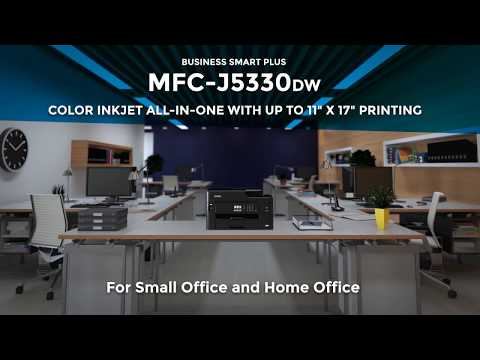
Brother Colour All In One Inkjet Printer with WiFi and Mobile Printing

Key features:

  • Print, copy, scan & fax
  • Print speed: 28 ppm
  • Print resolution: 4800x1200 DPI
  • Connections: Ethernet, USB, Wi-Fi
  • Dimensions: 530 x 398 x 305 mm
See full description
  • Print Color Colored
  • Consumable Inkjet
  • See all
239 90
240 Coins 240 Coins
Delivery Tomorrow
5,00 €  
Do you want it with Free shipping?
From Just Business 4.9 (4)
Περιστέρι, Αττικής
In-store pickup available
7 pieces
See Printers & Accessories on the page of Just Business
What if it breaks?

You have at least a 2-year warranty. Contact us by phone and we will immediately take care of the repair, replacement or refund of your money, completely free of charge.

What if I change my mind?

No problem, as long as it's within 14 days. We'll come pick it up or you can choose the Skroutz Point that suits you, completely free for up to 2 times per year, and we'll refund your money. Get Skroutz Plus to enjoy unlimited free returns.

Is delivery to a floor free?

Yes, we will carry it up to the floor for you, without any restrictions.

You can select additional services after adding the product to the cart.

Description

Description

The Brother MFC-J5340DW is a multifunction printer that combines high print quality, reliability, and speed. With the capability to print, copy, scan, and fax in one machine, the MFC-J5340DW printer is ideal for small businesses and homes.

It also features a range of interesting functions, such as automatic duplex printing, built-in Wi-Fi, and compatibility with Apple AirPrint and Google Cloud Print. Additionally, with the Brother iPrint&Scan app, you can print from and scan to your smartphone or tablet.

Furthermore, the Brother MFC-J5340DW printer is equipped with dual paper trays that allow for the use of different paper sizes, as well as large ink capacities to reduce replacement costs.

Increase printing speed with Brother's new MAXIDRIVE printing technology.

The high-power print head allows for a dramatic improvement in printing speed, saving you time when printing your professional documents. Not only is the speed improved, but this new print head is extremely durable and produces exceptionally high print quality, delivering professional results in your prints.

Larger Print

With the ability to print in full color A3, important educational material or presentation documents will stand out, helping you to gain more interest from the reader. By printing A3 documents at home, you have greater control over your deadlines and can expand your capabilities.

Printing from Anywhere

To use the MFC-J5340DW, you don't need to sit only at your desk or even close to the printer. With the range of available connectivity options, you can print anywhere in your office/home - even from your mobile phone via a wireless connection.

By downloading the Brother Mobile Connect app, you can access a range of features - from sending print jobs to checking ink levels.

Scanning technology to improve workflow, even when working remotely

As a multifunction device, the MFC-J5340DW can do much more than just print. The available scanning capabilities, for example, can significantly enhance your productivity from home. You can scan color or black-and-white pages at high speeds to various destinations to boost your workflow: Images, files, OCR, and Email

Consumables

Manufacturer

See full description

Specifications

Specifications

Technical Specifications

Type
Inkjet
Ink Tank
No
Printing Colour
Colored
Exclusively for Photos
No
All in one
Yes
Consumable
Inkjet
Memory
256 MB
Paper Size
A3, A4, Folio, Letter, Photo, Poster
Compatibility
Mac, Windows
Features
Fax, Mobile Printing Capability
Connectivity
Ethernet, USB, Wi-Fi
Colour
White

Printer

Colour printing speed
28 ppm
Duplex Print
Manual
Maximum Print Resolution
4800x1200 DPI

Scanner / Scanner

Maximum Scan Resolution
2400x1200 DPI
ADF Sheet Quantity
50 sheets
Scanning Capabilities
ADF

Dimensions

Height
304 mm
Width
530 mm
Length
398 mm

Important information

Specifications are collected from official manufacturer websites. Please verify the specifications before proceeding with your final purchase. If you notice any problem you can report it here.

See all specifications

Reviews (5)

Reviews

  1. 4
  2. 4 stars
    0
  3. 3 stars
    0
  4. 2 stars
    0
  5. 1
Review this product
Questions (3)

Questions

125 users have this product and can help you

Ask for the product
FILIP_BAL

Γνωρίζει κανείς πως γίνεται η εκτύπωση διπλής όψης σε αυτόν τον εκτυπωτή;
Αν υπάρχει έστω η ρύθμιση εκτύπωσης των μονών σελιδών ενός εγκράφου και στη συνέχεια η χειροκίνητη επανατοποθέτηση στην θήκη με την πίσω πλευρά, για την εκτύπωση των ζυγών.

charchar

Η αυτόματη εκτύπωση διπλής όψης ισχύει για την Α4 και όχι για την Α3. Εκεί αναφέρεται το χειροκίνητο

See all questions (3)

Description & Specifications

The Brother MFC-J5340DW is a multifunction printer that combines high print quality, reliability, and speed. With the capability to print, copy, scan, and fax in one machine, the MFC-J5340DW printer is ideal for small businesses and homes.

It also features a range of interesting functions, such as automatic duplex printing, built-in Wi-Fi, and compatibility with Apple AirPrint and Google Cloud Print. Additionally, with the Brother iPrint&Scan app, you can print from and scan to your smartphone or tablet.

Furthermore, the Brother MFC-J5340DW printer is equipped with dual paper trays that allow for the use of different paper sizes, as well as large ink capacities to reduce replacement costs.

Increase printing speed with Brother's new MAXIDRIVE printing technology.

The high-power print head allows for a dramatic improvement in printing speed, saving you time when printing your professional documents. Not only is the speed improved, but this new print head is extremely durable and produces exceptionally high print quality, delivering professional results in your prints.

Larger Print

With the ability to print in full color A3, important educational material or presentation documents will stand out, helping you to gain more interest from the reader. By printing A3 documents at home, you have greater control over your deadlines and can expand your capabilities.

Printing from Anywhere

To use the MFC-J5340DW, you don't need to sit only at your desk or even close to the printer. With the range of available connectivity options, you can print anywhere in your office/home - even from your mobile phone via a wireless connection.

By downloading the Brother Mobile Connect app, you can access a range of features - from sending print jobs to checking ink levels.

Scanning technology to improve workflow, even when working remotely

As a multifunction device, the MFC-J5340DW can do much more than just print. The available scanning capabilities, for example, can significantly enhance your productivity from home. You can scan color or black-and-white pages at high speeds to various destinations to boost your workflow: Images, files, OCR, and Email

Consumables

Manufacturer

Technical Specifications

Type
Inkjet
Ink Tank
No
Printing Colour
Colored
Exclusively for Photos
No
All in one
Yes
Consumable
Inkjet
Memory
256 MB
Paper Size
A3, A4, Folio, Letter, Photo, Poster
Compatibility
Mac, Windows
Features
Fax, Mobile Printing Capability
Connectivity
Ethernet, USB, Wi-Fi
Colour
White

Printer

Colour printing speed
28 ppm
Duplex Print
Manual
Maximum Print Resolution
4800x1200 DPI

Scanner / Scanner

Maximum Scan Resolution
2400x1200 DPI
ADF Sheet Quantity
50 sheets
Scanning Capabilities
ADF

Dimensions

Height
304 mm
Width
530 mm
Length
398 mm

Important information

Specifications are collected from official manufacturer websites. Please verify the specifications before proceeding with your final purchase. If you notice any problem you can report it here.

Reviews (5)

  1. 4
  2. 4 stars
    0
  3. 3 stars
    0
  4. 2 stars
    0
  5. 1
Review this product
239,90 €
5,00 €