USB Network Adapters

D-Link DWA-171 USB Network Adapter with Wireless Wi-Fi Connection 433Mbps

Provides your computer with access to Wi-Fi through the USB port.

Provides your computer with access to Wi-Fi through the USB port.

See full description See full description
23 00
23 Coins 23 Coins
Delivery by Thu, 27 Aug
2,50 € to a Skroutz Point
or   3,50 €   shipping cost
Do you want it with Free shipping to Skroutz Point?
From Allaboutoffice 4.7 (44)
Κόρινθος, Κορινθίας
In-store pickup available
See Networking & Wi-Fi Solutions on the page of Allaboutoffice
What if I change my mind?

No problem, as long as it's within 14 days. We'll come pick it up or you can choose the Skroutz Point that suits you, completely free for up to 2 times per year, and we'll refund your money. Get Skroutz Plus to enjoy unlimited free returns.

Mercusys

Mercusys Hot Summer Offers

Βρες καλοκαιρινές προσφορές σε προϊόντα Mercusys!

Discover here Discover here
Mercusys Hot Summer Offers

Description

Description

Provides your computer with access to Wi-Fi through the USB port.

Manufacturer

See full description

Specifications

Specifications

Dimensions

Network Standards
IEEE 802.11 b/g/n, IEEE 802.11ac
Data Transfer Rate
433 Mbps

Connectivity

Connection
Wireless
Antenna
Integrated
USB-C
No

Important information

Specifications are collected from official manufacturer websites. Please verify the specifications before proceeding with your final purchase. If you notice any problem you can report it here.

See all specifications

Reviews (11)

Reviews

  1. 5
  2. 2
  3. 1
  4. 2
  5. 1
Review this product
  • Ease of installation
  • Range
  • Speed
  • Does it disconnect/freeze?
  • Value for money

Reviews by our members

  • vagos80gr
    5
    1 out of 1 members found this review helpful

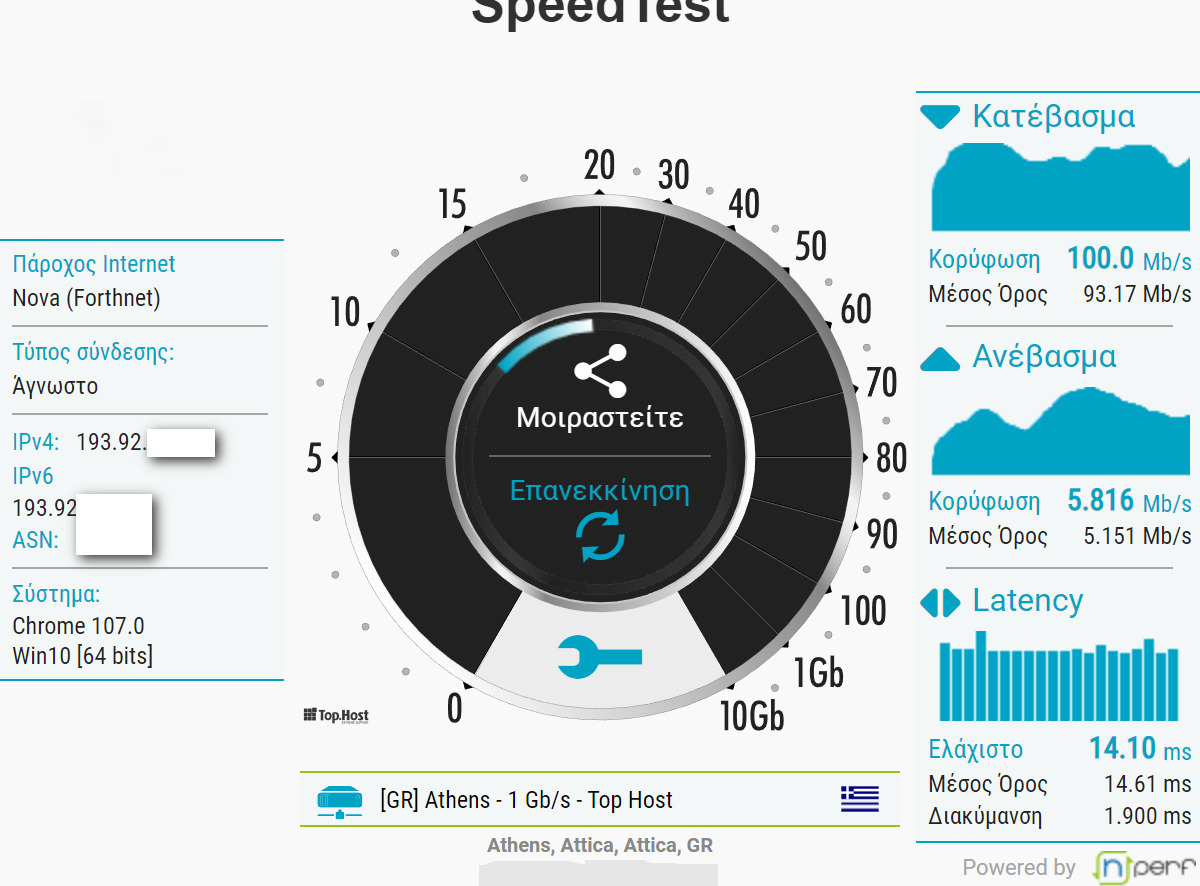
    No problem with Win10, locked at 100 Mbps with 5G!

    Translated from Greek ·
    • Ease of installation
    • Range
    • Speed
    • Value for money
    Did you find this review helpful?
  • ΤΖΑΝΕΤΟΣ ΚΛΑΡΙΝΕΤΟΣ
    3
    2 out of 2 members found this review helpful

    It was tested on win10. The installation process is very poor in my opinion because instead of being recognized by Windows and installing itself, it has something like another partition that gives you a setup.exe, which makes it probably impossible to install it on Linux. However, for general use on Windows, it is good, the speeds are good, and it reaches 5GHz as promised. Nevertheless, this particular adapter is NOT for gaming because it does not provide a stable ping.

    Translated from Greek ·
    • Range
    • Ease of installation
    • Speed
    • Value for money
    • Does it disconnect/freeze often?
    Did you find this review helpful?
  • kostas2712
    1
    1 out of 7 members found this review helpful

    The most useless thing I have bought and it is circulating. Wasted money. I broke it into pieces out of frustration and connected it with a cable

    Translated from Greek ·
    • Does it disconnect/freeze often?
    • Value for money
    Did you find this review helpful?
  • moutsos.88

    Verified purchase

    I installed it in my htpc, which is 2 meters away from the switch, with just a hallway in between, and I didn't want to run a cable for aesthetic reasons. The switch provides 50Mbps, and I get a solid 10Mbps on the htpc without any obstacles in between. At least it has never disconnected...

    Translated from Greek ·
    • Does it disconnect/freeze?
    • Ease of installation
    • Value for money
    • Range
    • Speed
    Did you find this review helpful?
  • cptbill
    5
    2 out of 2 members found this review helpful

    Fast installation by downloading the drivers from dlink (be careful to download the drivers for the correct hardware revision, mine was the C version), within 2 minutes the computer recognized it and the indicator LED turned on.
    Connected to the 5GHz band of my modem, I now have ~150mbps (meaning 70+mbps download/upload maximum communication with my modem) and I can make use of the 50mbps VDSL via wifi.
    I won't comment on the range because my modem is simply 2 meters away without any obstacles. However, I wouldn't expect miracles from the small dlink USB. I imagine those who get it don't expect it to improve their range.
    Note: in Windows 10, specifically in the control panel--->network and internet--->network connections, I still saw, in addition to the dlink and my laptop's wifi connection. I disabled it as a precaution.

    Translated from Greek ·
    • Ease of installation
    • Speed
    • Does it disconnect/freeze?
    • Value for money
    Did you find this review helpful?
  • iliasvicky__psycho
    4
    2 out of 5 members found this review helpful

    I bought this product because I saw very positive reviews.. I have 50mbps at home.. through the adapter I get 39mbps but in games my ping goes up a lot even though I have full signal..
    The distance from the modem is very short but I can't use a cable... I don't know what causes all this lag.. I go up to 600 to 900 Ms..
    Unacceptable..

    Translated from Greek ·
    • Ease of installation
    • Range
    • Does it disconnect/freeze?
    • Speed
    • Value for money
    Did you find this review helpful?
  • Ilias_2014
    5
    4 out of 4 members found this review helpful

    Perfect. It is worth much more than its price. I have been using it for about a month. I downloaded the latest drivers. On a 200 Mbps line, it gives me up to 60 Mbps on 2.4 GHz and 200 Mbps on 5 GHz (measured with Okla's Speedtest), with the computer at a distance of 5m from the router. At a distance of about 12m and with the interference of two walls, on my mobile, still using Speedtest, it shows me 200 Mbps. So far, no interruptions.

    Translated from Greek ·
    • Ease of installation
    • Speed
    • Does it disconnect/freeze?
    • Value for money
    Did you find this review helpful?
  • nikosa
    5
    2 out of 2 members found this review helpful

    I bought it for an old Dell 630 Laptop that I have at home. Recently, I upgraded my internet connection to a 50 Mbps plan and, after measuring, I found out that the WiFi connection of various devices and computers had extremely low speeds, reaching only 16-17 Mbps, compared to the 47-49 Mbps I was getting with an Ethernet cable. When I switched the router to 5GHz, the difference was huge, resulting in almost the same speeds as wired, around 46-48 Mbps. However, the Dell didn't have a built-in antenna to "see" the 5GHz frequency, so I bought this USB "antenna" and I don't regret it. The laptop transformed into a turbocharged machine. The speeds it achieves are like being connected to LAN, without interruptions, fluctuations, and without any connection issues. An excellent product at an amazing price.

    Translated from Greek ·
    • Ease of installation
    • Range
    • Speed
    • Does it disconnect/freeze?
    • Value for money
    Did you find this review helpful?
    • Ease of installation
    • Speed
    • Does it disconnect/freeze?
    • Range
    • Value for money
    • Ease of installation
    • Range
    • Speed
    • Does it disconnect/freeze?
    • Value for money
  • No problem with Win10, locked at 100 Mbps with 5G!

    Translated from Greek ·
    1
  • It was tested on win10. The installation process is very poor in my opinion because instead of being recognized by Windows and installing itself, it has something like another partition that gives you a setup.exe, which makes it probably impossible to install it on Linux. However, for general use on Windows, it is good, the speeds are good, and it reaches 5GHz as promised. Nevertheless, this particular adapter is NOT for gaming because it does not provide a stable ping.

    Translated from Greek ·
    2
  • The most useless thing I have bought and it is circulating. Wasted money. I broke it into pieces out of frustration and connected it with a cable

    Translated from Greek ·
    1
  • I installed it in my htpc, which is 2 meters away from the switch, with just a hallway in between, and I didn't want to run a cable for aesthetic reasons. The switch provides 50Mbps, and I get a solid 10Mbps on the htpc without any obstacles in between. At least it has never disconnected...

    Translated from Greek ·
    0
  • See all
Questions (1)

Questions

43 users have this product and can help you

Ask for the product
See all questions (1)

Description & Specifications

Provides your computer with access to Wi-Fi through the USB port.

Manufacturer

Dimensions

Network Standards
IEEE 802.11 b/g/n, IEEE 802.11ac
Data Transfer Rate
433 Mbps

Connectivity

Connection
Wireless
Antenna
Integrated
USB-C
No

Important information

Specifications are collected from official manufacturer websites. Please verify the specifications before proceeding with your final purchase. If you notice any problem you can report it here.

Reviews (11)

  1. 5
  2. 2
  3. 1
  4. 2
  5. 1
Review this product
  • Ease of installation
  • Range
  • Speed
  • Does it disconnect/freeze?
  • Value for money

Reviews by our members

  • vagos80gr
    5
    1 out of 1 members found this review helpful

    No problem with Win10, locked at 100 Mbps with 5G!

    Translated from Greek ·
    • Ease of installation
    • Range
    • Speed
    • Value for money
    Did you find this review helpful?
  • ΤΖΑΝΕΤΟΣ ΚΛΑΡΙΝΕΤΟΣ
    3
    2 out of 2 members found this review helpful

    It was tested on win10. The installation process is very poor in my opinion because instead of being recognized by Windows and installing itself, it has something like another partition that gives you a setup.exe, which makes it probably impossible to install it on Linux. However, for general use on Windows, it is good, the speeds are good, and it reaches 5GHz as promised. Nevertheless, this particular adapter is NOT for gaming because it does not provide a stable ping.

    Translated from Greek ·
    • Range
    • Ease of installation
    • Speed
    • Value for money
    • Does it disconnect/freeze often?
    Did you find this review helpful?
  • kostas2712
    1
    1 out of 7 members found this review helpful

    The most useless thing I have bought and it is circulating. Wasted money. I broke it into pieces out of frustration and connected it with a cable

    Translated from Greek ·
    • Does it disconnect/freeze often?
    • Value for money
    Did you find this review helpful?
  • moutsos.88

    Verified purchase

    I installed it in my htpc, which is 2 meters away from the switch, with just a hallway in between, and I didn't want to run a cable for aesthetic reasons. The switch provides 50Mbps, and I get a solid 10Mbps on the htpc without any obstacles in between. At least it has never disconnected...

    Translated from Greek ·
    • Does it disconnect/freeze?
    • Ease of installation
    • Value for money
    • Range
    • Speed
    Did you find this review helpful?
  • cptbill
    5
    2 out of 2 members found this review helpful

    Fast installation by downloading the drivers from dlink (be careful to download the drivers for the correct hardware revision, mine was the C version), within 2 minutes the computer recognized it and the indicator LED turned on.
    Connected to the 5GHz band of my modem, I now have ~150mbps (meaning 70+mbps download/upload maximum communication with my modem) and I can make use of the 50mbps VDSL via wifi.
    I won't comment on the range because my modem is simply 2 meters away without any obstacles. However, I wouldn't expect miracles from the small dlink USB. I imagine those who get it don't expect it to improve their range.
    Note: in Windows 10, specifically in the control panel--->network and internet--->network connections, I still saw, in addition to the dlink and my laptop's wifi connection. I disabled it as a precaution.

    Translated from Greek ·
    • Ease of installation
    • Speed
    • Does it disconnect/freeze?
    • Value for money
    Did you find this review helpful?
  • iliasvicky__psycho
    4
    2 out of 5 members found this review helpful

    I bought this product because I saw very positive reviews.. I have 50mbps at home.. through the adapter I get 39mbps but in games my ping goes up a lot even though I have full signal..
    The distance from the modem is very short but I can't use a cable... I don't know what causes all this lag.. I go up to 600 to 900 Ms..
    Unacceptable..

    Translated from Greek ·
    • Ease of installation
    • Range
    • Does it disconnect/freeze?
    • Speed
    • Value for money
    Did you find this review helpful?
  • Ilias_2014
    5
    4 out of 4 members found this review helpful

    Perfect. It is worth much more than its price. I have been using it for about a month. I downloaded the latest drivers. On a 200 Mbps line, it gives me up to 60 Mbps on 2.4 GHz and 200 Mbps on 5 GHz (measured with Okla's Speedtest), with the computer at a distance of 5m from the router. At a distance of about 12m and with the interference of two walls, on my mobile, still using Speedtest, it shows me 200 Mbps. So far, no interruptions.

    Translated from Greek ·
    • Ease of installation
    • Speed
    • Does it disconnect/freeze?
    • Value for money
    Did you find this review helpful?
  • nikosa
    5
    2 out of 2 members found this review helpful

    I bought it for an old Dell 630 Laptop that I have at home. Recently, I upgraded my internet connection to a 50 Mbps plan and, after measuring, I found out that the WiFi connection of various devices and computers had extremely low speeds, reaching only 16-17 Mbps, compared to the 47-49 Mbps I was getting with an Ethernet cable. When I switched the router to 5GHz, the difference was huge, resulting in almost the same speeds as wired, around 46-48 Mbps. However, the Dell didn't have a built-in antenna to "see" the 5GHz frequency, so I bought this USB "antenna" and I don't regret it. The laptop transformed into a turbocharged machine. The speeds it achieves are like being connected to LAN, without interruptions, fluctuations, and without any connection issues. An excellent product at an amazing price.

    Translated from Greek ·
    • Ease of installation
    • Range
    • Speed
    • Does it disconnect/freeze?
    • Value for money
    Did you find this review helpful?
    • Ease of installation
    • Speed
    • Does it disconnect/freeze?
    • Range
    • Value for money
    • Ease of installation
    • Range
    • Speed
    • Does it disconnect/freeze?
    • Value for money
  • No problem with Win10, locked at 100 Mbps with 5G!

    Translated from Greek ·
    1
  • It was tested on win10. The installation process is very poor in my opinion because instead of being recognized by Windows and installing itself, it has something like another partition that gives you a setup.exe, which makes it probably impossible to install it on Linux. However, for general use on Windows, it is good, the speeds are good, and it reaches 5GHz as promised. Nevertheless, this particular adapter is NOT for gaming because it does not provide a stable ping.

    Translated from Greek ·
    2
  • The most useless thing I have bought and it is circulating. Wasted money. I broke it into pieces out of frustration and connected it with a cable

    Translated from Greek ·
    1
  • I installed it in my htpc, which is 2 meters away from the switch, with just a hallway in between, and I didn't want to run a cable for aesthetic reasons. The switch provides 50Mbps, and I get a solid 10Mbps on the htpc without any obstacles in between. At least it has never disconnected...

    Translated from Greek ·
    0
  • See all
23,00 €
2,50 € to a Skroutz Point
or   3,50 €   shipping cost